

Website lead tracking is the practice of recording where each potential customer comes from and what they do on your site before contacting you. For small business owners, this data is the difference between spending your marketing budget wisely and wasting it on channels that produce nothing. The industry term for this practice is lead source tracking, and it sits at the heart of any reliable small business marketing system. When you track website leads for your small business correctly, you know exactly which channels, pages, and campaigns are generating real enquiries, not just traffic.
How to track website leads for your small business: the foundations
Lead source tracking attaches a single, fixed label to each lead in your CRM, showing you exactly where that person came from. Automatic source capture is the standard method, and it is far more reliable than asking staff to type source names manually. Manual entry creates inconsistent data, and inconsistent data makes your reports useless.

The key metrics to watch are sessions, user source channels, top landing pages, and conversion completions. These four data points tell you which channels drive leads and which pages convert visitors into enquiries. Without them, you are making budget decisions based on guesswork.
Your tracking system also needs to go beyond website clicks. Search impressions and branded search volume show your market presence even when visitors do not click through to your site. Tracking these indicators gives you a fuller picture of your brand’s reach and helps you spot awareness gaps early.
What tools do you need to track leads on your website?
Every reliable lead tracking setup relies on three core tool categories working together: website analytics, a CRM with source fields, and automatic capture methods.
Website analytics tools like Google Analytics record traffic sources, session counts, and on-site behaviour. They show you which pages attract visitors and where those visitors drop off. Without this layer, you have no visibility into what happens before a lead submits a form or makes a call.
CRM lead source fields store the origin of each lead as a fixed, structured label. Source lists should be short, clear, and consistent to produce meaningful reports. Good examples include: Google Ads, Facebook, Website Form, Phone Call, and Referral. Avoid free text entry for source fields, because staff will spell things differently every time and your reports will fragment into noise.
Automatic capture methods include hidden form fields, UTM parameters, and tracked phone numbers. These tools pull source data directly from your campaigns and attach it to each lead without any human input. Manual entry results in poor data consistency and lost insights, so automation is not optional. It is the foundation of clean reporting.
| Tool category | Purpose | Example method |
|---|---|---|
| Website analytics | Track traffic sources and on-site behaviour | Google Analytics |
| CRM source fields | Store lead origin as a fixed label | Dropdown source field |
| Form tagging | Capture campaign data automatically | Hidden fields with UTM values |
| Call tracking | Attribute phone leads to their source | Tracked phone numbers per channel |
Pro Tip: Set up your CRM source dropdown before you launch any campaign. Adding it after the fact means your early leads have no source data, and you can never recover that information.
How to implement a lead tracking system step by step
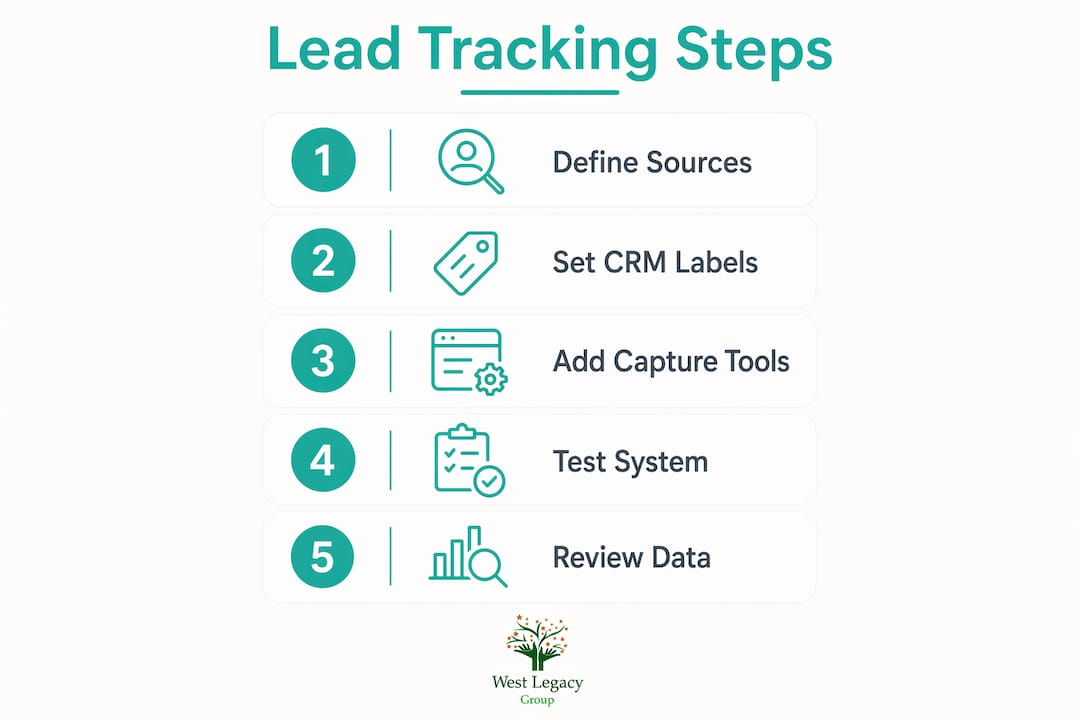
A working lead tracking system requires four steps, completed in order. Skipping any step creates gaps that corrupt your data downstream.
-
Define and standardise your lead source categories. Open your CRM and create a dropdown field called “Lead Source.” Add no more than eight to ten options. Keep labels short and channel-specific: Google Ads, Facebook Ads, Organic Search, Website Form, Phone Call, Referral, Email Campaign. Lock the field to dropdown only. This single decision prevents the majority of data quality problems before they start.
-
Set up automatic source capture across every entry point. Add hidden fields to every website form that pull UTM parameter values from the URL. Assign a unique tracked phone number to each marketing channel so calls are attributed correctly. Connect your ad platforms so campaign data flows directly into your CRM. Tracking lead sources requires integration across website forms, call tracking, and ad platforms for this automatic data capture to work reliably.
-
Connect your analytics tools to your CRM and marketing platforms. Google Analytics should feed into your CRM or at minimum share data with it through a shared UTM convention. Your ad platforms should pass conversion data back to Google Analytics so you can see cost per lead by channel. This connection turns isolated data points into a single, readable report.
-
Test your tracking before you go live. Submit a test form from a tagged URL and confirm the source field populates correctly in your CRM. Call your tracked numbers and verify the call is attributed to the right channel. Use Google Analytics Real-Time reports to confirm sessions are being recorded as you test. Real-Time reports are best for catching immediate setup errors, not for making business decisions.
Pro Tip: After testing, ask a colleague or friend to submit a real enquiry through your website. Check the CRM record immediately. If the source field is blank or wrong, fix it before spending a dollar on advertising.
What common lead tracking problems do small businesses face?
Most lead tracking failures come from a small set of recurring problems. Knowing them in advance saves you weeks of corrupted data.
- Inconsistent source naming. If one staff member types “Google” and another types “google ads,” your CRM treats these as two separate sources. The fix is a locked dropdown field with no free text option.
- Lost UTM parameters. UTM tags disappear when visitors click through to a page that redirects them, or when your website strips query strings. Test every campaign URL before launch and check that the tag survives the full journey to your thank-you page.
- Form misconfigurations. Hidden fields that are not mapped to CRM fields silently drop source data. Audit your form-to-CRM field mapping every time you update your website or change your form tool.
- Phone call misattribution. Calls that come through a single shared number cannot be attributed to a channel. Assign a unique tracked number to each channel and confirm your call tracking tool logs the source in your CRM.
- Reacting to daily traffic swings. Avoid checking analytics daily to prevent emotional reactions to normal traffic fluctuations. Daily numbers are noisy. Monthly reviews give you the trend data you need to make sound decisions.
Pro Tip: Set a recurring calendar reminder for the same day each month to review your source report. Consistency in your review schedule matters as much as consistency in your data.
The most overlooked problem is inaction. Tracking data only creates value when you act on it. The true value of lead tracking comes when business owners actively reallocate budgets and adjust campaigns based on what the data shows.
How do you use lead tracking data to improve conversions and marketing ROI?
Lead source reports tell you which channels produce bookings and which produce noise. The next step is using that information to shift your budget and improve your website.
- Identify your highest-converting channels. Sort your CRM leads by source and compare booking rates across channels. A channel with high lead volume but low bookings is costing you money. A channel with low volume but high bookings deserves more budget.
- Calculate cost per booking by channel. Divide your ad spend for each channel by the number of bookings it produced. This single number tells you where your marketing dollars work hardest.
- Improve pages that receive traffic but convert poorly. If Google Analytics shows a landing page with strong traffic but few form submissions, the page content or call to action needs attention. West Legacy Group’s guide on high-converting website elements covers exactly what those pages need to turn visitors into leads.
- Combine source data with on-site behaviour. Combining lead source data with website behaviour analytics allows personalised follow-up and better conversion rates. A lead from Facebook Ads who spent three minutes on your pricing page is a different prospect from one who bounced after five seconds.
Review your source report weekly, pause budgets on channels with zero bookings, and reallocate spend to higher performers. This weekly habit turns your tracking system from a record-keeping exercise into a revenue driver.
Key takeaways
Reliable lead tracking for small businesses requires clean source data, automatic capture across every channel, and a consistent weekly review habit that leads to real budget decisions.
| Point | Details |
|---|---|
| Use automatic source capture | Hidden form fields and tracked phone numbers prevent manual entry errors. |
| Lock CRM source fields to dropdowns | Free text entry fragments your data and makes reports unreliable. |
| Test before spending on ads | Confirm source fields populate correctly before launching any paid campaign. |
| Review monthly, act weekly | Monthly trends guide strategy; weekly source reports drive budget shifts. |
| Combine analytics with CRM data | Linking on-site behaviour to lead source improves follow-up and conversion rates. |
Why simplicity beats complexity in small business lead tracking
I have worked with small business owners who spent months setting up elaborate tracking dashboards before they had a single clean data point. The complexity became the obstacle. They were so focused on building the perfect system that they never used the data to make a decision.
The businesses that get the best results from lead tracking are the ones that keep it simple. A short source dropdown, a hidden form field, a tracked phone number per channel, and a monthly review. That is genuinely all you need to start making better marketing decisions. You do not need enterprise software or a dedicated analyst.
The mistake I see most often is treating tracking as a technical project rather than a business habit. The setup takes a few hours. The value comes from the habit of checking your source report, noticing which channel stopped performing, and moving budget the same week. That weekly action is where the return on investment actually lives.
If you are just starting out, build the simplest version first. Get one month of clean data. Then add complexity only where the data tells you it is needed. A small business with six months of clean, simple source data will always outperform one with a sophisticated system that nobody checks.
— Christopher
West Legacy Group can help you build a tracking-ready website
Getting your tracking setup right starts with a website that is built for it. West Legacy Group works with small businesses across Australia to create websites that capture lead data cleanly from day one, with forms, analytics, and CRM integrations built in from the start.
If your current website is not capturing lead sources or your analytics feel disconnected from your actual sales, West Legacy Group’s web design and digital services are built to fix exactly that. Every service is available as a single engagement or as part of an affordable subscription package, so you can start at the right scale for your business. Reach out to West Legacy Group to discuss what a tracking-ready website looks like for your goals.
FAQ
What is lead source tracking for small businesses?
Lead source tracking records where each website enquiry or customer came from, such as Google Ads, organic search, or a referral. It attaches a fixed source label to each lead in your CRM so you can measure which channels produce real results.
How do I track website leads without expensive software?
Google Analytics covers website traffic and behaviour at no cost. Pair it with a CRM that has a source dropdown field and use hidden form fields with UTM parameters to capture source data automatically. This combination works for most small businesses without enterprise-level tools.
How often should I review my lead tracking data?
A monthly analytics review is sufficient for spotting trends and avoiding overreaction to daily fluctuations. Check your CRM source report weekly to catch any channels that have stopped producing bookings and reallocate budget promptly.
What is a UTM parameter and why does it matter?
A UTM parameter is a short tag added to the end of a URL that tells your analytics tool where a visitor came from. For example, a UTM tag on a Facebook Ad URL lets Google Analytics record that visit as coming from Facebook, giving you accurate channel attribution.
Why are my lead source fields showing up blank in my CRM?
Blank source fields usually mean your hidden form fields are not mapped to the correct CRM field, or your UTM parameters are being stripped before the visitor reaches your form. Test your form submission from a tagged URL and check the CRM record immediately to identify where the data is being lost.