

Your contact page is defined as a direct trust signal that tells both users and search engines your business is real, reachable, and legitimate. The role of contact page SEO goes well beyond placing a phone number on a page. It connects Google’s E-E-A-T framework, local search rankings, and conversion rates into one underused asset. 51% of web visitors cite missing or hard-to-find contact information as their primary frustration, and that frustration translates directly into higher bounce rates and lower organic rankings. If you run a small business or manage a website, your contact page deserves the same care you give your homepage.
What is the role of contact page SEO?
Contact page SEO is the practice of structuring and optimising your contact page so that search engines can verify your business identity and users can reach you without friction. Google’s E-E-A-T framework, which stands for Experience, Expertise, Authoritativeness, and Trustworthiness, treats visible contact details as a core trust signal. A page with a clear phone number, physical address, and email address tells Google’s quality raters that a real business operates behind the website.
The impact on local SEO is direct. Search algorithms use NAP data (Name, Address, Phone) to verify physical legitimacy for “near me” searches. Consistent NAP data across your website and external directory listings strengthens your local map pack rankings. Inconsistencies confuse both users and search engines, and they can reduce your rankings without any other obvious cause.

Contact page optimisation also affects conversions. A visitor who cannot find your phone number in under ten seconds will leave. That exit signals low engagement to Google, which reinforces a negative ranking cycle. Treating your contact page as a conversion asset, not a formality, is the first shift in thinking that produces real results.
How contact page SEO strengthens trust and credibility
Trust is the currency of search. Google’s quality raters actively assess whether a site provides enough information to confirm a business is genuine. Your contact page is one of the first places they look.
Visible contact details do specific work in this assessment:
- A text-based phone number and email address are crawlable by search engines and readable by users with screen readers.
- A physical address confirms geographic presence, which matters for local and “near me” searches.
- Business hours set accurate expectations and reduce wasted contact attempts.
- A named contact person or team adds a human layer that builds confidence.
Contact info hidden behind scripts or presented only as images is not reliably detected by crawlers or users. This is a common technical mistake that silently damages your E-E-A-T score. Search engines cannot read text embedded in a JPEG. If your phone number lives only inside an image file, it does not exist for SEO purposes.
Consistent NAP information across your website and external listings, such as Google Business Profile, Yelp, and local directories, boosts trust signals and local rankings. A single digit difference in a phone number between your website and a directory listing is enough to create a mismatch that search engines penalise.
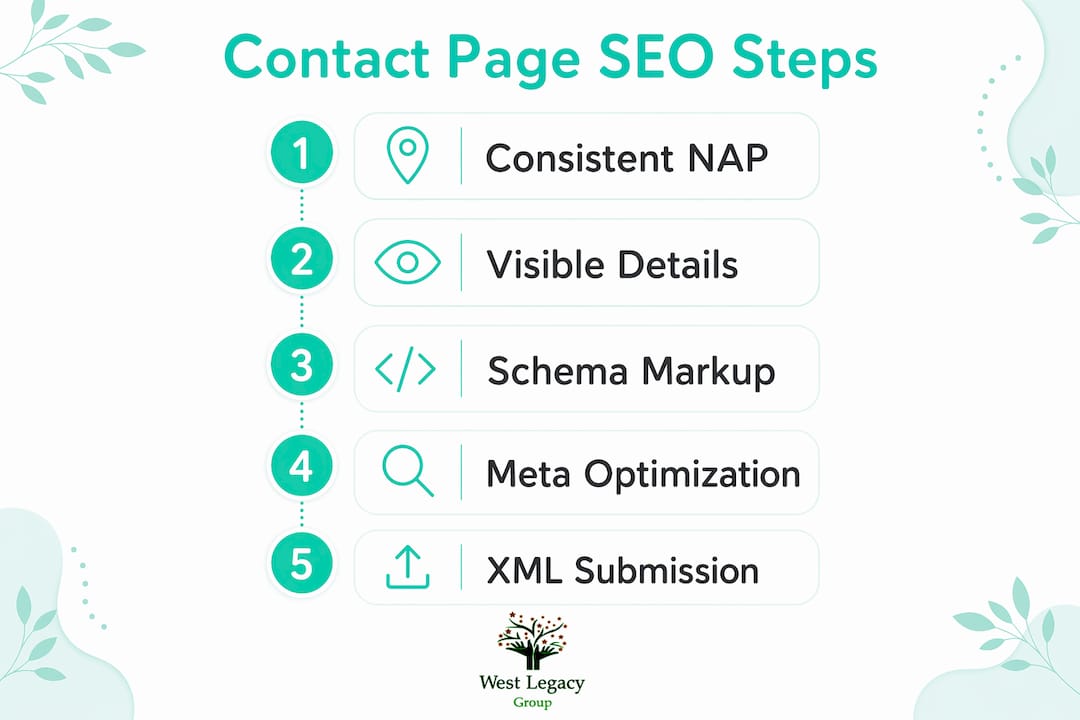
Pro Tip: Run a NAP audit every six months. Search your business name across Google, Apple Maps, and local directories. Fix any inconsistency you find, even minor formatting differences like “St” versus “Street.”
What elements does a contact page need for SEO?
A well-built contact page covers both machine readability and human usability. The two goals are not in conflict. They reinforce each other.
The core elements every contact page needs:
- Visible phone number and email address in plain text, not images or JavaScript-rendered content.
- Physical address written consistently with your Google Business Profile listing.
- Business hours including any seasonal variations or public holiday changes.
- Service area information if you serve clients across a region rather than from a single location.
- Embedded Google Maps widget to confirm your location visually and support local SEO signals.
- ContactPage Schema structured data to help search engines and AI tools parse your business identity correctly.
- Social proof elements such as a short testimonial, trust badge, or professional certification.
- Optimised title tag and meta description specific to the contact page.
Optimising your meta description to under 160 characters and making it keyword-rich improves search snippet relevance and click-through rates. A meta description that reads “Contact [Business Name] in [City] for [Service]” confirms searcher intent immediately. That confirmation reduces pogo-sticking, where a user clicks your result and immediately returns to the search page.
Structured data using ContactPage Schema is the element most businesses skip entirely. Schema markup tells search engines and AI tools exactly what your contact page contains. Without it, Google interprets your page through inference. With it, your business name, address, phone, and hours are machine-readable facts.
| Contact page element | SEO benefit |
|---|---|
| Plain text phone and email | Crawlable by search engines, readable by screen readers |
| Consistent NAP data | Strengthens local map pack rankings |
| Google Maps embed | Confirms physical location for local search signals |
| ContactPage Schema | Enables AI and search engines to parse business identity |
| Optimised meta description | Improves click-through rate from search results |
Pro Tip: Add your contact page URL to your XML sitemap and submit it in Google Search Console. Many sites exclude contact pages from sitemaps by default, which slows down crawling and indexing.
Common mistakes that undermine contact page SEO
Most contact page problems are avoidable. They stem from treating the page as a low-priority task rather than a functional SEO asset.
- Placing contact details inside images. A phone number saved as a PNG file is invisible to search engines. Use plain HTML text for all contact information.
- Relying only on a contact form. Contact forms support engagement but lack of visible alternatives lowers user confidence and trust signals. Always display a direct phone number and email alongside any form.
- Burying the contact page in navigation. If a visitor needs more than two clicks to find your contact page from any page on your site, your navigation is working against you. Place a contact link in your main menu and your footer.
- Using excessively long forms. Every additional required field reduces form completion rates. Ask only for what you genuinely need: name, email, and message. Add fields only when the business process requires them.
- Inconsistent NAP across your web presence. A different phone number on your Facebook page versus your website creates a trust mismatch. Search engines weight consistency heavily in local ranking decisions.
Pro Tip: Test your contact page on a mobile device every time you make a change. Most contact attempts happen on mobile, and a form that breaks on a small screen costs you real enquiries.
How does an optimised contact page boost local SEO and conversions?
An optimised contact page does measurable work in local search. Embedding interactive maps, maintaining consistent NAP data, and stating business hours are critical for ranking in the local map pack. Google uses these signals to verify that your business has a genuine physical presence before showing it in location-based results.
The user experience improvements are equally concrete:
- Visitors who find contact information quickly spend more time on the page, which reduces bounce rate.
- A lower bounce rate signals relevance to Google, which supports rankings over time.
- Clear business hours prevent wasted calls and reduce negative reviews from frustrated customers.
- A visible address builds confidence for customers considering an in-person visit.
Google crawls and actively parses contact pages to map business identity and verify operational details. This parsing directly affects local rankings and how your business appears in AI-generated search features. A contact page that gives Google clear, consistent, structured information performs better in both traditional search results and AI-powered answer features.
The conversion benefit is straightforward. A visitor who lands on your contact page has already decided they want to reach you. Every obstacle between that intent and a completed contact attempt costs you a lead. Removing those obstacles, through clear layout, visible details, and a short form, converts that intent into an enquiry. You can learn more about tracking those leads once your contact page is working properly.
Practical steps to implement contact page SEO
Improving your contact page does not require a full website rebuild. A focused audit and a few targeted changes produce results quickly.
- Audit your current contact page. Check that all contact details appear as plain HTML text. Confirm your NAP matches your Google Business Profile exactly.
- Add ContactPage Schema markup. Use Google’s Structured Data Markup Helper to generate the correct JSON-LD code. Paste it into the head section of your contact page.
- Embed a Google Maps widget. Go to Google Maps, search your business address, click Share, and copy the embed code. Place it on your contact page above the fold where possible.
- Write a specific meta description. Keep it under 160 characters. Include your city, your service type, and a clear call to action such as “Call us today.”
- Scan for NAP inconsistencies. Search your business name on Google and check the top ten directory listings. Correct any mismatches in phone number, address format, or business name spelling.
- Submit your contact page in Google Search Console. Use the URL Inspection tool to request indexing after any significant changes.
For a broader view of how contact page improvements fit into your overall local search strategy, the local SEO checklist for small business from West Legacy Group covers the full picture.
Key takeaways
A well-optimised contact page is one of the highest-return, lowest-effort SEO improvements a small business website can make.
| Point | Details |
|---|---|
| Trust signals matter | Visible, text-based contact details directly support Google’s E-E-A-T assessment. |
| NAP consistency is non-negotiable | Matching name, address, and phone across all listings strengthens local rankings. |
| Schema markup is underused | ContactPage Schema helps search engines and AI tools read your business identity correctly. |
| Forms need visible alternatives | Contact forms alone reduce trust; always display a direct phone number and email. |
| Meta descriptions drive clicks | A keyword-rich meta description under 160 characters improves click-through from search results. |
Why contact pages are the most neglected SEO asset
Most businesses treat contact pages as afterthoughts, and I have seen this pattern consistently across the small businesses I work with. A site owner will spend weeks refining their homepage copy and then publish a contact page with a form, a generic heading, and nothing else. That page then sits untouched for years.
What surprises people when they fix it is how quickly results follow. A contact page is one of the few pages on your site where the visitor’s intent is already confirmed. They want to reach you. Your only job is to make that easy and to give Google enough structured information to trust you. Neither task is technically difficult.
The emerging factor worth watching is AI-powered search. Tools like Google’s AI Overviews pull business details directly from structured data on contact pages. A business with ContactPage Schema in place is far more likely to have its hours, location, and contact details surfaced accurately in these features. Businesses without it risk being misrepresented or excluded entirely.
My advice is to treat your contact page with the same care you give a product or service page. Write a proper title tag. Add Schema. Check your NAP monthly. It takes less than an hour to get right, and the compounding benefit to your local rankings and conversion rate is real.
— Christopher
West Legacy Group can help you get this right
Your contact page is a direct line between your business and the people searching for you. Getting it right means more calls, more enquiries, and stronger local rankings.
West Legacy Group works with small businesses and start-ups across Australia to build affordable, effective SEO strategies that include contact page optimisation, local SEO, and structured data implementation. Whether you need a full audit or targeted fixes, the team at West Legacy Group has the experience to make your contact page work harder for your business. Start with a custom SEO plan built around your goals and budget, or explore the full range of digital marketing services available to Australian small businesses.
FAQ
Why is contact page SEO important for small businesses?
Contact page SEO helps search engines verify your business is legitimate, which directly supports local rankings and E-E-A-T scores. 51% of web visitors report that missing contact information is their primary frustration, making it a direct conversion issue as well.
What is NAP and why does it matter for contact pages?
NAP stands for Name, Address, and Phone number. Consistent NAP data across your website and external directory listings is a core local SEO ranking signal that search engines use to confirm your business identity.
What is ContactPage Schema and do I need it?
ContactPage Schema is structured data markup that tells search engines and AI tools exactly what information your contact page contains. Using ContactPage Schema is the most reliable way to ensure your business hours, address, and phone number are parsed correctly by Google.
How long should a contact page meta description be?
A contact page meta description should be under 160 characters and include your city, service type, and a clear prompt to contact you. This improves both search snippet relevance and click-through rates.
Can a contact form replace visible contact details?
A contact form should complement visible contact details, not replace them. Forms keep visitors engaged but removing visible phone numbers and email addresses reduces user trust and lowers your E-E-A-T signals.