

A careless website migration can wipe out years of SEO progress in a weekend. A careful one won’t cost you a thing. Benchmark everything before you touch the old site, map every URL to a 1:1 redirect, test the whole build on staging, and watch Google Search Console daily for the first 30 to 90 days. Skip staging noindex tags on launch. Never redirect a large number of unrelated old pages to your homepage. Some ranking wobble in week one is normal; a drop that keeps sliding usually means one specific thing went wrong, and it’s almost always findable.
TL;DR:
- Proper benchmarking involves crawling the entire site and exporting URLs, titles, canonical tags, and performance data to serve as a reference point.
- Staging environments must be thoroughly tested for noindex tags, correct canonical tags, and JavaScript rendering issues before launch to prevent visibility problems.
- Building and verifying a one-to-one, prioritized redirect map ensures that high-value URLs retain their rankings and prevents ranking drops caused by improper redirects.
- Launch-day checks should include confirming removal of noindex tags, testing high-priority redirects, and verifying that analytics and robots.txt settings are correct to avoid hidden or lost traffic.
- Ongoing post-launch monitoring in Search Console for at least two weeks is essential to catch crawl errors, redirect issues, or structural problems that can harm rankings.
Table of Contents
- Website migration SEO: the pre-migration checklist you can’t skip
- How do you test staging before a website goes live?
- Redirect and URL mapping: the part that decides everything
- Launch-day verification: what to check in the first hours
- What should you monitor after launch to protect rankings?
- Common migration mistakes and how to fix them fast
- Which migration types carry the most SEO risk?
- What West Legacy Group has learned from client migrations
- How West Legacy Group supports your website migration
- Sources
Website migration SEO: the pre-migration checklist you can’t skip
Every migration disaster we’ve seen traces back to the same root cause: nobody captured what the old site actually looked like before it disappeared. You cannot fix what you cannot compare against, so the benchmark crawl is not optional homework. It’s the single most important hour you’ll spend on the whole project.
Start with a full crawl using a tool like Screaming Frog or Sitebulb. Export every URL on the site along with its status code, page title, H1, meta description, and canonical tag. This becomes your source of truth. If a page vanishes after launch, or a canonical suddenly points somewhere strange, this export is how you prove it and fix it fast.
Alongside the crawl, pull your Google Search Console data and analytics baseline. You want landing pages, ranking queries, clicks, impressions, and conversion numbers for at least the last three months. Website owners often benchmark rankings but forget conversions, then have no way to tell whether a post-migration traffic dip is actually costing them revenue or just costing them vanity metrics.
Here’s the sequence we recommend running through before a single file gets touched:
- Crawl the entire live site and export URLs, status codes, titles, H1s, and canonicals.
- Export Search Console performance data covering queries, landing pages, and click trends.
- Pull analytics conversion data for your top-converting pages and funnels.
- Identify your high-value pages by traffic volume, ranking position, and backlink count.
- Freeze the scope of the migration in writing: domain, CMS, URL structure, templates.
- Draft the redirect plan before development starts, not after.
Not every page deserves equal attention. A pre-migration audit and one-to-one redirect map for every URL is what separates migrations that hold their rankings from ones that don’t, and missing entries in that map are the single biggest driver of permanent losses. Tag your top 20% of pages by traffic and backlinks, because those are the ones you check first if anything breaks.
Scope freezing matters more than most teams expect. Migrations that quietly expand mid-project, a domain change that becomes a domain change plus a full redesign plus a content overhaul, are the ones that spiral. Write down exactly what’s changing before development starts, and treat any addition to that list as a decision, not a drift.
You’ll also need to decide what to do with dead weight. Some pages should be consolidated into a stronger page, some should be left to expire with a proper 410 response, and some genuinely deserve their own redirect. This decision belongs in the benchmarking phase, not as an afterthought during launch week. A content checklist built for consolidation decisions can help you separate what’s worth keeping from what’s just taking up space.
One newer addition to the benchmarking phase: capturing how your brand shows up in AI-driven search surfaces before you migrate. If ChatGPT or Perplexity currently cites your category or brand pages for certain queries, you want a record of that before the URLs change. Guidance on checking your AI search visibility is worth a read if this is new territory for your team.
Pro Tip: Export your benchmark crawl to a spreadsheet with a timestamp in the filename, and store it somewhere outside your CMS. If the migration goes sideways and you need to compare against the original site structure, you don’t want that file trapped inside a platform you’re in the process of retiring.
How do you test staging before a website goes live?
Staging is where mistakes get cheap. Every SEO issue caught here costs you an hour of QA. The same issue caught after launch can cost you weeks of rankings while you figure out what changed and why.
Crawl the staging environment the same way you crawled the live site, then diff the two exports against each other. You’re hunting for pages that exist on the old site but are missing on staging, title tags that changed without anyone deciding they should, and canonical tags pointing to the wrong destination. This diff is tedious. It’s also the single most reliable way to catch a missing template variable before it ships to production.
Robots.txt deserves particular attention here, because this is where migrations quietly sabotage themselves. Staging environments are almost always set to noindex, and that’s correct while you’re building. The failure mode is forgetting to flip it back before launch, which leaves your brand-new production site invisible to Google while everyone assumes it’s working fine.
Before launch, check that:
- Robots.txt on staging blocks crawlers, and there’s a documented step to remove that block on production.
- Canonical tags across templates point to what will be the final production URL, not the staging URL.
- Structured data validates correctly and references live URLs, not staging placeholders.
- Hreflang tags, if you run multiple regional or language versions, point to the correct final destinations.
- Internal links and navigation menus render properly, including anything driven by JavaScript that might hide content from a crawler.
- Analytics and tag manager containers fire correctly in a test property before you touch production tracking.
JavaScript-driven navigation catches a lot of teams out. A menu that looks fine to a human tester in a browser can be invisible to a crawler if it depends on client-side rendering that Googlebot doesn’t execute the same way. Test with a crawler, not just your own eyes.
Pro Tip: Run your staging crawl through a tool with JavaScript rendering enabled, then run it again with rendering disabled. If the two crawls produce meaningfully different results, you’ve found a navigation or content visibility problem before Google ever sees it.
Redirect and URL mapping: the part that decides everything
This is where most of the SEO value of your old site either survives the move or doesn’t. A redirect map isn’t a nice-to-have spreadsheet you build if there’s time. It’s the mechanism that tells Google, and every site that’s ever linked to you, where your content actually went.
Build it as a working spreadsheet with five columns: old URL, new URL, redirect type, priority, and verification status. Priority should track back to the high-value pages you tagged during benchmarking, because those are the ones you verify first and re-check most often after launch.
The rules here are simple, and simple doesn’t mean optional:
- Map every old URL to its single closest equivalent new URL. One to one, not many to one.
- Use 301 redirects for permanent moves, or 308 if your setup specifically requires preserving the request method.
- Never redirect a large batch of unrelated pages to your homepage. Google treats this as close to a soft 404, and it’s one of the most damaging anti-patterns in migration work, destroying the link equity those pages built up over years.
- Avoid redirect chains. If page A redirects to B, which redirects to C, fix it so A goes straight to C.
- For genuinely obsolete pages with no equivalent, use a 410 Gone rather than forcing a redirect to somewhere unrelated.
How long should you keep redirects live? Google’s own guidance recommends maintaining redirects for at least 180 days when you’re using the Change of Address tool for a domain move, since that’s the window Google uses to forward ranking signals from the old domain to the new one. In practice, we tell clients to plan for 12 months or longer wherever it’s practical. Old backlinks, bookmarks, and social shares don’t expire on a schedule that matches Google’s minimum.
Implementation matters too. Server-level redirects (through your .htaccess file, nginx config, or CMS redirect manager) tend to be more reliable than CDN or edge-level rules, which can sometimes apply inconsistently across cached and uncached requests. If you’re using a CDN layer for redirects, test from multiple locations and force a cache bypass before you trust the results.
Launch-day verification: what to check in the first hours
Launch day isn’t the finish line. It’s the point where all your preparation either holds up under real traffic or reveals a gap nobody spotted on staging. Work through this in order, because some checks depend on earlier ones passing first.
- Confirm the noindex tag is gone. Crawl the live production site immediately and check that the staging block didn’t travel with the deployment.
- Test a sample of your highest-priority redirects. Pull 20 to 30 URLs from your priority list and confirm each returns an HTTP 301, not a 302 or a soft redirect through JavaScript.
- Submit your updated XML sitemap in Google Search Console and check for crawl errors within the first few hours.
- Verify canonical tags on production match what you tested on staging, page by page on your priority list.
- Check that analytics and Google Tag Manager are firing and that conversion events register correctly on the new domain or URL structure.
- Confirm robots.txt on production is permissive and that the old site, if it’s still reachable at all, isn’t blocking Googlebot from following your redirects through to the new destination.
That last point trips up more teams than you’d expect. If the old server gets decommissioned too early, or its robots.txt gets locked down as a security afterthought, Googlebot can’t crawl the redirect at all. The signal never transfers.
Pro Tip: Keep a shared document open on launch day with every check ticked off in real time, timestamped. If something breaks three days later, that record tells you exactly what was verified at launch and what wasn’t, which saves hours of guessing during the panic.
What should you monitor after launch to protect rankings?
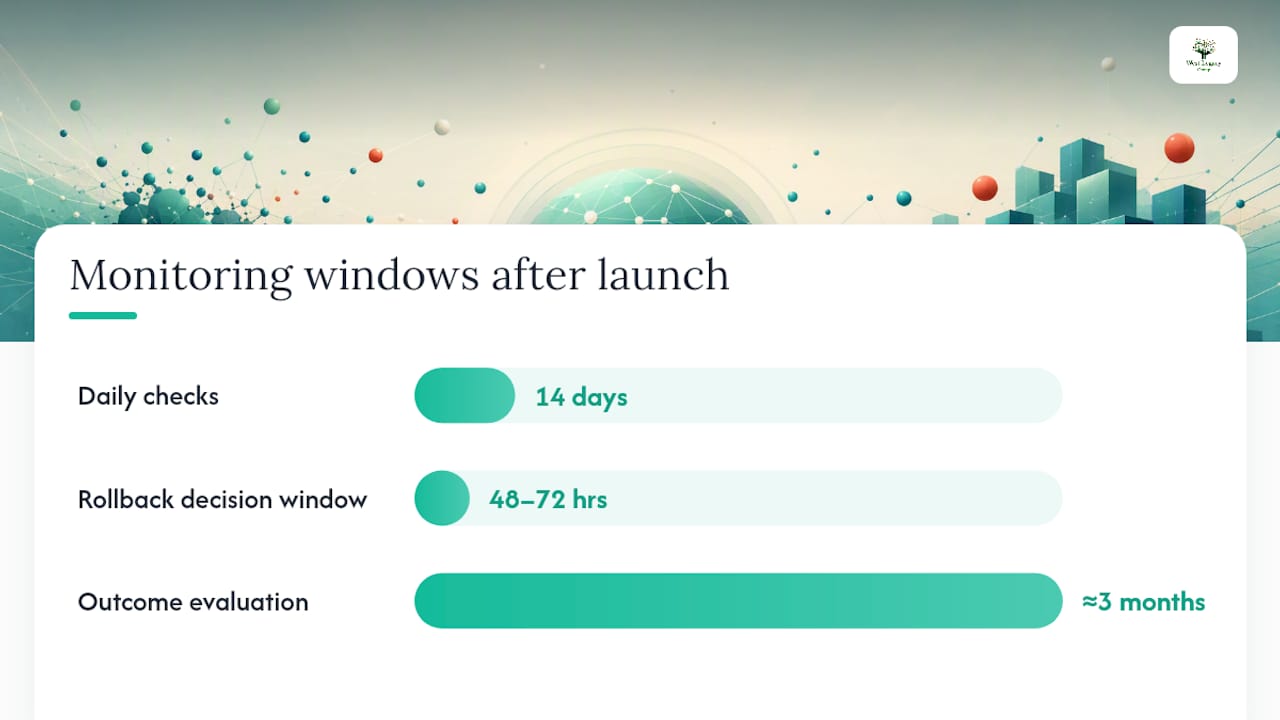
The first two weeks after launch decide how the next three months go. This is where daily discipline matters more than any single technical fix.
For the first 14 days, check Google Search Console every day: index coverage reports, crawl stats, and the pages report for any spike in 404s or redirect errors. Daily monitoring in this window is what catches a launch-day error before it compounds into a genuine ranking loss, because Google often needs repeated failed crawl attempts before it starts dropping a URL from the index.
When you spot pages that have lost visibility, compare a fresh crawl against your original benchmark crawl. This diff usually points straight at the cause:
- A missing redirect where the new URL doesn’t match what’s in your map.
- A canonical tag conflict, where the new page canonicalises to the wrong URL.
- A template change that accidentally stripped structured data or altered a heading structure across an entire section.
- Internal links still pointing to old URLs instead of the new structure, diluting the redirect signal.
Server logs and Search Console reports remain your best diagnostic tools here, because they show you what Googlebot is actually doing, not just what you assume it’s doing.
Decide your rollback threshold before you need it, not during the crisis. If a critical revenue page has lost significant visibility and you can’t identify the cause within 48 to 72 hours, patch what you can identify and keep monitoring rather than rolling back the whole migration, unless the fault is clearly systemic. Communicate the plan to stakeholders early so a normal week-one dip doesn’t trigger a panicked reversal that undoes work you actually needed to do.
Beyond the first fortnight, extend your diagnostics further out: recheck your backlink profile to confirm links are hitting redirected URLs rather than 404s, monitor Core Web Vitals for any regression from the new build, and if you captured an AI-surface baseline earlier, check how your AI search strategy is holding up against that snapshot.
Common migration mistakes and how to fix them fast
Most migration failures are one of a handful of repeat offenders, and most are fixable within a day once identified.
- Staging noindex left on production. Symptom: organic traffic falls off a cliff within 48 hours. Fix: crawl for the meta robots tag site-wide and remove it immediately.
- Robots.txt blocking the old domain. Symptom: redirects exist but rankings on the new domain never rise. Fix: check that the old site’s robots.txt still allows Googlebot through so it can follow the redirect chain.
- Bulk redirects to the homepage. Symptom: individual page rankings vanish while homepage rankings barely move. Fix: rebuild the redirect map with genuine one-to-one destinations.
- Bundling domain, CMS, and content overhaul together. This makes every problem harder to diagnose, because you can’t isolate which change caused which symptom. Where possible, separate these into sequential phases.
- Redirect chains. Symptom: slow page loads and diluted link equity. Fix: flatten every chain so each old URL redirects directly to its final destination in one hop.
If traffic drops unexpectedly and you can’t immediately identify why, the fastest remediation path is always the same: pull the benchmark crawl, pull a fresh crawl, and diff them side by side.
Which migration types carry the most SEO risk?
Not all migrations carry equal risk, and knowing which category you’re in should shape how cautiously you move.
Domain changes carry the highest risk and the longest recovery windows of any migration type, since you’re asking Google to transfer trust and ranking signals to an entirely new address. Recovery from a poorly handled domain move can stretch across many months, and in badly executed cases, some rankings never fully return.
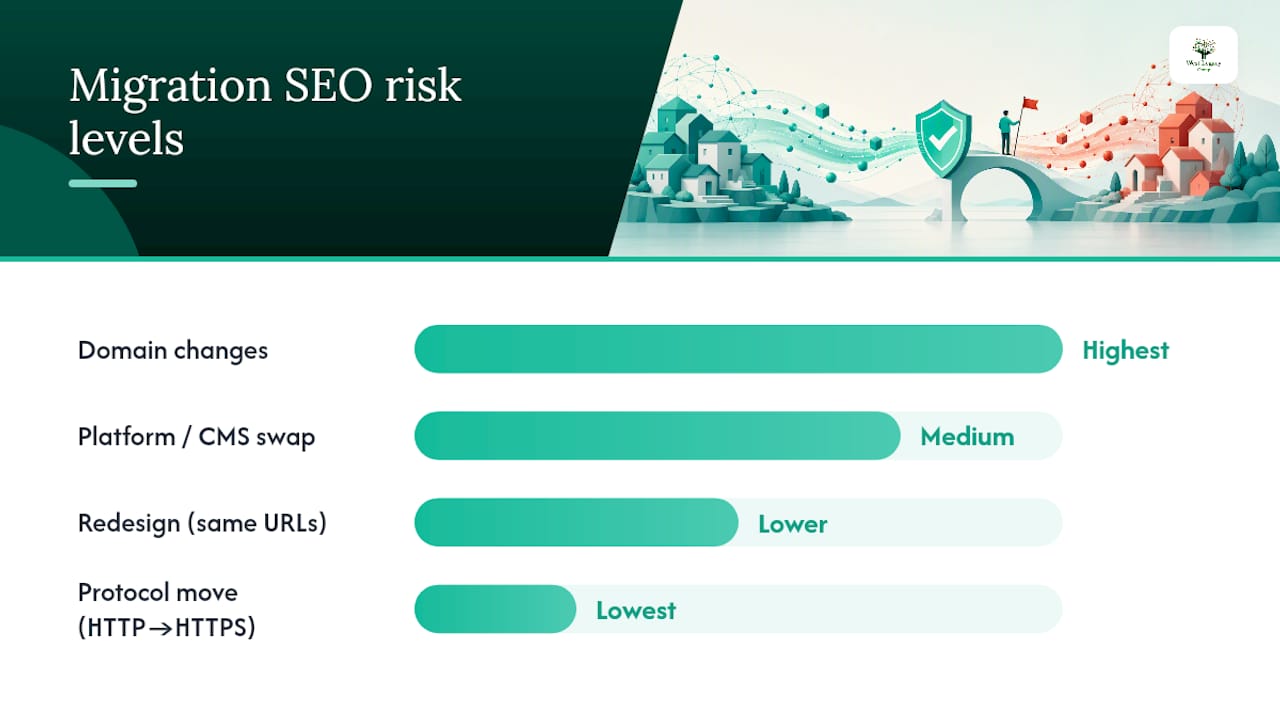
Platform or CMS swaps sit in the middle, since URL structures often survive but templates and technical implementation change underneath them. Redesigns that keep the same URLs carry lower structural risk but can quietly damage rankings through lost internal linking patterns or thinner content. Protocol moves, like shifting from HTTP to HTTPS, are usually the lowest risk of the group when handled correctly, since the URL path itself barely changes.
A rough decision framework:
- Changing your domain alone? Isolate it. Don’t bundle a redesign into the same launch.
- Swapping CMS platforms? Budget extra QA time for template and structured data parity.
- Redesigning within the same domain and URL structure? Lower risk, but audit internal linking carefully.
- Moving to HTTPS? Straightforward if redirects are clean, but still map and verify every URL.
Recovery timelines vary depending on migration type and site size, and larger, more established sites generally take longer to fully re-settle simply because there’s more surface area for something to go wrong. If your project touches more than one of these categories at once, phase them rather than launching everything in a single cutover.
What West Legacy Group has learned from client migrations
Over many years working with small businesses, we’ve watched migrations fail for the same handful of reasons, almost every time: nobody benchmarked properly, nobody mapped every URL, and nobody watched Search Console closely enough in the first fortnight. The technical fixes are rarely hard. Catching the problem early is the hard part.
The shortcuts that actually work aren’t shortcuts at all. They’re disciplined habits: freeze scope, map everything, test before you launch, watch daily after. Skip any one of those and you’re gambling with traffic you spent years earning.
— Christopher
How West Legacy Group supports your website migration
Migration SEO is best run as a structured engagement rather than a one-off favour bolted onto a website build. Some agencies treat redirects as an afterthought once the new site is “done,” but it’s important to treat the technical audit, redirect mapping, staging QA, and post-launch monitoring as the actual project, with the build happening around it.

If you’re planning a domain move, a CMS switch, or a full site redesign, our technical audits identify exactly which pages carry your ranking and backlink value before anything changes. From there, we build the redirect map, verify it against a staging crawl, and stay on the daily Search Console checks through the first weeks after launch, exactly the cadence outlined above. If your project includes a rebuild, our small business website design packages are built with this migration discipline baked in from the first wireframe, not added on afterwards.
Ready to scope your migration properly before you touch a single file? Get in touch with a professional service provider to map out exactly what your site needs to come through the move intact.
Sources
Google’s own Change of Address guidance is the authoritative starting point for any domain move, covering verification requirements and the 180-day redirect window Google uses to forward ranking signals. For a broader checklist approach, Itamar Blauer’s migration checklist covers the full-crawl and redirect-mapping process in detail, while Search Engine Land’s migration guide is worth bookmarking for its post-launch monitoring framework.
For tools, a crawler like Screaming Frog or Sitebulb remains the backbone of both benchmarking and staging QA. Google Search Console stays your primary post-launch diagnostic tool, and if your migration timeline allows for it, our SEO planning templates can help structure the project from benchmark through to monitoring.
- Move a site with URL changes – Search Console Help
- Website migrations: a plan to keep your traffic and SEO safe