

Google Maps ranking is driven mainly by relevance, proximity and prominence, and your Business Profile is the single most actionable control a small business owns. Get those three pillars right and everything else, from reviews to citations to your website, feeds into them. This guide breaks down each pillar and gives you the specific, step-by-step tactics that move a listing up the map.
TL;DR:
- Verifying your Business Profile and keeping it up-to-date is the most immediate way to improve local search visibility.
- Ensuring your NAP details match across your website and directory citations supports ranking consistency and trustworthiness.
- Building detailed reviews, especially those with relevant keywords and recency, significantly boosts prominence signals.
- Developing localized website pages with schema markup enhances relevance and helps Google better classify your business.
- Regular profile audits, review responses, and citation management are essential for maintaining and improving your map ranking over time.
Table of Contents
- What are the three core Google Maps ranking factors?
- Your Google Business Profile checklist for stronger map rankings
- How much do reviews affect Google Maps ranking?
- Which website signals feed your Maps ranking?
- Do citations and backlinks still influence local rankings?
- Why does Google Maps rank the way it does?
- How West Legacy Group approaches local ranking work
- Get your Google Business Profile working harder for you
- Sources
- FAQ
What are the three core Google Maps ranking factors?
Google’s own guidance is refreshingly direct: local results are ranked mainly on relevance, distance and prominence. Every tactic in local SEO ultimately serves one of these three pillars, so understanding them first stops you wasting effort on things that don’t move the needle.
Relevance measures how well your Business Profile matches what someone searched for. A plumber who lists “emergency plumber” and “hot water repairs” as services shows up for those searches. A plumber who only lists “plumbing services” misses the more specific, higher-intent queries. Relevance comes from your category selection, the keywords in your business description, and how closely your website content mirrors what you actually do.
Distance, or proximity, is the plainest of the three. Google estimates how far your business is from the location implied by the search, whether that’s a suburb name typed into the query or the searcher’s actual GPS position. You can’t move your shopfront, but you can make sure your pin sits in the right spot and that your service area settings reflect where you genuinely operate.
Prominence is the reputation layer, and it’s where most small businesses either win or lose ground. Google explicitly factors in how many websites link to your business and how many reviews and ratings you’ve collected. BrightLocal’s breakdown of the local algorithm adds on-page content and behavioural signals to that mix, which means prominence isn’t built in one place. It’s built everywhere your business is mentioned online.
The sub-signals under each pillar look like this:
- Relevance: primary and secondary GBP categories, keyword use in your business description, service and product listings, website content alignment.
- Proximity: pin accuracy, service area radius settings, physical address (for storefronts), the searcher’s own location.
- Prominence: review volume and text, backlink quality, citation consistency, click-through rate, calls, direction requests, and general brand mentions across the web.
Here’s the part that trips people up: these pillars aren’t separate boxes you tick individually. A well-optimised Business Profile improves relevance directly, but it also earns more reviews (prominence) because it’s easier to find and trust. A strong local landing page on your website reinforces the category signals Google already sees in your profile. Every improvement compounds.
Your Google Business Profile checklist for stronger map rankings
If you fix one thing this week, fix your Business Profile. It’s the fastest lever you have, and Google says as much: verified, complete profiles are more likely to appear in local results than incomplete or unverified ones.
Work through this in order:
- Verify ownership and keep the profile current. An unverified or abandoned listing is invisible for most valuable searches. Log in monthly and update anything that’s changed, from hours to services.
- Match your NAP everywhere. Your name, address and phone number on your website’s contact page must match your Business Profile exactly, down to abbreviations like “St” versus “Street.” Run a quick search of your business name plus your suburb and check the citations that appear on directory sites for old addresses or misspelt names.
- Pick the most specific primary category available. “Italian Restaurant” beats “Restaurant.” “Divorce Lawyer” beats “Lawyer.” Add secondary categories only when they’re genuinely accurate, not just to grab more search real estate.
- Fill out every attribute, product and service field. Wheelchair access, outdoor seating, “women-led,” accepted payment types, and specific services all give Google more to match against searches.
- Set your business hours accurately, including holiday hours. A listing showing “closed” when you’re actually open is one of the fastest ways to lose a click.
- Check your map pin sits on your actual entrance or service centre, not somewhere down the street.
- Upload photos regularly and post updates. Fresh content signals an active, legitimate business.
Our own Google Business Profile guide walks through categories, hours and photo strategy in more depth if you want a second pass.
Pro Tip: Set a recurring calendar reminder every four weeks to check your profile for accuracy. Google rewards freshness, and a stale, “set and forget” listing is one of the quietest ways businesses lose map visibility without noticing.
Whitespark’s industry survey consistently ranks primary GBP category, proximity and keyword use in the profile among the heaviest-weighted factors in local pack results, which is exactly why this checklist earns the time it takes.
How much do reviews affect Google Maps ranking?
Reviews influence both ranking and, arguably more importantly, whether someone actually clicks through once they see your listing. Google counts review volume and rating as a direct prominence signal, but the story is more nuanced than “get more stars.”
Text matters as much as the star rating itself. A review that mentions “same day emergency callout” or “fixed our shopfront awning” gives Google additional keyword context that reinforces your relevance signals. A pile of five-star reviews that just say “great!” does far less work than a smaller number of detailed, specific reviews. Whitespark’s most recent survey data shows review signals and behavioural signals climbing in importance for local pack and AI-driven search results compared to previous years, so this isn’t a static factor to set and ignore.
Volume and recency both count too. A business with 40 reviews, half of them from the last three months, tends to outperform a business sitting on 100 reviews that stopped arriving two years ago. Recency tells Google, and the searcher, that you’re still trading and still delivering.
Getting reviews without breaching platform policy comes down to timing and simplicity:
- Ask at the moment of highest satisfaction, right after a job is finished or a purchase is collected, not weeks later.
- Send a direct link to your review form via SMS or email rather than asking in person and hoping they remember.
- Never offer a discount, prize or incentive in exchange for a review. Google’s policies prohibit this, and it can get a profile suspended.
- Respond to every review, good or bad, within a few days. A thoughtful reply to a negative review often reassures future customers more than the review itself worries them.
This is worth taking seriously if you’re in hospitality especially, where customer reviews carry outsized weight on booking decisions, often more than menu photos or pricing.
Which website signals feed your Maps ranking?
Your website does more work for your map ranking than most business owners realise, mainly because Google cross-references your site against your Business Profile to confirm you are who you say you are.
Dedicated local landing pages matter more than a single generic “services” page. If you offer plumbing across three suburbs, one page per suburb, each with genuinely different content (not just a swapped suburb name), gives Google far more to match against local searches than one page trying to cover everything.
Structured data adds a machine-readable layer on top of that content. Google Search Central specifically recommends using the most specific LocalBusiness subtype available, such as “Restaurant” or “DaySpa” rather than the generic “LocalBusiness” tag, because it helps Google classify your business correctly and surface it for the right refined queries.
A short technical checklist worth running through:
- Match your website’s HTML NAP to your Business Profile character for character.
- Add LocalBusiness or industry-specific schema, plus organisation markup covering your logo, social profiles (sameAs) and a contactPoint.
- Confirm your landing page categories and service descriptions echo your GBP categories, not a different set of terms.
- Verify your site ownership in Google Search Console, which gives you a say in what appears in your knowledge panel.
None of this is glamorous work, but it’s the difference between Google guessing at what your business does and knowing it with confidence.
Do citations and backlinks still influence local rankings?
Yes, and they work differently to how most business owners assume. A citation is simply a mention of your business name, address and phone number on another website, usually a directory. A backlink is a link pointing to your site, often without any NAP details at all. Both build prominence, but through different mechanisms: citations confirm consistency and legitimacy, backlinks signal that other credible sites vouch for you.
Prioritise quality over quantity here. A listing on your local chamber of commerce site or a relevant industry association carries more weight than fifty low-quality directory submissions nobody has ever visited. Community involvement, sponsoring a local sports club, running a workshop, partnering with a complementary local business, tends to generate the kind of organic mentions and links that no amount of directory submission can replicate. Our guide to growing local online presence covers partnership tactics in more detail.
Watch for these red flags, which cost businesses far more than they gain:
- Duplicate or near-duplicate listings for the same business under slightly different names.
- Fake or “virtual” addresses used purely to rank in a suburb you don’t actually service.
- Service-area settings that misrepresent your real coverage area.
Google’s own service-area business guidance is unambiguous on this point: it expects a single central profile with an honestly defined service area, and profiles that misrepresent location can be suspended outright. It’s not worth the risk for a marginal ranking bump that rarely lasts anyway.
Why does Google Maps rank the way it does?
Google Maps isn’t one algorithm making one decision. Industry analysis from Search Engine Land describes a multi-stage architecture with separate retrieval and scoring layers, some running server-side and some on-device. That structure explains why chasing a single “hack”, like stuffing keywords into your business name, rarely produces lasting results. A signal that helps at the retrieval stage means nothing if your profile fails at the scoring stage further down the pipeline.
The practical implication is straightforward: build a presence that holds up across every layer of the system, not just the one factor you’ve read about this month. Profile completeness, review depth, website evidence and real user behaviour all get evaluated, often independently, before your listing earns its final position.
Behavioural signals sit at the centre of this. Click-through rate from the local pack, clicks to call, requests for directions and tracked in-store visits are all measurable, and all improvable without touching your ranking directly. Better photos and a clearer business description lift click-through rate. A prominent, correctly formatted phone number lifts calls. Accurate hours and pin placement lift direction requests.
Pro Tip: Set up call tracking and UTM-tagged links on your Business Profile website field so you can see, in hard numbers, whether your local SEO work is generating calls and visits, not just impressions.
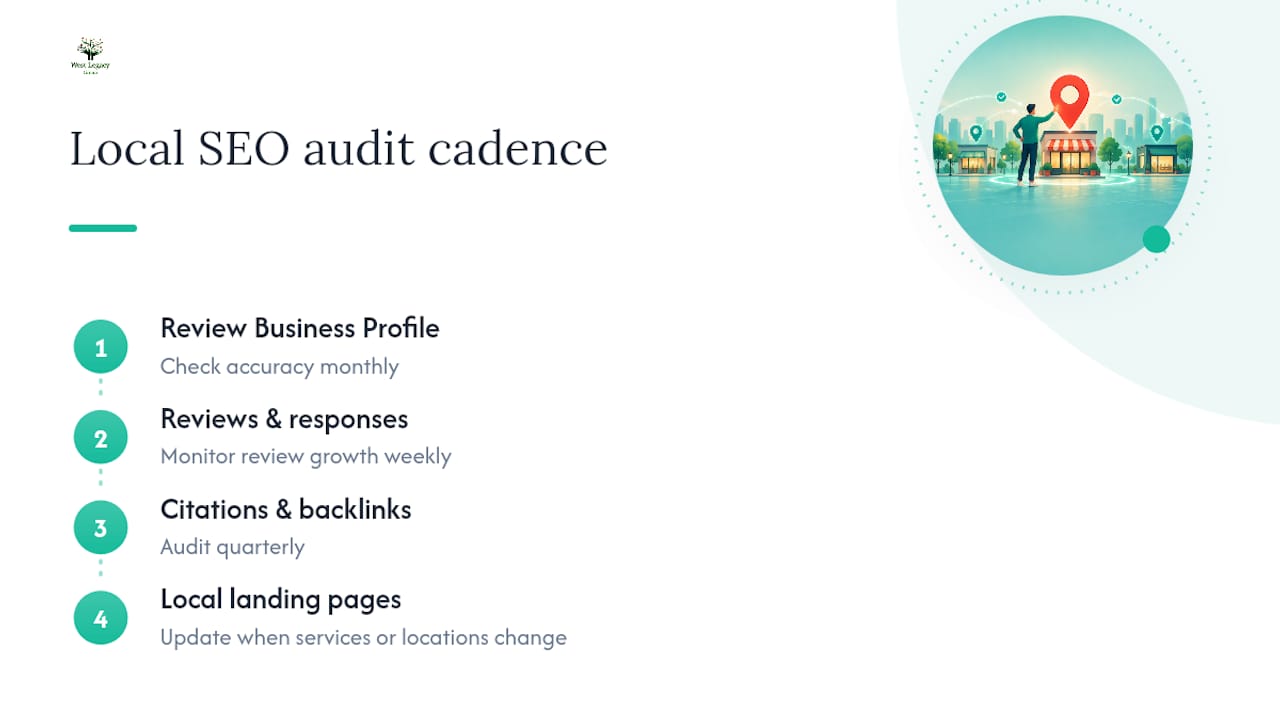
A practical audit cadence looks like this: review your GBP for accuracy monthly, check review growth and response backlog weekly, audit citations and backlinks quarterly, and revisit your local landing pages whenever your services or locations change. Whitespark’s research into the ranking factors that actually move local pack positions consistently points to category accuracy, review acquisition and a targeted local backlink plan as the four areas that produce measurable gains, which lines up neatly with the checklist above.
How West Legacy Group approaches local ranking work
Every audit we run for a client follows the same three steps: audit, implement, report. We start by checking Business Profile accuracy, NAP consistency, review health and on-site structured data against the pillars covered above. Then we implement the fixes, whether that’s rewriting category structures, building local landing pages, or setting up a review request workflow. Finally, we report back with the specific metrics that actually matter: call volume, direction requests, and ranking movement, not vanity numbers.
The goal in every engagement is the same outcome this guide has walked through: a Business Profile and website that reinforce each other across relevance, proximity and prominence, so ranking gains hold up over time instead of fading after one algorithm update.
Get your Google Business Profile working harder for you
Reading a checklist and finding the hours to action it properly are two different things, and most small business owners are already running the business, not managing citations and review workflows on the side. A dedicated Google Business Management service offers an alternative to doing this piecework yourself or hiring a generalist agency that treats your profile as an afterthought. Such services are built specifically around the pillars covered in this guide, not as bolt-ons to broader retainers.

Such services have a starting price currently listed on the provider’s website and typically cover ongoing category accuracy, review response management, photo and post scheduling, and NAP consistency checks that many businesses overlook. If you want it folded into a broader local SEO push that includes website structured data and local landing pages, the Sapling Plan and other digital marketing packages cover that ground too.
Head to the Google Business Management page to see exactly what’s included, or get in touch to request a profile audit and find out where your listing is losing ground right now.
Sources
For readers who want to go straight to the primary sources, start with Google’s own local ranking tips and structured data guidance for local businesses. Whitespark’s annual Local Search Ranking Factors survey and Search Engine Land’s breakdown of Google Maps’ ranking architecture round out the picture with industry-wide data and analysis.
- Tips to improve your local ranking on Google — Google Business Profile Help
- Local business structured data — Google Search Central
- Inside Google Maps: ranking signals and the architecture behind local search — Search Engine Land
FAQ
What are Google’s local ranking factors?
Google states that local results are based mainly on relevance, distance and prominence. Relevance measures how well your listing matches the search, distance measures proximity to the searcher, and prominence reflects your reviews, backlinks and general reputation.
How can I increase my Google Maps ranking?
Start with your Business Profile: verify it, complete every field, pick the most specific category, and keep hours and photos current. From there, focus on earning detailed text reviews consistently, matching your website’s NAP to your profile, and building genuine local citations and backlinks rather than mass directory submissions.
Is a 4.8 Google rating good?
Yes, a high star rating average is considered strong and sits well above what most consumers expect before trusting a business. Rating alone isn’t the full picture though. Google also weighs review volume, recency and the detail in the review text as part of its prominence signal.
Is 75 a good SEO score?
SEO scores vary depending on which tool generates them, since there’s no single universal scale Google publishes or endorses. Scores from most auditing tools generally indicate a healthy site with room for improvement, though the metrics that actually influence Maps rankings, like GBP completeness and review health, sit outside most generic SEO scoring tools entirely.
What does Google Business Management cost with West Legacy Group?
West Legacy Group’s Google Business Management service is priced at $95 AUD per month, covering ongoing profile optimisation, review management and content scheduling. Broader local SEO packages that include website and citation work are available through the digital marketing plans page.