

Start by picking 2 to 5 business domains, moving your core data to the cloud, and automating one or two high-volume tasks like lead follow-up or invoicing. That single sequence, backed by McKinsey’s “bite size” transformation research, typically produces measurable hours saved within 90 days. Some service providers build exactly this kind of phased plan for small businesses that can’t afford to get it wrong.
TL;DR:
- Prioritize fixing high-volume workflows like lead follow-up, scheduling, and invoicing in the first 30 days to achieve immediate time savings.
- Use a three-sprint roadmap: establish a centralized data core, integrate tools smoothly, then add analytics and AI capabilities over 12 months.
- Select 2 to 5 key business domains based on potential value and feasibility, ensuring quick wins before expanding digital transformation efforts.
- Keep software simple and well-integrated by avoiding overlapping tools, and verify that all systems can connect before making purchases.
- Assign roles and involve staff early in adoption, focusing on training, clear communication, and quick wins to encourage long-term use and cultural change.
Table of Contents
- What does digital transformation mean for a small business?
- What quick wins should you target first?
- The three-sprint roadmap: foundation, connect, intelligence
- How do you choose where to start?
- Building a tech stack that lasts
- Getting your team to actually use the new tools
- How do you measure whether it’s actually working?
- Why trust West Legacy Group with this process?
- How do you know if your business is ready?
- What does digital transformation cost a small business?
- What data security basics do small businesses need?
- How do you connect the roadmap to your business goals?
- How do you bring your team along with the change?
- A note from Christopher: start small, measure, then scale
- How West Legacy Group runs your first sprint
- Sources
- FAQ
What does digital transformation mean for a small business?
Digital transformation for a small business means replacing manual, disconnected work with systems that talk to each other. It’s not about owning more software. It’s about your booking, invoicing, and customer records living in one place instead of three spreadsheets and a notebook by the till.
The distinction that trips up most owners is buying tools before diagnosing the problem. Rework’s framework on digital strategy makes this point directly: treating a technology purchase as the strategy itself is the single most reliable predictor of failure. You fix the workflow first, then choose the tool that fits it.
AI and automation belong in this picture, but later — for example, you can explore practical examples of AI use cases for small-business marketing that accelerate growth without a dedicated team. They’re accelerants for a process you already understand, not the starting point.
What genuine transformation changes in a small business:
- How leads get followed up (automatically, not “when someone remembers”)
- Where customer data lives (one CRM, not four inboxes)
- How invoices go out and get paid (triggered, not typed)
- How you see performance (a dashboard, not a guess)
Businesses that treat this as business-led change, not an IT project, tend to see stronger growth and operational gains than those chasing feature lists.
What quick wins should you target first?
The fastest wins are the ones your team already complains about. Automating lead follow-up, online scheduling, and invoicing tends to return hours every week almost immediately, because these are high-frequency, low-complexity tasks that don’t need a culture shift to fix.
Three quick wins worth targeting in your first month:
- Automated lead follow-up. A missed enquiry after hours often means a lost customer. An automated response and reminder sequence closes that gap without hiring anyone.
- Online scheduling. Replacing phone-tag booking with a self-serve calendar cuts admin time and reduces no-shows through automatic reminders.
- Invoicing automation. Triggering invoices from job completion, rather than typing them manually at week’s end, shortens the time between work done and cash in the bank.
These wins matter beyond the hours saved. They build the internal case, and often the budget, for the bigger infrastructure work that follows.
The three-sprint roadmap: foundation, connect, intelligence
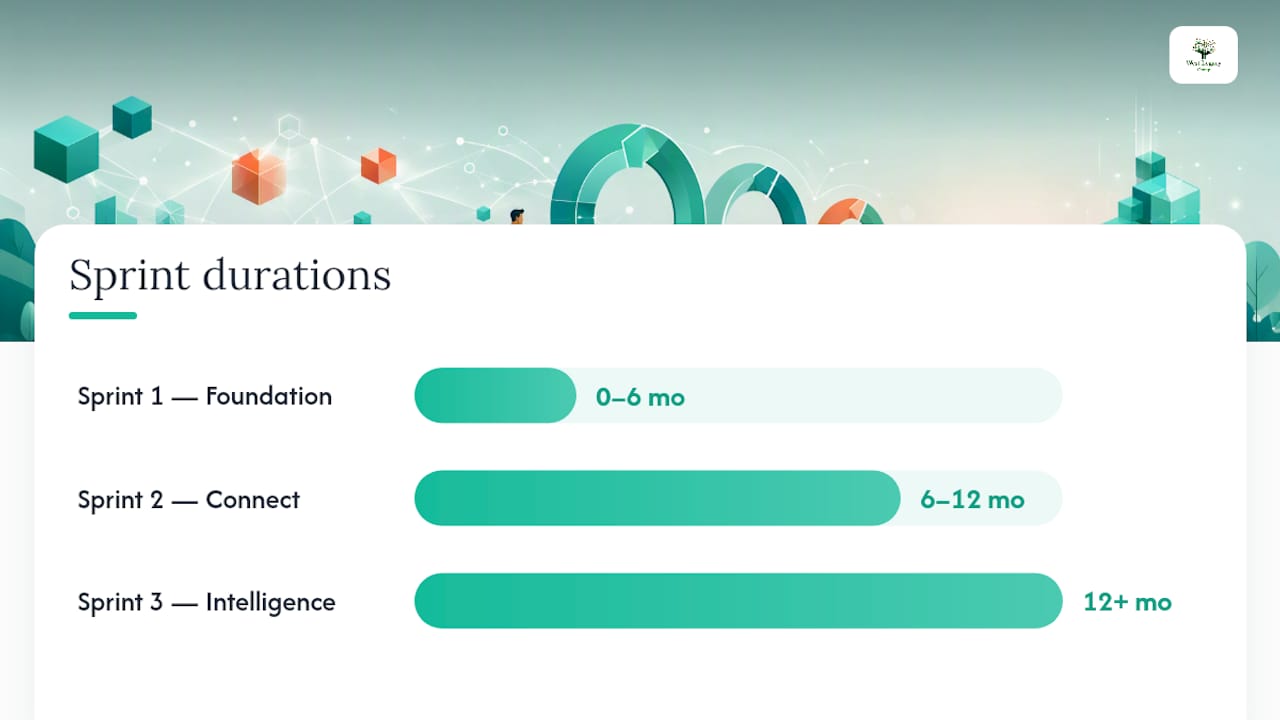
A workable small-business roadmap runs in three sprints, each with its own deliverables and checkpoint before you move on. This structure keeps risk low and cost manageable, and it matches the practical playbook Nexuron Insights outlines for small-business transformation timelines.
Sprint 1: Foundation (0 to 6 months). Migrate core data to the cloud, establish one CRM as your single source of truth, automate two high-impact tasks, and lock down basic security (password manager, two-factor authentication, backup schedule).
Sprint 2: Connect (6 to 12 months). Integrate the tools from Sprint 1 so data flows between them without manual re-entry. Fix the customer journey gaps that Sprint 1 exposed. Eliminate the data silos that still force staff to check three systems for one answer.
Sprint 3: Intelligence (12 months plus). Add analytics, predictive lead scoring, and AI-assisted automation once your data is clean and your team is used to working digitally.
Checkpoints between sprints:
- Sprint 1 to Sprint 2: your CRM is the only place staff log customer interactions, no exceptions
- Sprint 2 to Sprint 3: reporting takes minutes, not a half-day of manual collation
- Sprint 3: at least one repetitive decision (lead prioritisation, restock timing) runs on a rule or model, not gut feel
Pro Tip: Don’t start Sprint 2 until Sprint 1’s tools are actually being used daily. A CRM nobody opens isn’t a foundation, it’s a subscription you’re paying for nothing.
The most common pitfall is skipping straight to Sprint 3 because AI sounds exciting. Without clean, centralised data from Sprint 1, predictive tools have nothing reliable to predict from.
How do you choose where to start?
Pick domains using two questions: how much value will fix this create, and how feasible is it right now? McKinsey recommends selecting 2 to 5 business domains for an initial transformation, large enough to matter, contained enough that a stumble doesn’t take down the whole business.
Typical domains worth scoring:
- Sales pipeline and lead follow-up
- Customer onboarding
- Invoicing and payments
- Scheduling and bookings
- Inventory alerts and reordering
Run a short worksheet exercise before committing:
- List 1 to 3 workflows that eat the most staff time each week
- Estimate hours lost per week on each (ask your team, don’t guess alone)
- Score each on value (hours or dollars recovered) and feasibility (can you fix it in under 90 days)
- Pick the top 2 to 5 that score high on both
If invoicing eats 6 hours a week and can be automated in a fortnight, it beats a CRM overhaul that might take four months to bed in, even if the CRM’s long-term value is higher.
Building a tech stack that lasts
Fewer, better-integrated tools beat a large collection of disconnected apps. Tool sprawl creates real costs. G2’s guidance on small-business tech stacks points out that switching between unconnected systems burns time that never shows up on an invoice but shows up everywhere else.
Four principles worth following:
- Start with the problem, not the product. Choose based on what you’re fixing, not what’s trending.
- Prefer cloud-based, integrated tools over on-premise software that doesn’t talk to anything else.
- Avoid overlapping tools. Two apps doing the same job is friction, not redundancy.
- Check integrations before you buy. If it doesn’t connect to your CRM or accounting software, it’s adding a silo, not removing one.
Core categories worth having covered: cloud backup, a CRM, invoicing, scheduling, and basic analytics. Start with free or freemium tiers where the workload is light, and set a clear upgrade trigger. Usually that’s when your team hits a usage cap or you’re manually exporting data to make two tools cooperate.
Getting your team to actually use the new tools
New software fails when nobody owns making it stick. Assign three roles before you buy anything: an executive sponsor who protects the budget and priority, a program lead who runs the rollout day to day, and local owners in each team who answer the “how do I actually do this” questions.
Governance guidance from Rework’s transformation framework sets a useful adoption benchmark: adoption below 70% after 90 days is a warning sign that something in training, workflow fit, or leadership backing needs attention.
Three tactics that improve adoption in the first quarter:
- Train in short, task-specific sessions tied to real work, not a single long onboarding webinar
- Set a firm cutover date for the old process so the new one isn’t optional
- Migrate data in stages, checking accuracy at each step rather than one large risky transfer
Pro Tip: Watch for scope creep during rollout. “While we’re at it” additions are how a six-week Sprint 1 becomes a six-month one.
How do you measure whether it’s actually working?
Track a small set of numbers before and after each sprint: hours saved per week, adoption rate among staff, cost to serve each customer, conversion rate, and average response time to enquiries.
Run a simple before-and-after comparison. Record baseline numbers before Sprint 1 starts, then check again at the 90-day mark. A basic dashboard using your CRM’s built-in reporting is enough to start; you don’t need a data analyst for this stage.
Adoption below 70% within 90 days signals a rollout problem worth fixing before adding more tools.
Quick wins like invoicing automation tend to show measurable benefit within weeks. Integrated benefits, like reduced cost to serve from connected systems, usually take a full sprint cycle to show up clearly. If you want a structured way to track the financial side, a before/after ROI calculation gives you a repeatable method rather than a one-off guess.
Why trust West Legacy Group with this process?
Certain firms have spent many years developing practical, conversion-first digital work for small businesses, from WordPress websites through to technical audits and phased transformation packages. Our initial audits identify your highest-value, most feasible domains before any tool gets recommended, and our Sprint 1 engagements are scoped to deliver a working foundation, not a shelf of unused software.
How do you know if your business is ready?
Digital maturity sits on a rough spectrum: manual and paper-based at one end, fully integrated and data-driven at the other. Most small businesses sit somewhere in the middle, with a mix of spreadsheets, one or two disconnected apps, and a lot of tribal knowledge held in someone’s head.
A quick readiness check covers four areas. First, data: is customer and job information centralised, or scattered across email, paper, and someone’s memory? Second, process: are your core workflows (quoting, onboarding, invoicing) documented anywhere, or does each staff member do it slightly differently? Third, tools: do your existing systems integrate, or does someone manually copy data between them? Fourth, people: does your team have basic comfort with cloud tools, or will Sprint 1 need to include foundational digital literacy training?
Score yourself honestly on each, because overestimating readiness is a common reason Sprint 1 drags. If your team still has any resistance to using shared calendars or cloud folders, plan extra time for the change management side of Sprint 1 before you touch integrations.
The value of this exercise isn’t the score itself. It’s knowing which of the three sprints needs the most attention. A business with clean data but chaotic processes needs a different first move than one with good processes but data trapped in five different systems. An initial audit process exists specifically to answer this before recommending any tool.
What does digital transformation cost a small business?
Costs scale with ambition, but Sprint 1 work for a small business typically runs on modest software subscriptions plus either internal time or a fixed-fee external engagement, not enterprise consulting rates. Cloud CRM and invoicing tools commonly start on free or low-cost tiers, which is exactly why Sprint 1 is designed around them.
Budget in three buckets: software subscriptions (usually the smallest line item at this stage), implementation time or fees (migrating data, setting up automations, configuring integrations), and training time (staff hours spent learning the new workflow, which is a real cost even though no invoice arrives for it).
Australian small businesses should check whether their technology spending qualifies for concessions under ATO guidance on the small-business technology investment boost, which can reduce the net cost of eligible investments. Eligibility depends on your specific circumstances, so confirm against the current criteria rather than assuming it applies.
The biggest budgeting mistake is underestimating implementation time and overestimating software cost. A $30 a month tool that takes 40 unplanned hours to configure properly is more expensive than a $60 a month tool that comes pre-integrated with what you already use. Price the whole job, not just the licence.
What data security basics do small businesses need?
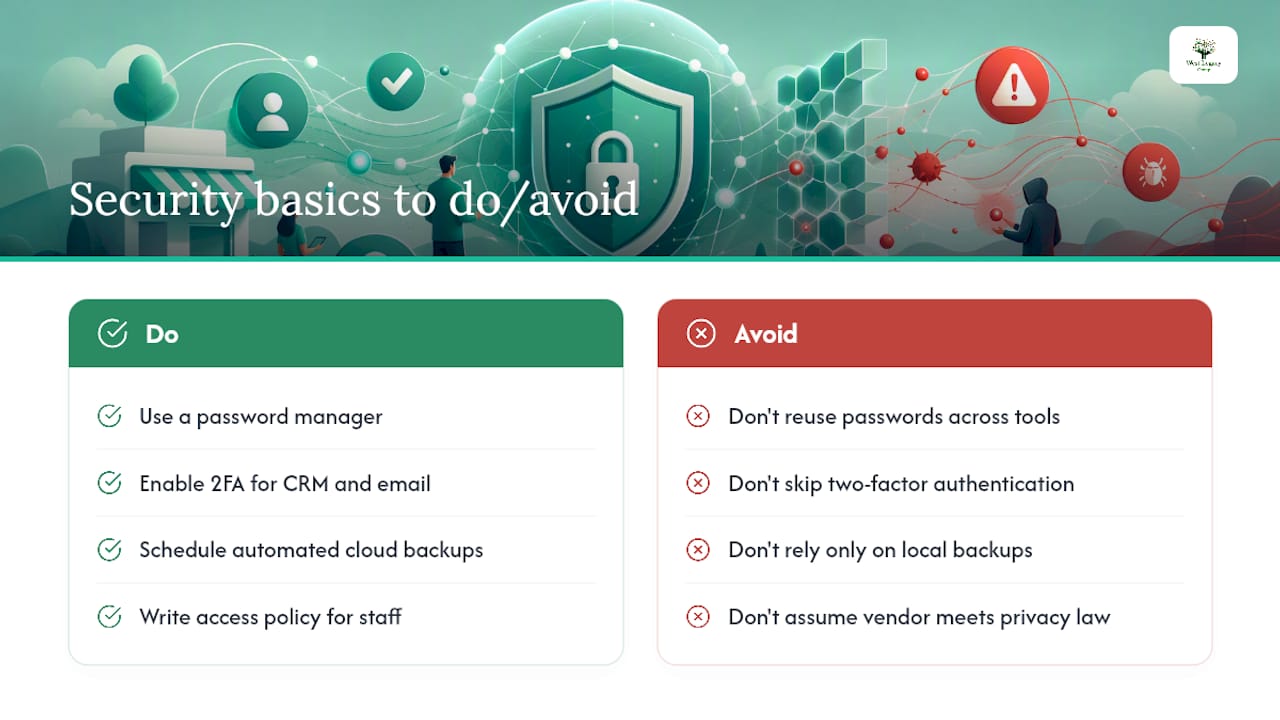
Security in Sprint 1 doesn’t need to be complicated, but it can’t be skipped. Centralising customer data in one CRM raises the stakes if that system isn’t protected, because you’ve just put all your eggs in a basket that’s now a more attractive target.
Four basics worth having in place before you migrate anything: a password manager with unique passwords for every business tool, two-factor authentication turned on for your CRM and email at minimum, an automated cloud backup schedule so a hardware failure or ransomware incident doesn’t cost you your customer records, and a written policy on who can access what data, especially if you’re using casual or contract staff.
Data privacy matters just as much as security. If you’re collecting customer information through new booking or lead-capture tools, check what each vendor does with that data and whether it meets Australian Privacy Principles obligations relevant to your business size and sector. This is worth a specific conversation with whoever implements your Sprint 1 tools, not an assumption that “the software handles it.”
The same caution applies whether you’re automating lead capture or setting up predictive analytics in Sprint 3: any tool holding customer data needs the same access controls and backup discipline, not a lighter version because it feels like a smaller project.
How do you connect the roadmap to your business goals?
A transformation roadmap disconnected from your actual business goals produces busywork with a technology veneer. Before locking in your 2 to 5 domains, hold them up against what you’re actually trying to achieve this year: more revenue per customer, faster growth, lower operating cost, or better retention.
McKinsey’s guidance on transformation decisions makes a useful point here: start with a specific business problem, like reducing 16 weekly admin hours, and measure success against that improvement rather than against a generic feature checklist. If your goal is growth and your Sprint 1 domain is invoicing automation, the link needs to be explicit: faster invoicing improves cash flow, which funds the marketing spend that drives growth.
Revisit this alignment at each sprint checkpoint. A domain that made sense when you chose it can drift out of relevance if your business goals shift, a new competitor changes your customer expectations, or last quarter’s numbers reveal a different bottleneck than the one you assumed.
How do you bring your team along with the change?
Employees resist new systems for predictable reasons: fear of being made redundant, frustration at relearning a task they already do well, or simple scepticism that this rollout will actually stick where the last one didn’t. Naming these reasons upfront, rather than pretending resistance won’t happen, makes the rollout smoother.
Involve local owners (the staff who’ll use the new system daily) in choosing between finalist tools, not just in being told which one won. People support what they help build, even in small ways like testing two scheduling apps for a week and voting.
Communicate the “why” in terms of their day, not the business’s. “This CRM means you stop entering the same customer details three times” lands better than “this improves our operational efficiency.” Tie training sessions to real, current work rather than a generic demo, and celebrate the first visible win publicly, whether that’s the first automated invoice going out or the first lead caught by the new follow-up sequence.
Cultural change tends to follow adoption, not precede it. Once staff see the new process actually saving them time in week two or three, the scepticism from week one usually fades on its own.
A note from Christopher: start small, measure, then scale
Every failed transformation I’ve studied shares one trait: excitement for the tool outpaced discipline about the problem. Phased work looks unglamorous next to a big-bang platform launch, but it’s the version that survives contact with a busy Tuesday. If you’re unsure where your 2 to 5 domains should be, ask for a short audit before you commit to anything.
— Christopher
How West Legacy Group runs your first sprint
Some providers offer an alternative to hiring an enterprise consultancy for a job that doesn’t need one, with a phased, fixed-scope approach built for businesses running lean, not a six-month discovery phase before anything ships.

A typical first engagement starts with an audit of your current workflows and data setup, scoring your domains on value and feasibility the same way this article describes. From there, we scope a Sprint 1 package covering the highest-priority fix, whether that’s a rebuilt small business website that actually converts enquiries, an SEO plan that gets you found in the first place, or reporting that finally tells you what’s working. Our LEGACY Framework structures this work into clear phases with checkpoints, so you always know what’s being delivered and when.
If you’d rather start lighter, build your own SEO plan and add services as your Sprint 1 wins fund the next phase. Either way, the next step is the same: book an audit and find out which 2 to 5 domains will move the needle for your business first.
Sources
- Choose the right transformation ‘bite size’
- Digital transformation strategy — a practical framework for mid‑market leaders
- Small-business technology investment boost — ATO
- Small business tech stack guide
FAQ
What is digital transformation in a business?
It’s the process of replacing manual, disconnected workflows with connected, mostly cloud-based systems, centred on a clear business problem rather than a list of software features.
What are the seven pillars of digital transformation?
Frameworks vary by source, but common pillars include strategy, customer experience, data and analytics, technology infrastructure, process automation, culture and people, and security. There’s no single universally agreed list.
What are the top digital transformation companies?
Rankings vary widely by source and region and change often, so no fixed list holds true for long. For small businesses specifically, look for a provider offering phased, audit-first engagements like West Legacy Group rather than a large enterprise consultancy built for bigger budgets.
What business types will see the biggest gains from digital transformation?
Service-based and appointment-driven businesses, trades, and retailers with repetitive admin tasks tend to see the fastest returns, since scheduling, invoicing, and lead follow-up automate cleanly and free up hours quickly.
How much should a small business budget for Sprint 1?
Costs depend on your existing tools and the domains you choose, but Sprint 1 is designed around modest software subscriptions and a fixed-scope implementation, not enterprise consulting fees. Check current ATO technology investment concessions for eligibility before finalising your budget.