

Your Business Profile needs one primary category and several additional categories within the allowable limits, and the single most important action you can take today is checking whether your primary category is the most specific label available, not just a generic one. If it says “Store” when it should say “Bicycle Shop,” you’re leaving local visibility on the table.
TL;DR:
- Using the most specific primary category is crucial, as it directly influences your business features and local search visibility, especially when it unlocks booking or menu options.
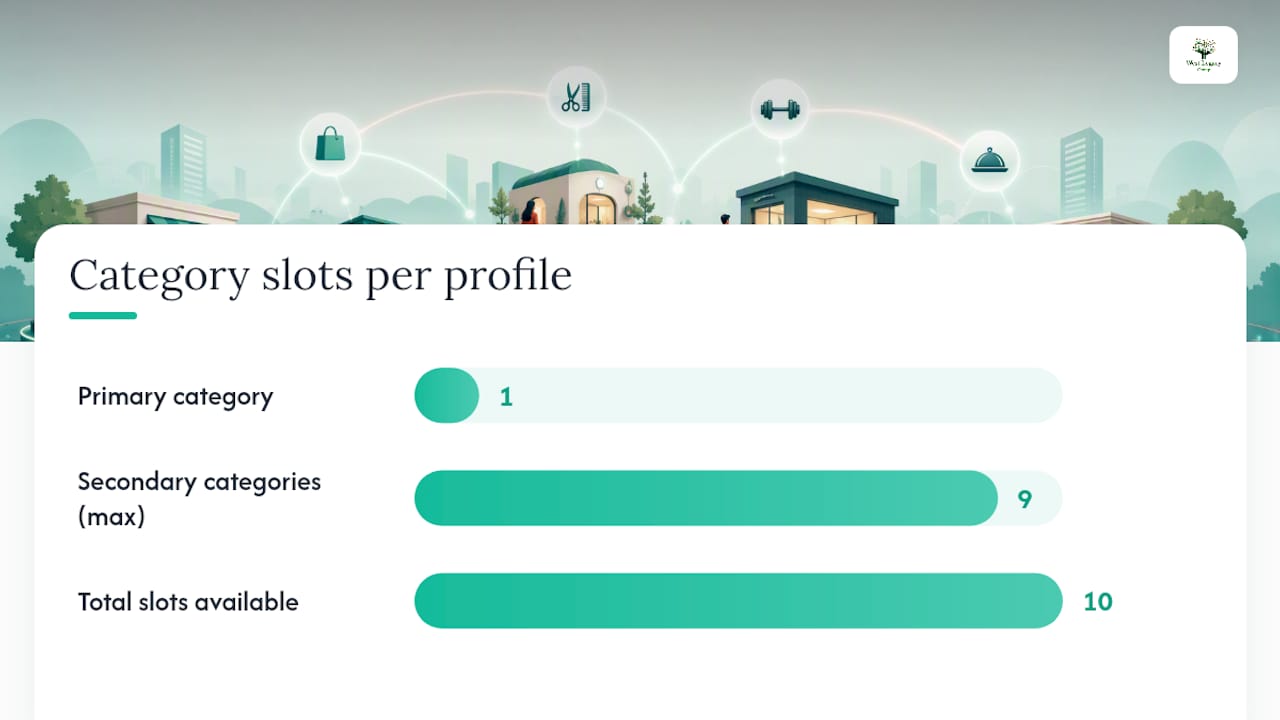
- Google allows only one primary category and up to nine secondary categories, all from a fixed list, with no custom labels or additional slots beyond these nine.
- Category selection must accurately reflect what your business is rather than just what it does, emphasizing precise terminology like “Vegan Restaurant” over broad labels like “Restaurant.”
- Changing categories can trigger verification needs, may temporarily affect features, and should be tested over two to six weeks for impact on search metrics.
- The full taxonomy includes about 4,000 categories, accessible via Google’s APIs or curated lists, which helps avoid guesswork during audits or profile updates.
Table of Contents
- What are Google business categories and why do they matter?
- How do you choose the right primary and secondary categories?
- Where can you find the full 2026 category list?
- How do you edit categories in your Business Profile?
- Do category choices actually change what customers see?
- What mistakes should you avoid, and how do you test a category change?
- How does West Legacy Group approach category selection for clients?
- Why specificity beats stuffing every time
- Want help getting your categories right the first time?
- Where to check the official rules and current category lists
- Sources
- FAQ
What are Google business categories and why do they matter?
A Google Business Profile runs on a fixed structure: one primary category, plus up to nine secondary categories if they genuinely apply. That’s the entire allowance. There’s no way to add a tenth, and there’s no way to invent your own label either. You choose from Google’s predefined list, full stop, no exceptions, no custom entries.
The primary category carries the most weight in this system. Google treats it as the strongest single signal for what your business actually is, which makes it one of the more influential factors in local search visibility. Secondary categories help fill in the picture, telling Google about additional services or offerings, but they never override what the primary category tells the algorithm about your core identity.
Behind every category name sits a stable identifier called a GCID (Google Category ID). These IDs stay consistent even when display names shift between languages or regions, which is why agencies and developers rely on them when automating profile audits across multiple markets. Independent 2026 compilations of the taxonomy report roughly 4,000+ categories sitting in Google’s system, grouped loosely by industry.
Here’s what trips up a lot of business owners: categories aren’t just labels sitting quietly in the background. They actively determine which features appear on your profile. Pick “Restaurant,” and you unlock menu links and reservation buttons. Pick “Hotel,” and star ratings and amenity fields show up. Choose a category tied to health or beauty services, and a booking button can appear directly on your listing.
This happens because of how Google’s Business Profile API structures categories on the backend. Each category resource can carry optional serviceTypes and moreHoursTypes data, output-only fields that unlock extra hours settings or service-specific detail panels. In practice, that means:
- Restaurants and cafés can display menu links, online ordering, and reservation integrations.
- Hotels and accommodation providers can show star ratings and amenity icons.
- Health, beauty, and personal care businesses often get a direct booking button.
- Home service trades can list specific service types tied to categories like plumber or electrician.
- Retail categories sometimes unlock product tagging and catalogue features.
If your primary category doesn’t match your actual operations, you’re not just risking a ranking hit. You’re potentially locking yourself out of the exact features that turn a browser into a booking. Developers can confirm this structure directly through the categories.list method, which returns category names alongside their categoryId when filtered by regionCode and languageCode. That’s useful if you manage profiles across several countries and need to be certain the display name you’re seeing matches the exact identifier Google uses internally.
One more mechanical detail worth knowing: you cannot create your own category if the perfect description doesn’t exist. If your business is a genuine hybrid, say a bakery that also runs a small coffee bar, you pick the closest available match for your primary offering and use a secondary category for the rest. Trying to force an approximate label into the primary slot because it “sounds right” is one of the more common reasons profiles underperform in local search.
How do you choose the right primary and secondary categories?
Start with a blunt question: what is your business, not what does it do? Google’s own guidance draws a sharp line between these two framings, and getting this distinction wrong is probably the single most common category mistake small business owners make.
A cafe that also caters events is still fundamentally a café. The catering is a service it performs, not what it is. So “Cafe” belongs in the primary slot, and “Caterer” goes into secondary categories if catering makes up a meaningful part of the business. Reverse that order, and you risk having Google treat your business as a catering company that happens to also serve coffee, which changes who sees you in local search results entirely.
Follow this sequence when auditing or setting up your categories:
- List every genuine service and product line your business offers. Be honest here. If you only occasionally do something, it probably doesn’t deserve a category slot.
- Identify the one description that answers “what are we” most precisely. Not the broadest fit, the most specific one that’s still accurate. “Vegan Restaurant” beats “Restaurant” if that’s genuinely your focus.
- Set that as your primary category.
- Select secondary categories only for services that are genuinely distinct and regularly performed, not every tangential thing you’ve ever done for a client.
- Check which categories unlock features you actually want, like booking buttons or menu integrations, and weigh that against pure descriptive accuracy.
- Search Google’s category list directly inside the Business Profile editor to confirm your ideal wording actually exists as a selectable option.
Prioritise by customer intent, not by internal business structure. A plumber who also does gas fitting should think about which search behaviour brings in more paying jobs, then order categories accordingly. If most calls come from people searching for emergency plumbing, don’t bury “Plumber” under a broader label like “Contractor” just because that also technically applies.
Here’s how that plays out across a few common business types:
- A hairdresser who also sells retail hair products: Primary category “Hair Salon,” secondary “Beauty Supply Store” if retail sales are a genuine, ongoing revenue line, not just a shelf near the till.
- A physiotherapy clinic that also offers remedial massage: Primary “Physical Therapist,” secondary “Massage Therapist,” because both are core, bookable services with distinct search demand.
- A bakery with a small in-house cafe: Primary “Bakery,” secondary “Cafe,” reflecting that baking is the core identity and cafe seating is a genuine additional offering.
- An electrician who occasionally does solar installation: Primary “Electrician,” and only add “Solar Energy Contractor” as secondary if solar work is a consistent, marketed service, not a one-off.
Pro Tip: Before finalising your secondary categories, search each one you’re considering inside the Business Profile category picker first. Some categories that sound like natural fits don’t actually exist in Google’s taxonomy under the name you’d expect, and finding that out before you commit saves a frustrating troubleshooting session later.
Practitioner guidance backs this restraint. BrightLocal’s analysis of category selection recommends using the fewest categories that accurately describe the core business, then testing changes rather than assuming more categories automatically means more visibility.
Where can you find the full 2026 category list?
The most reliable source is Google’s own developer documentation, specifically the categories.list API method. It returns category names with their stable categoryId, and you can filter by regionCode and languageCode to get exact display names for a specific market. If you manage profiles for clients in different countries, or you’re building any kind of automated audit tool, this is the authoritative source, not a blog post, not a spreadsheet someone shared in a Facebook group.
For business owners who just want to browse without touching an API, curated third-party lists fill a real gap. Independent 2026 compilations group Google’s roughly 4,000+ categories into industry buckets, which makes scanning for relevant options far faster than scrolling through an alphabetical dump. These lists also publish GCIDs alongside display names, useful when you need to confirm that the category you’ve selected in the editor matches the identifier you intended, especially since display names can shift slightly between English variants and other languages.
A few practical notes worth keeping in mind:
- Inside the Business Profile editor itself, search matches the front of the category name, not the middle or end. Typing “salon” won’t necessarily surface “Hair Salon” if the system is matching from the start of the string, so try leading with the most likely first word.
- Curated lists are best for browsing and initial research, when you want to see what’s available without committing to a technical integration.
- The API is best for verification and scale, when you’re managing dozens of listings or need to confirm exact
categoryIdvalues programmatically. - Regional variation matters. A category display name that reads naturally in Australian English might differ from the US or UK version, so if something looks slightly off when searching, that’s often why.
If you’re managing a single local business profile, a curated list plus manual searching in the editor will cover almost everything you need. If you’re running category audits across multiple locations or franchises, the API becomes worth the setup time. Either way, cross-referencing whichever list you’re using against what actually appears in the live editor is a habit worth building, since taxonomies do get updated and a list from eighteen months ago may already be slightly out of date.
How do you edit categories in your Business Profile?
Changing your categories takes only a few minutes inside the Business Profile interface, but the steps matter more than they look, particularly around what happens after you hit save.
- Sign in to your Business Profile and open the listing you want to update.
- Select “Edit profile,” then find the “Business category” section.
- Review your current primary category first. Decide if it’s still the most accurate, specific description available before touching anything else.
- Update the primary category if needed, searching by the front of the category name to find your best match.
- Add or remove secondary categories based on which services are genuinely current and regularly offered.
- Save your changes, then check for any verification prompts Google presents immediately afterwards.
That last step matters more than people expect. Category changes can trigger re-verification, particularly when the new category shifts your business into a different classification Google treats more cautiously, think anything touching legal, financial, medical, or other sensitive service areas. Treat any category edit as a meaningful profile change, not a cosmetic tweak, and schedule it for a time when you can respond quickly if a verification request lands in your inbox or as a phone call.
Changes typically propagate within a few days, though it can occasionally take longer depending on how much re-verification is involved. Confirm the update actually applied by searching your business name directly and checking the category badge shown in the knowledge panel, rather than relying purely on what the editor displays back to you.
Statistic to keep in mind: category selection sits alongside verification and profile completeness as one of the most significant local ranking factors Google’s own guidance points to, which is exactly why rushing this step or leaving it unchecked for years is a bigger risk than it looks.
If the exact category name you want isn’t showing up, don’t force a close-but-wrong match into the primary slot. Try alternate wording, check a curated list for the precise phrasing Google uses, or consider whether a secondary category might be the more accurate home for that particular service.
Do category choices actually change what customers see?
Yes, and the effect is more concrete than most owners realise. Category selection doesn’t just influence ranking mathematics behind the scenes, it changes the literal features and fields visible on your live profile.
A restaurant with the right category gets menu links and reservation integration. A hotel gets star rating displays and amenity icons. A health or beauty business often gets a direct booking button sitting right on the listing, which can be the difference between a customer calling and a customer simply booking on the spot. These aren’t cosmetic extras, they’re conversion tools tied directly to category selection.
Category choice also shapes whether your business shows up in the local pack for specific searches, and whether Maps surfaces you for related queries beyond your exact category name. This creates a genuine trade-off:
- A narrow, highly specific category (like “Vegan Restaurant” instead of “Restaurant”) tends to convert better with the right audience, because it matches searcher intent precisely, but it can also narrow the pool of searches you appear in.
- A broader category captures more search volume but risks diluting relevance, showing up for searches where you’re technically eligible but not genuinely the best match.
A specialist Italian restaurant choosing “Italian Restaurant” over plain “Restaurant” will likely see fewer total impressions but a higher proportion of genuinely interested searchers clicking through. A general contractor choosing “General Contractor” over a narrower trade label captures broader search volume but may compete against listings that are a closer match for specific jobs like “Roofing Contractor” or “Kitchen Remodeler.” Neither approach is universally right, it depends on whether your business benefits more from volume or from precision.
What mistakes should you avoid, and how do you test a category change?
Category stuffing is the mistake that costs businesses the most without them ever realising it. Adding every remotely applicable secondary category doesn’t strengthen your profile, it dilutes the clarity Google needs to understand what you actually specialise in. Mislabelling the practitioner as the practice is a close second: a solo physiotherapist choosing “Medical Clinic” instead of “Physical Therapist” sends a confusing signal about business size and service type that can actually hurt customer expectations, not just search rankings.
Run any category change as a genuine test, not a set-and-forget decision.
- Record baseline numbers in Business Profile Insights, covering search impressions, direction requests, calls, and website clicks over the prior few weeks.
- Change only the category, keeping every other profile element steady so you can isolate the effect.
- Hold for two to six weeks, giving Google enough time to reindex and giving yourself enough data to see a genuine pattern rather than daily noise.
- Compare the same metrics again, alongside Search Console queries and any website analytics tied to local landing pages.
Pro Tip: If a category change coincides with a service pivot, like adding a new department or discontinuing an old one, don’t test both changes at once. Separate them by a few weeks so you know which change actually drove the result you’re seeing.
If a business genuinely operates two distinct departments in different physical spaces, a separate profile may make more sense than cramming both identities into one listing’s category structure. If results decline after a change, roll back rather than layering a third adjustment on top of an untested second one.
How does West Legacy Group approach category selection for clients?
Getting a Google Business Profile category right sounds simple until you’re staring at a list of near-identical options wondering which one actually matches search intent in your suburb. That’s the exact spot most small business owners get stuck, and it’s where some local SEO providers spend a fair chunk of their work on this area.
Every category audit typically starts the same way: pulling the current primary and secondary categories, checking them against actual service offerings, and mapping them against what local competitors are ranking under. For example, a retail client moved from a generic “Store” primary category to a more specific retail category and corrected two secondary categories that no longer matched current stock lines, resulting in a measured lift in local pack impressions within a month, tracked through Business Profile Insights.
Category work is often paired with citation consistency checks, schema markup on the website confirming the same business type Google sees in the profile, and service page structure that reinforces the primary category rather than contradicting it. A mismatch between website content and profile category can impact ranking, which might be overlooked without active cross-checking. Readers wanting the fuller picture on this pairing can look at how Google Business Profile SEO connects to broader signals beyond category selection alone, or work through a local SEO checklist that treats categories as one piece among several.
Why specificity beats stuffing every time
If there’s one thing worth taking from all of this, it’s that specificity beats volume, every single time. A business that picks one precise primary category and two or three genuinely accurate secondary categories will generally outperform a competitor who’s ticked eight boxes trying to cover every possible search term. Google’s own systems reward clarity, not coverage. Beyond picking well, the real discipline is measuring what happens next, checking Insights honestly, and being willing to roll back a change that didn’t help rather than assuming more time will fix it.
If you’re staring at your own profile wondering whether your category still fits a business that’s grown or pivoted since you first set it up, that’s worth a proper look rather than a guess.
— Christopher
Want help getting your categories right the first time?
Some providers offer category audits as part of frameworks focused on matching primary and secondary categories to customer search behavior, then monitor results through Business Profile Insights to evaluate effectiveness.

The Google Business Management service runs at $95 AUD per month and covers category audits, selection, implementation, and ongoing monitoring, all handled without you needing to learn Google’s internal taxonomy yourself. It also sits naturally alongside the wider digital marketing packages if you want category work bundled with broader local SEO, from the Sapling Plan through to Redwood. For businesses also chasing better lead generation channels alongside their Google presence, pairing profile work with complementary tactics like those covered in this solo ads lead generation guide rounds out the picture. Book a profile review through the Google Business Management page and find out whether your current category is actually working for you.
Where to check the official rules and current category lists
Google’s own Business Profile category help page is the first stop for anything about limits, edits, and verification triggers, since it’s updated directly by Google rather than interpreted secondhand. Developers and agencies managing multiple listings should bookmark the categories.list API reference for programmatic access to category names and IDs. For browsing the full 2026 taxonomy without touching code, the curated categories list groups options by industry and includes GCIDs. West Legacy Group’s own posts on local SEO strategy and Google Business posts extend this into measurement and conversion tactics.
Sources
- Manage your business category – Google Business Profile Help
- Method: categories.list | Google Business Profile APIs | Google for Developers
- The Complete Google Business Categories List Updated 2026
FAQ
What are the different types of business categories?
Google groups categories into broad industry buckets covering retail, food and drink, health and beauty, professional services, trades, and hundreds more specific subtypes within each. Each business selects one primary category describing what it fundamentally is, plus up to nine additional categories for genuinely distinct services.
What do I put for business category?
Choose the most specific category that accurately describes what your business is, not everything it occasionally does. If you run a bakery, “Bakery” belongs in the primary slot even if you also cater events, since catering can sit as a secondary category instead.
What are the 7 types of business models?
This question usually relates to general business structure (subscription, retailer, franchise, and similar models), not Google’s category system, and definitions vary depending on the source. Google Business Profile categories describe what a business is for search purposes, separate from its underlying commercial model.
How do I change the business category on Google?
Open your Business Profile, select “Edit profile,” then “Business category,” and update your primary or additional categories from Google’s predefined list. Saving the change can trigger a re-verification request, so make the edit when you’re able to respond quickly if Google asks for confirmation.
How many Google business categories are there?
Independent 2026 compilations put the figure at roughly 4,000+ categories across Google’s full taxonomy. The exact list can shift slightly over time, so checking a current source or Google’s own API is more reliable than relying on an older count.