

Affordable web design is the practice of building effective, professional business websites that balance cost, functionality, and customer trust. For small business owners and entrepreneurs, the role of affordable web design goes well beyond saving money. A well-built, budget-friendly site acts as your 24/7 digital representative, building credibility with potential customers and supporting your visibility in local search. Getting this balance right is one of the most practical investments a small business can make.
What is affordable web design and why does it matter?
Affordable web design is not simply cheap web design. The distinction matters. A site built purely to minimise cost often fails at the one job it needs to do: convert visitors into enquiries or sales. Affordable design, done correctly, prioritises fit-for-purpose functionality over decorative extras, giving your business a credible and usable online presence without unnecessary spend.
The core pages that matter for most small businesses are the homepage, services page, and contact page. These three pages do the heavy lifting. Your homepage communicates who you are and what you offer. Your services page answers the questions customers bring to Google. Your contact page removes friction from the enquiry process.
Mobile usability is non-negotiable. The majority of local searches happen on mobile devices, so a site that does not display correctly on a phone loses customers before they read a single word. Affordable design solutions that skip mobile optimisation are not affordable at all. They cost you in lost leads.
A well-structured, budget-friendly website also supports your digital marketing. Search engines reward clear site structure, fast load times, and relevant content. When your site meets these standards, your SEO efforts compound over time rather than starting from scratch with every campaign.
Key features every affordable small business website needs:
- A clear headline on the homepage that states what you do and who you serve
- Mobile-responsive design that works on all screen sizes
- Fast page load speed, ideally under three seconds
- A visible contact method on every page, such as a phone number or enquiry form
- Basic on-page SEO including title tags and meta descriptions
- An SSL certificate for security and browser trust signals
Pro Tip: Keep your navigation simple. Five menu items or fewer reduces decision fatigue and keeps visitors moving toward your contact page.
How to balance cost and quality in web design on a budget
Cost and quality are not opposites in web design. The right approach depends on your budget, your technical confidence, and how much customisation your business genuinely needs.
Understanding your options
Three main paths exist for small business owners building a website on a budget.
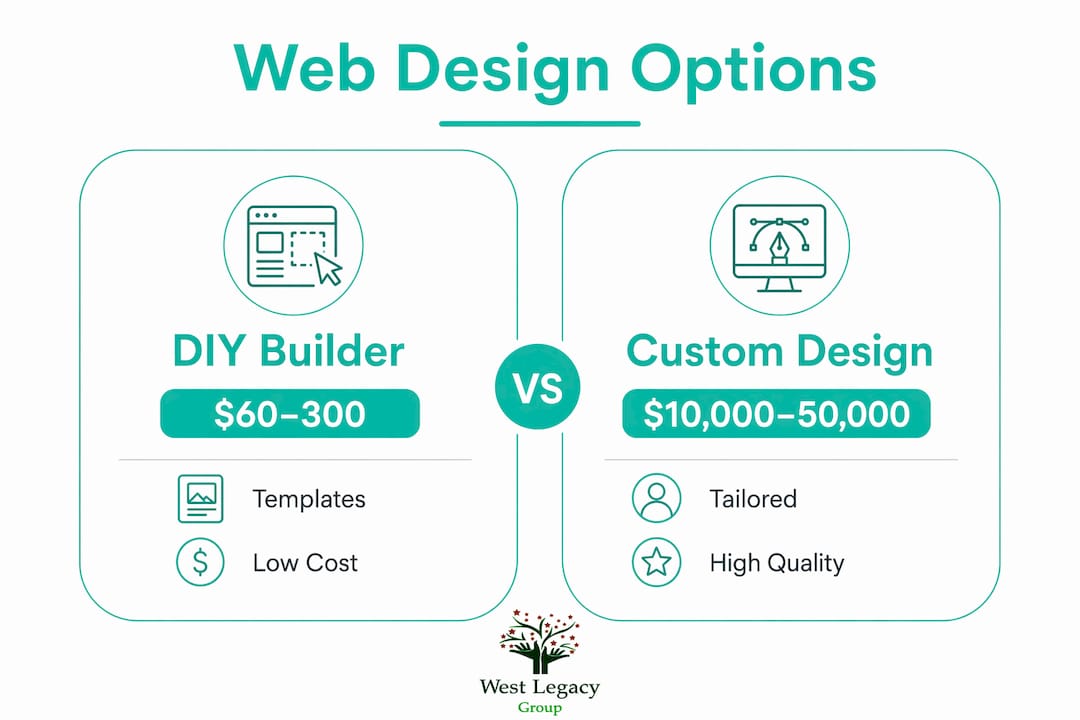
DIY website builders use templates and drag-and-drop tools. DIY websites cost as little as $60 to $300 annually. That figure covers hosting and a basic subscription to a builder platform. The trade-off is time. You build and maintain the site yourself, which suits business owners with some technical confidence and a simple service offering.
Customised templates sit in the middle ground. A freelancer or small agency takes a professional template and adapts it to your brand, content, and specific needs. Hiring a freelancer typically costs between $1,000 and $10,000. This range reflects the scope of work, from a simple five-page site to a more involved build with booking systems or product catalogues.
Fully custom design means building a site from scratch to your exact specifications. Agencies charge $10,000 to $50,000 or more for this level of work. For most small businesses, this level of investment is not necessary at the start. A customised template delivers a professional result at a fraction of the cost.
| Approach | Typical cost | Best for | Scalability |
|---|---|---|---|
| DIY builder | $60–$300 per year | Sole traders, simple services | Limited |
| Customised template | $1,000–$10,000 | Growing small businesses | Moderate |
| Fully custom build | $10,000–$50,000+ | Established businesses with complex needs | High |
Ongoing costs matter as much as the upfront build. Routine maintenance runs around $50 to $200 per month, with annual upkeep estimated between $600 and $3,000. Factor these figures into your total budget before committing to a platform or provider.
Prioritise the pages and features that directly support your business goals. A tradie does not need an e-commerce store. A consultant does not need a booking system on day one. Build what you need now, and plan for what you will need in twelve months.
Pro Tip: Ask any web design provider to show you examples of sites they have built at your budget level. Real examples tell you more than any proposal document.
What are the common pitfalls of cheap web design?
The biggest risk in web design on a budget is false economy. A website that costs little but performs poorly costs your business far more in lost customers than you saved on the build.
The most common problems with genuinely cheap web design include:
- Slow load times. Pages that take more than three seconds to load see significantly higher abandonment rates. Slow sites also rank lower in Google search results, reducing your visibility before a customer even arrives.
- Poor mobile experience. A site that is not mobile-responsive looks broken on a phone. Customers leave immediately and rarely return.
- Weak trust signals. Missing SSL certificates, no visible contact details, and outdated design all signal to visitors that your business may not be legitimate or active.
- No clear enquiry path. If a visitor cannot immediately see how to contact you or take the next step, they will not search for it. They will leave.
- Thin or missing content. Pages with little text give search engines nothing to index and give customers no reason to stay.
A cheap website that loads slowly or fails to build trust is poor value regardless of what it cost to build. The goal is not the lowest price. The goal is the best return on what you spend.
When choosing a provider, ask specifically about mobile performance, page speed, and how they handle contact forms and enquiry paths. A provider who cannot answer these questions clearly is not the right fit for a small business with real growth goals.
Effective, affordable web design tools and solutions
Small business owners have more practical options than ever for building a professional website without a large budget. The key is matching the tool or provider to your actual needs.
-
WordPress.org with Elementor. WordPress.org offers free core software with full control over hosting and plugins. Paired with the Elementor page builder, it gives you a flexible, professional site that scales as your business grows. This combination suits business owners who want control and are willing to invest a small amount of time in learning the platform.
-
Managed hosting providers. Hosting costs vary widely, but managed WordPress hosting from reputable providers removes the technical burden of server management. You pay a monthly fee and focus on your business rather than your server settings.
-
Freelancers for targeted work. A freelancer can build your site on a template and hand it over for you to manage. This approach keeps costs down while delivering a professional result. Be clear about what is included: design, content upload, mobile testing, and a basic SEO setup should all be part of the scope.
-
Small agencies with small business packages. Some agencies offer fixed-price packages specifically for small businesses. West Legacy Group, for example, structures its web design and development services as single items or subscription packages built to be affordable for businesses at every stage.
-
Plan for growth from the start. Low-budget websites work best when they focus on credibility, clear messaging, and simplified next steps rather than extensive customisation. Build a lean site now, then add features as your revenue grows.
Pro Tip: Before you build anything, write your homepage headline and your services page content first. Clear content makes every other design decision easier and cheaper.
Key takeaways
Budget-friendly web design delivers the strongest results when it prioritises mobile usability, clear enquiry paths, and credibility over decorative features or unnecessary complexity.
| Point | Details |
|---|---|
| Affordable does not mean cheap | Fit-for-purpose design returns more value than the lowest-cost option. |
| Prioritise core pages first | Homepage, services, and contact pages drive the most business outcomes. |
| Factor in ongoing costs | Maintenance runs $50–$200 per month; budget for this before you build. |
| Mobile usability is non-negotiable | A site that fails on mobile loses customers before they read your content. |
| Plan for scalability | Build a lean site now and add features as your business and budget grow. |
Why I think most small businesses get web design backwards
The most common mistake I see small business owners make is treating their website as a one-time expense rather than an ongoing business asset. They spend weeks agonising over colours and fonts, then launch a site with no clear contact path and wonder why enquiries do not come in.
The value of affordable web design is not in how the site looks on launch day. It is in how consistently it performs over the following months and years. A site that loads fast, reads well on a phone, and makes it easy to get in touch will outperform a visually impressive site with poor usability every single time.
I have also seen businesses skip web design entirely because they believe social media is enough. It is not. Social platforms change their algorithms, reduce organic reach, and can suspend accounts without warning. Your website is the one digital asset you fully own and control.
The businesses that get the most from a budget-friendly website are the ones who treat it as a foundation, not a finish line. They launch with the essentials, measure what works, and invest in improvements based on real data. That approach delivers far better returns than trying to build the perfect site on a limited budget from day one.
If you are a small business owner in Australia, the question is not whether you can afford a professional website. The question is whether you can afford to operate without one.
— Christopher
How West Legacy Group supports small business web design
West Legacy Group has spent over 20 years building services that help small businesses and start-ups establish a professional online presence without overspending. Our web design and development services are structured as flexible packages, so you pay for what your business actually needs right now.
Whether you need a clean five-page site built on a proven template or a more involved build with SEO foundations and content support, West Legacy Group offers options at every budget level. Every package is designed to deliver credibility, mobile performance, and clear enquiry paths from day one. If you want to understand what makes a site actually convert visitors into customers, our guide on high-converting website elements is a practical starting point.
FAQ
What does affordable web design actually include?
Affordable web design covers the core pages, mobile-responsive layout, basic SEO setup, and contact functionality a small business needs to operate online. It prioritises function and credibility over decorative features.
How much does a small business website cost in Australia?
DIY options cost as little as $60 to $300 per year, while a freelancer-built site typically runs $1,000 to $10,000. Ongoing maintenance adds $50 to $200 per month to the total cost.
Is WordPress good for budget web design?
WordPress.org is one of the most cost-effective platforms available because the core software is free and you control your own hosting and plugins. It suits small businesses that want flexibility and room to grow.
What is the biggest risk of a cheap website?
The biggest risk is poor performance. A site that loads slowly, fails on mobile, or lacks clear contact paths loses customers and ranks lower in search results, costing more in lost revenue than the build saved.
How do I know if my web design provider is right for my budget?
Ask to see examples of sites they have built at your price point, and confirm that mobile testing, page speed, and enquiry path setup are included in the scope. A provider who cannot answer these questions clearly is not the right fit.