

A technical SEO audit checks whether search engines and AI crawlers can find, render and index the pages you want ranked. It ends with a prioritised action list, not just a report full of problems. This guide walks you through the checklist, the tools worth paying for, Core Web Vitals thresholds, and how to turn findings into a plan your team can actually execute.
TL;DR:
- A technical SEO audit should prioritize fixing critical issues like noindex tags, blocked URLs, and duplicate content that prevent search engines and AI crawlers from discovering your content effectively.
- Sample core pages and key templates, then cross-reference crawl data, search console coverage, and server logs to avoid wasting crawl budget on irrelevant or redundant URLs.
- Core Web Vitals thresholds require improvements in image optimization, script deferral, and third-party code management to meet targets for faster load times and visual stability.
- Regularly recheck your site monthly for crawl errors and Core Web Vitals trends using free tools, and perform full audits quarterly or after major site changes to prevent regressions.
- Fixing a handful of high-impact issues within 30 to 90 days is realistic, but more complex core rendering and server configuration problems should involve developers or external specialists.
Table of Contents
- What does a technical SEO audit actually cover?
- How do you run a technical SEO audit step by step?
- What tools do you actually need to audit your site?
- Core Web Vitals: what to test and what “good” looks like
- Why crawl budget and server logs matter more than you think
- How do you prioritise everything the audit finds?
- How often should you re-check your site’s technical health?
- How West Legacy Group approaches a small-business technical audit
- Christopher’s perspective: what audits keep revealing
- Prefer to hand this off? Here’s how West Legacy Group can help
- Where to go next for the primary sources
- Sources
What does a technical SEO audit actually cover?
A technical SEO audit is the systematic examination of a website’s infrastructure to confirm search engines and AI crawlers can discover, crawl, render, and index its content. It focuses on code and configuration, not the words on the page. That distinction trips up a lot of business owners, so let’s be clear about it.
A content audit looks at whether your blog posts answer the right questions. A backlink audit looks at who links to you and how authoritative those sites are. A technical audit checks whether Google can even see your content in the first place. You can write the best guide on your topic and it will never rank if a stray noindex tag or a broken redirect chain is quietly blocking it.
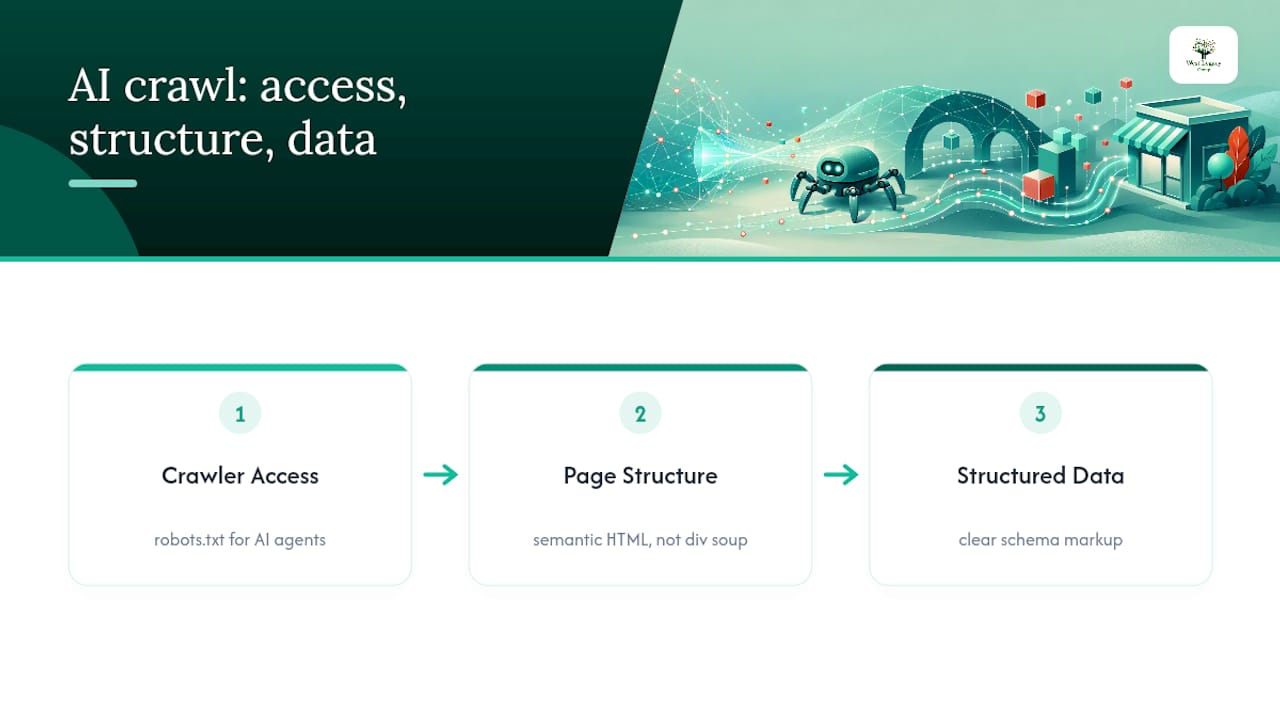
This matters more now than it did five years ago, because it isn’t just Googlebot you’re auditing for. AI retrieval agents from tools like ChatGPT and Perplexity crawl and parse your site differently to a traditional search bot, and a site that’s crawlable for humans and old-school search bots isn’t automatically legible to AI systems. A proper audit in 2026 checks robots.txt directives for AI user agents, confirms your markup uses semantic HTML rather than div soup, and validates that structured data gives machines a clean, unambiguous read of what’s on the page.
How do you run a technical SEO audit step by step?
Running a full audit on a small business site doesn’t require weeks of work. Here’s the order that gets you reliable findings without drowning in spreadsheet rows.
- Scope and sample first. For sites under a few hundred pages, crawl everything. For larger catalogues, sample the homepage, every core template (category, product, blog), your highest-impression pages in Search Console, and anything published in the last quarter.
- Run your crawl and export the raw data. Point a crawler at the site, export status codes, response times, title/meta duplication, canonical tags, and internal link counts. This becomes your master reference sheet.
- Check robots.txt, sitemaps and Search Console coverage. Confirm robots.txt isn’t accidentally blocking key folders, that your XML sitemap only lists indexable 200-status URLs, and that Search Console’s Coverage report matches what you expect. Also check whether robots.txt explicitly allows or blocks known AI crawler user agents.
- Audit on-page technical signals. Look at status codes, canonical consistency, duplicate title tags, missing H1s, and header hierarchy across your sampled pages.
- Test performance and Core Web Vitals. Run representative URLs through PageSpeed Insights and check field data in Search Console.
- Validate structured data. Confirm schema markup is present, error free, and eligible for the rich results relevant to your business type.
- Hunt for redirect chains, broken links and orphan pages. Multi-hop redirects waste crawl budget and dilute link equity; orphan pages with no internal links rarely get crawled at all.
- Pull server logs if you can get them. Logs tell you what Googlebot actually requested, not just what you hoped it would.
- Document everything as a ticket, not a note. Every issue needs a URL, a screenshot, the specific fix, and an owner.
Pro Tip: *Don’t audit every page on day one.
What tools do you actually need to audit your site?
You don’t need an enterprise SEO subscription to run a credible audit. The minimum toolkit that gets you genuinely useful data includes Google Search Console for crawl stats and Core Web Vitals field data, paired with a dedicated crawler such as Screaming Frog to inspect status codes, canonicals, and internal linking at scale.
Beyond that baseline, here’s how the rest of the stack fits together:
- Google Search Console — free, and non-negotiable. It’s the only place you’ll see how Google itself is crawling and indexing your site.
- Screaming Frog or Sitebulb — desktop crawlers that mimic Googlebot and export the technical data points a manual review can’t catch at scale.
- PageSpeed Insights / Lighthouse — for per-URL performance diagnostics and Core Web Vitals lab data.
- Server log analysis — reveals actual Googlebot visits, though it requires access to raw server logs, which not every hosting plan makes easy to pull.
- Uptime and change-monitoring tools — catch regressions between full audits.
Free tools will get you most of the way, but they won’t cross-reference each other automatically. A crawler might flag a page as returning a 404 while Search Console still shows it indexed from three weeks ago. Neither tool is wrong. They’re just looking at different moments in time, which is exactly why you check your findings against more than one source before you call something broken.
Core Web Vitals: what to test and what “good” looks like
Core Web Vitals monitoring works best when you combine field data with lab diagnostics rather than trusting either alone. Use Search Console’s Core Web Vitals report for real-world, page-group performance and PageSpeed Insights or Lighthouse for per-URL lab diagnostics you can act on immediately.
The three metrics and their targets, measured at the 75th percentile of visits:
- Largest Contentful Paint (LCP): 2.5 seconds or faster.
- Cumulative Layout Shift (CLS): 0.1 or lower.
- Interaction to Next Paint (INP): 200 milliseconds or faster.
Most small business sites miss LCP because of unoptimised hero images or render-blocking JavaScript loaded before anything visible appears. CLS problems are usually ads or fonts loading late and shoving content around after the page has already painted. INP issues tend to trace back to heavy third-party scripts, like chat widgets or tracking pixels, hogging the main thread.
Quick wins include compressing and correctly sizing images, deferring non-critical scripts, and putting static assets behind a content delivery network. Anything involving your site’s core template code, server response time, or a rebuild of how JavaScript renders content will usually need a developer.
Why crawl budget and server logs matter more than you think
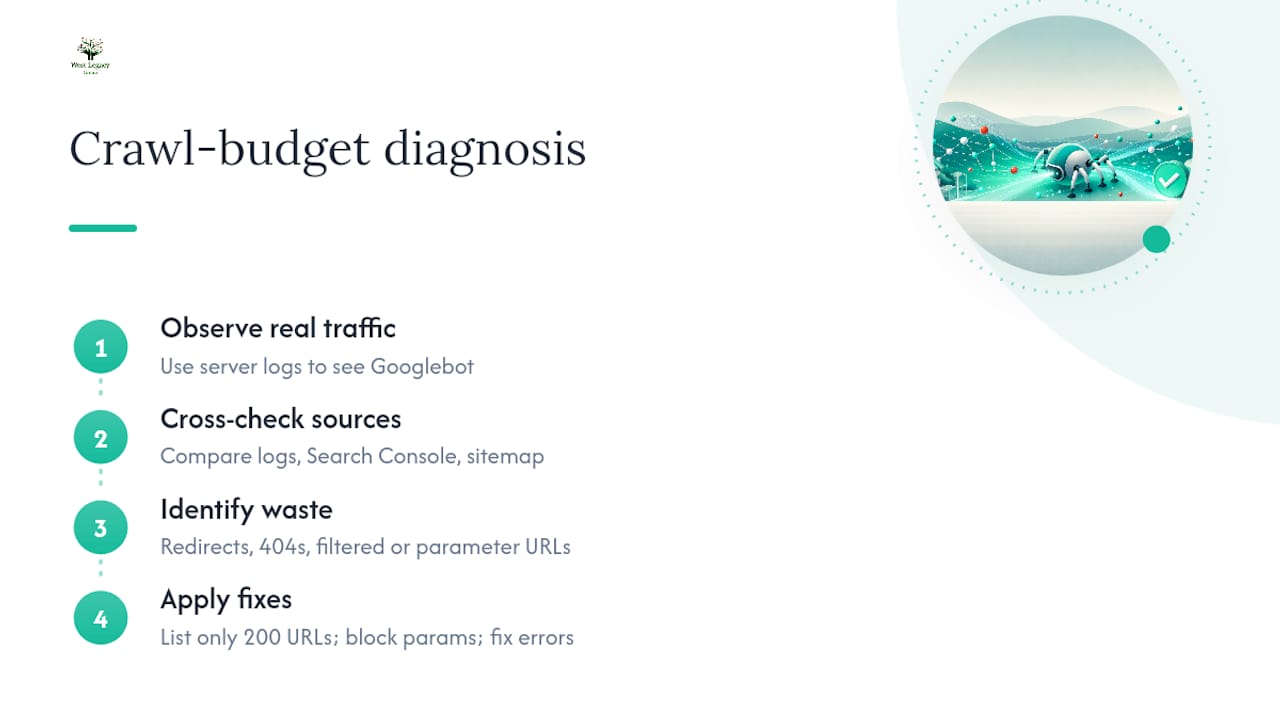
Server logs show what Googlebot genuinely requested, which is a different picture to what you assume it’s crawling. That’s why server log analysis is considered essential for diagnosing crawl-budget problems on any site with more than a few hundred pages.
Cross-reference your logs against Search Console’s crawl stats and your sitemap’s actual contents. If your sitemap lists URLs that redirect or 404, you’re sending Google contradictory signals and burning crawl budget on pages that don’t need it. Common symptoms of waste include Googlebot spending most of its visits on filtered or parameterised URLs instead of your money pages, or your newest content taking weeks to get crawled at all.
The fix is usually mechanical: clean your sitemap to list only indexable 200-status URLs, block low-value parameter combinations in robots.txt, and resolve any status code errors turning up repeatedly in your logs.
How do you prioritise everything the audit finds?
An audit that produces forty issues and no order of operations is close to useless for a small team. The fix is a prioritised action framework that sorts findings by impact and effort, converting raw findings into sprint-ready tickets rather than a wall of text.
- Critical, low effort: Fix immediately. A
noindextag left on a live page, or a robots.txt blocking your whole site, falls here. - High impact, higher effort: Schedule for the current sprint. Template-level Core Web Vitals failures or a broken canonical strategy across product pages sit here.
- Medium impact: Batch into your next sprint. Missing schema markup or duplicate title tags across a handful of pages.
- Low impact, low urgency: Add to the backlog. Minor alt text gaps or cosmetic header hierarchy issues.
A realistic 30 to 90 day plan tackles Critical items in week one, High-impact template fixes across weeks two to six, and Medium items on a rolling basis after that. Anything involving core rendering, server configuration, or a full template rebuild is the point where it’s worth escalating to a developer or an external specialist rather than letting an in-house team improvise for months. The 90 day roadmap approach used for ecommerce audits follows this same logic at store scale.
How often should you re-check your site’s technical health?
A one-off audit has a shelf life. Sites change, plugins update, and a single deployment can quietly undo three months of fixes overnight.
Run lightweight monthly checks: a quick scan of Search Console coverage, Core Web Vitals trends, and any new crawl errors. Reserve the full audit for once a quarter, or immediately after any major change, like a platform migration, a redesign, or a large content push.
Set up alerts in Search Console for coverage drops and Core Web Vitals degradation, and schedule recurring crawls so you can diff results against your last baseline instead of relying on memory. Catching a regression within a week is a five-minute fix. Catching it three months later, after rankings have already slipped, is a much longer conversation.
How West Legacy Group approaches a small-business technical audit
A typical small-business audit runs one to two weeks, scoped to your core templates and highest-value pages rather than every URL on the site. You get an annotated crawl export, a prioritised action list sorted by impact and effort, Core Web Vitals snapshots per template, and a monitoring setup so regressions get flagged instead of discovered by accident.
West Legacy Group has been building small business digital services for over 20 years, and Christopher’s guides on the site follow the exact framework used in paid audits. The checklist above isn’t a simplified version of the real process. It’s the same one.
Christopher’s perspective: what audits keep revealing
Most small-business audits I’ve reasoned through the same handful of root causes: a redirect chain nobody remembers building, a sitemap listing pages that no longer exist, or robots.txt blocking a folder someone forgot about years ago. None of it is glamorous.
Start with a representative sample instead of trying to audit everything at once. Trying to fix every page before fixing your templates is how audits stall out.
— Christopher
Prefer to hand this off? Here’s how West Legacy Group can help
Running the checklist above yourself will catch most issues, but a paid audit through West Legacy Group goes further than a checklist ever can. It includes hands-on fixes to the problems it finds, ongoing monitoring so regressions get caught before they cost you rankings, and set delivery dates instead of an open-ended “get to it eventually” pile.

For most small businesses, the modular SEO plans are the right starting point, letting you add a technical audit as a standalone service or fold it into an ongoing retainer. If your site needs a rebuild rather than a repair, the small business website design packages bake technical soundness in from the first line of code rather than patching it afterwards. Businesses that want a repeatable, structured engagement instead of a one-off fix can look at the LEGACY Framework, which is built specifically for that. Get in touch and West Legacy Group will scope a timeframe and quote based on your site’s actual size, not a generic package price.
Where to go next for the primary sources
The Semrush technical SEO audit guide and its checklist companion cover scope and AI-readiness in more depth. For tool-specific detail, read Ahrefs on audit methodology, DebugBear on Core Web Vitals thresholds, and Sitebulb’s crawl-budget checklist. For AI visibility strategy specifically, AuthorityLayer’s playbook is worth the read.
Sources
- How to Conduct a Technical SEO Audit: Semrush
- Technical SEO audit (Ahrefs)
- Technical SEO checklist (DebugBear)
- Technical SEO audit checklist (Sitebulb)