

Verify your Business Profile, check your recent reviews, and reply to anything new within a day or two. Set up a direct review link or QR code so customers can leave feedback in seconds. Those four moves will noticeably improve how your business looks to anyone searching for it this week. Flagging a fake or abusive review for removal is possible, but treat it as a slower, policy-based process, not a quick fix.
TL;DR:
- A two-week delay in review score updates means sudden influxes of positive reviews won’t instantly improve your rating.
- Responding to reviews promptly and specifically encourages more customer engagement and can motivate reviewers to update their star ratings.
- Creating direct review links or QR codes and placing them in visible locations significantly increases review volume within a short timeframe.
- Reporting unfair or fake reviews works only if they breach Google’s policies and requires concrete evidence for successful removal.
- Automating review management becomes essential when overseeing multiple locations or high review volumes, but manual oversight suffices for single-site businesses.
Table of Contents
- How Google Business reviews work: scores, timing and review types
- Read, reply and manage reviews from your Business Profile (step-by-step)
- Get more Google reviews: direct links, QR codes and lawful request best practice
- Report and request removal of reviews — procedure and realistic expectations
- Automation and APIs: when to scale review management
- Business impact: how reviews affect visibility, trust and bookings
- Practical templates and checklist from West Legacy Group
- Steady systems beat chasing review spikes
- Managed Google Business review support services
- Sources
- FAQ
How Google Business reviews work: scores, timing and review types
Your star rating is a straightforward average of every published rating on your profile, not a weighted or algorithm-adjusted figure. What trips business owners up is the lag: a new review can take up to two weeks to shift your aggregate score, so a sudden burst of five-star feedback won’t move the needle overnight.
Some service businesses see extra detail attached to reviews, including:
- Aspect-level ratings for things like value, quality or wait time
- Job or task labels showing what work the customer had done
- Photos attached by the reviewer
- A verified “local guide” badge on some reviewer profiles
Pro Tip: If your score looks stuck after a good week of reviews, don’t panic and don’t ask staff to “check if it’s broken.” Give it the full two weeks before you assume something’s wrong.
Understanding this delay matters because it stops you from over-reacting to a flat number when the real movement is just running behind the calendar.
Read, reply and manage reviews from your Business Profile (step-by-step)
You can find your reviews in three places: Google Search (search your business name), Google Maps, and Business Profile Manager, where you get the full management view. Here’s the workflow for handling them properly:
- Open Business Profile Manager and click into the Reviews tab.
- Verify your business first if you haven’t already. You can’t reply to any review until your Business Profile is verified.
- Read the review fully before drafting a reply, including any photos attached.
- Write a short, specific reply that addresses what the customer actually said.
- Submit it and wait. Replies are moderated and can take anywhere from a few minutes to 30 days to go live.
- Move sensitive issues offline by inviting the customer to email or call rather than hashing out details publicly.
Once your reply publishes, the reviewer gets a notification, and it’s common for them to come back and update their star rating after seeing you responded. That alone makes replying worth the effort, even on reviews you’d rather ignore.
Pro Tip: Never argue in a reply. Acknowledge the issue in one sentence, state what you’ll do about it, and invite them offline. Anything longer reads as defensive.
Get more Google reviews: direct links, QR codes and lawful request best practice
The single biggest lever for review volume is making it effortless to leave one. Create a direct review link or QR code through Business Profile Manager on a desktop browser, and that link drops the customer straight into the star-rating prompt instead of just showing your profile page. That distinction matters more than most business owners realise: a link that opens the rating box directly converts far better than a plain profile URL, because a customer who has to hunt for the “write a review” button usually gives up.
Once you’ve got the link or QR code, place it where the customer is already looking:
- On printed and emailed receipts
- In the signature line of follow-up emails
- In SMS confirmations sent an hour or two after service
- On a small counter sign or table card in-store
Timing beats volume. A request sent while the experience is still fresh, ideally within a day, outperforms a generic email blast sent to your whole customer list once a quarter.
What to avoid is just as important as what to do. Google explicitly permits reminding customers and sharing your review link, but it prohibits offering discounts, freebies or any other incentive in exchange for a review. The ACCC also treats manipulated or fabricated reviews as a breach of Australian consumer law, which means “gift a coffee for a five-star review” isn’t just against Google’s rules, it can land you in genuine legal trouble.
Pro Tip: Ask every satisfied customer, not just the ones you think will say something glowing. A natural spread of feedback looks more credible than a wall of identical five-star praise.
Report and request removal of reviews — procedure and realistic expectations
Not every unfair-feeling review qualifies for removal. Google only acts on reviews that breach its content policies, which generally covers:
- Spam or fake content, including reviews from bots or reviewers with no genuine connection to your business.
- Conflicts of interest, such as a competitor or a current employee leaving a review.
- Hate speech or harassment directed at staff or the business.
- Privacy violations, including reviews that expose personal information.
To act on one, open the review in Business Profile Manager or Google Maps, flag it as inappropriate, and select the reason that matches. You can track the status of your report through the Reviews Management Tool rather than guessing whether anything happened.
If the report gets rejected, you get one appeal. Use it wisely: gather concrete evidence first, screenshots, proof of no transaction, anything showing impersonation, rather than appealing on the basis that the review simply feels unfair. A genuinely negative but accurate review won’t get removed no matter how many times you flag it, and that’s by design, not a loophole Google forgot to close.
Automation and APIs: when to scale review management
Once you’re running more than a handful of locations, manually checking each profile stops being realistic. The Business Profile API lets developers list reviews, retrieve a specific review, post replies, delete replies and run batch operations across multiple locations from one system.
Automation earns its keep when:
- You’re managing five or more locations and checking each one daily isn’t practical
- Review volume is high enough that manual replies eat hours every week
- You need consolidated reporting across sites for owners or franchise partners
Before wiring anything up, sort out admin access and OAuth permissions properly. Giving a third-party tool broader access than it needs is a common setup mistake, and it’s worth locking that down at the start rather than retrofitting it later. For a single-location business, though, the manual workflow above is usually faster to run than it is to automate.
Business impact: how reviews affect visibility, trust and bookings
Review activity feeds directly into local search visibility, not just customer perception. A steady flow of recent reviews, replied to promptly, tends to outperform a stale profile with a higher score but no activity in the last six months. This ties into the broader mechanics covered in Google Business Profile SEO, where review signals sit alongside categories and photos as ranking inputs.
Counterintuitively, a flawless 5.0 rating can look less trustworthy than a 4.6 or 4.7 with a handful of critical reviews mixed in, because customers tend to read a perfect score as curated or suspicious rather than genuine.
Treat your reviews as a running audit of your business:
- Track recurring complaints (wait times, a specific staff member, pricing confusion) and fix the operational issue, not just the review
- Flag recurring praise and lean into it in your marketing
- Cross-check patterns against your local search rankings to see if fixes move the needle
Practical templates and checklist from West Legacy Group
You don’t need to write a review request from scratch every time. Here are three that work across most small businesses:
- Email/SMS: “Thanks for choosing us today. If you’ve got 30 seconds, we’d really appreciate a quick review: [link].”
- In-person: “If you were happy with the service, a Google review helps other locals find us. Here’s a QR code if you want to leave one now.”
- Follow-up: “Hope everything’s holding up well since your visit. If you have a moment, a review would mean a lot: [link].”
For replies, keep three templates on hand: a thank you for positive feedback that name-checks something specific they mentioned, a fix-and-offer for legitimate complaints that acknowledges the issue and invites them offline, and an escalation invite for serious disputes that keeps the public reply brief and moves detail to email or phone.
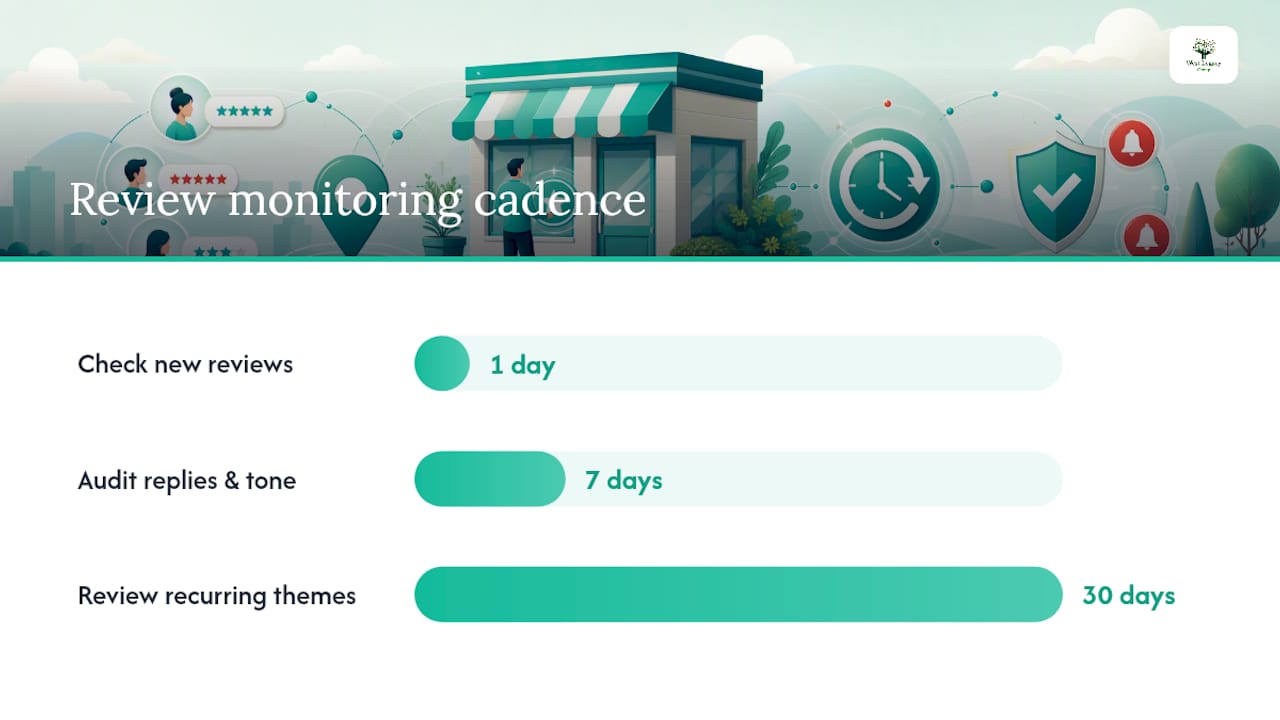
Run a simple monitoring cadence: check for new reviews daily, audit reply backlog and tone weekly, and review recurring themes monthly to catch operational issues before they show up in five more reviews; small businesses can effectively automate these marketing tasks using AI for Small Business tools. For extra reach beyond Google, our list of other review sites worth targeting rounds out the picture.
Steady systems beat chasing review spikes
Most small businesses treat reviews as a fire to put out: a bad one lands, panic sets in, someone fires off a rushed reply or files a removal request that was never going to succeed. The businesses that actually build a strong reputation do something less exciting. They check their profile on a schedule, reply within a day or two as a habit rather than a scramble, and hand every happy customer a direct link before they walk out the door.
Clients who stick to that cadence tend to see steadier score improvement and more consistent booking enquiries than those chasing a single viral review push. The checklist above isn’t clever. It’s just consistent, and consistency is what actually moves the number over months, not days.
— Christopher
Managed Google Business review support services
Chasing reviews between everything else running your business is where most owners fall behind, not from a lack of good customers, but from a lack of a system. Review management can be done as either a one-off setup project or an ongoing monitoring arrangement, so you’re not stuck choosing between doing it properly and doing it at all.

A setup project may cover profile verification, direct review link and QR code creation, and reply templates matched to your industry. An ongoing arrangement may include daily monitoring, weekly reply audits, and monthly reporting to help you see what’s improving instead of guessing. It’s the same discipline outlined in the checklist above, just handled by someone tracking it every day.
If you’d rather build your own plan first and see what a structured approach costs, build your own SEO plan walks you through the options, or head straight to our small business website design packages if your profile and site both need a refresh at the same time.
Sources
- Understand review scores for local places & businesses – Google Business Profile Help
- Online reviews for product and services – ACCC
FAQ
How do I leave a review of a business on Google?
Search the business name on Google or open it in Maps, scroll to the reviews section, click the star rating, write your feedback, and submit. If the business has shared a direct review link or QR code, following it takes you straight to that same prompt.
How can I find Google reviews for a business?
Search the business name on Google Search or Maps and its reviews appear alongside the listing, or open the business’s Business Profile directly to see the full list with replies.
Can I look up someone’s Google reviews?
Yes, if their profile is public. Click on a reviewer’s name attached to any review and Google shows their review history, provided they haven’t restricted it.
Can I see my own Google reviews?
Yes. Open your Google Maps app, tap your profile photo, then “Your contributions,” and select “Reviews” to see every review you’ve posted, including ones you can still edit or delete.
How long does it take for a new review to change my rating?
Your aggregate score updates on a rolling basis and can take up to two weeks to reflect a new review, so a delay of a few days is completely normal.