

Complete every field, verify your listing, and set your primary category to the narrowest accurate option. Then start a steady rhythm of review requests and weekly posts. Google’s Map Pack rewards profiles that show relevance, distance and prominence signals in the first few weeks, with compounding gains over 90 days. West Legacy Group has built and repaired hundreds of these profiles for small businesses, and this is the exact sequence that works.
TL;DR:
- Ensuring your business profile is claimed, verified, and set with the most specific primary category is essential for initial ranking success.
- Fully optimizing core fields, including NAP consistency, detailed descriptions, and attribute listings, significantly boosts relevance and prominence signals.
- Regular content activities such as posting weekly, uploading geo-tagged photos, and requesting reviews within 48 hours after service uphold steady engagement.
- Addressing issues like duplicate listings, NAP mismatches, and suspensions promptly prevents ranking setbacks and maintains profile integrity.
- Sustained weekly or monthly routine maintenance, or outsourcing to a managed service, outperforms one-time optimization efforts over the first 90 days.
Table of Contents
- Quick Google business profile SEO checklist to action today
- How does Google Business Profile affect local ranking?
- Getting started: claim, verify and your first 72 hours
- Core fields that matter most for Google business profile optimisation
- Building content and engagement signals that Google notices
- Off-profile signals: website, citations and local links
- What should you measure, and how often?
- Fixing duplicates, mismatches and suspensions
- Why West Legacy Group treats this as a maintainable routine, not a one-off fix
- Get your Google Business Profile managed properly
- Sources
Quick Google business profile SEO checklist to action today
Before you dig into the reasoning behind each ranking factor, run through this list. It’s the order West Legacy Group works through with every new client, and it’s designed so you can complete the first four items in under an hour.
- Claim and verify the profile. Search your business name on Google Maps first. If it already exists, claim it. If not, create it and secure admin access before anyone else does.
- Set the most specific primary category. “Plumber” beats “Contractor.” Add two or three accurate secondary categories, not ten vague ones.
- Match your NAP exactly. Your name, address and phone number on the profile must mirror your website’s footer and contact page, character for character.
- Upload at least 10 photos. Cover the storefront, team, work in progress and finished results. Geo-tag them where your camera or phone allows.
- Fill out services and products. List each offering by name with a short, plain-English description.
- Publish your first Google Post and seed two or three Q&A entries. Ask and answer the questions customers actually raise.
- Start requesting reviews this week. Text or email every satisfied customer a direct review link within 48 hours of the job finishing.
- Reply to every review within 24 to 48 hours, good or bad.
- Check GBP Insights weekly. Track views, searches and actions so you know what’s working before you change anything else.
None of this requires a developer or an agency retainer. It requires about two hours in week one and thirty minutes a week after that.
How does Google Business Profile affect local ranking?
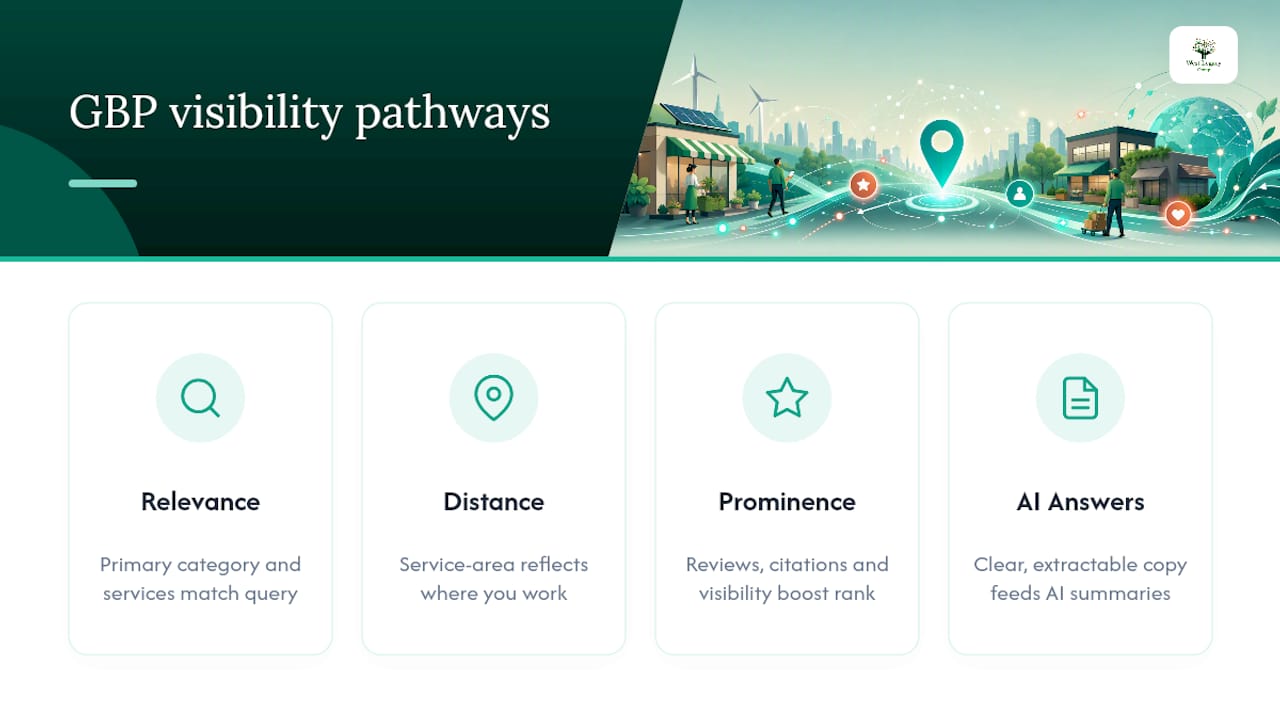
Google ranks local results on three factors: relevance, distance and prominence. That’s not marketing spin, it’s Google’s own explanation of how local ranking works, and every tactic in this guide maps back to one of those three levers.
Relevance is how well your profile matches what someone searched. If a searcher types “emergency electrician,” a profile with “Electrician” as its primary category and “emergency” mentioned in services will outrank one that only says “Trade Services.”
Distance measures how close your business (or service area) sits to the searcher’s location, or the location term they used. You can’t change physics, but you can make sure your service area boundaries in GBP reflect where you genuinely work, so Google doesn’t show you for suburbs you don’t serve and skip you for ones you do.
Prominence is your reputation and visibility online, built from review volume, review scores, citations, and how well-known your business is generally. This is the factor most within your control, and the one most small businesses neglect.
There’s a fourth factor now sitting alongside the classic three: how well your profile feeds AI-generated answers. Google Business Profile data increasingly powers AI Overviews and other generative summaries, and profiles with clear, extractable copy are more likely to get quoted directly in those answers. Vague descriptions and category soup don’t extract well. Short, declarative service descriptions do.
On average, businesses that fully optimise their GBP fields and maintain steady review and post activity see measurable Map Pack movement within 2 to 4 weeks, with the bigger compounding gains showing up around the 90-day mark. That timeline matters because it tells you not to panic in week one and not to get complacent in month four. This is also where profile engagement connects to broader behavioural signals, something we’ve unpacked in more detail when looking at dwell time in local SEO.
Getting started: claim, verify and your first 72 hours
Before you optimise anything, you need control of the listing. Search Google Maps for your business name and address first. Duplicate or “suggested” listings created automatically by Google are common, especially for businesses that have moved or rebranded.
If a listing exists unclaimed, claim it through the “Own this business?” prompt. If nothing exists, create a new profile from scratch via Google Business Profile Manager.
Verification methods vary by business type and history:
- Postcard by mail — the most common method, arrives in 5 to 14 days with a verification code.
- Phone verification — instant, available for some eligible businesses.
- Email verification — instant, mostly for businesses with an existing Google Search Console connection.
- Video verification — used increasingly for service-area businesses without a public storefront.
- Instant verification — automatic if your business is already verified in Search Console under the same domain.
Verification is compulsory before you can fully manage or edit certain profile elements, so treat it as step one, not an afterthought.
Once verified, move fast. In the first 72 hours: complete every profile field, upload your photo set, add services and products, and send review requests to your three most recent happy customers. Momentum here compounds.
If your profile gets suspended, don’t panic, but do act quickly. Check your email for Google’s reason, screenshot the suspension notice, gather proof of business legitimacy (ABN registration, a lease or utility bill, business registration documents), and file a reinstatement request through the Business Profile support channel. Suspensions are usually triggered by NAP mismatches, keyword-stuffed business names, or virtual offices flagged as fake addresses.
Pro Tip: Save every verification code and support ticket number in a shared document. If you ever need to prove ownership history during a dispute, having a paper trail saves weeks.
Core fields that matter most for Google business profile optimisation
Not every field on your profile carries equal weight. Some are decorative. Others are the difference between showing up in the Map Pack and not existing at all.
Business name and NAP consistency
Your business name on GBP should match your legal trading name, exactly as it appears on your signage and website. Don’t add keywords like “Best Plumber Melbourne” to your name field; Google treats that as a policy violation and it can trigger suspension.
Your NAP (name, address, phone) needs to be identical everywhere it appears online, your website footer, your Facebook page, your directory listings. Inconsistency confuses Google’s matching algorithms and dilutes the prominence signal you’re trying to build.
Primary and secondary categories
This is arguably the single highest-leverage decision on the entire profile. Primary category selection is one of the strongest on-profile ranking signals available to you, because it determines which searches you’re even eligible to appear in.
Choose the narrowest, most accurate primary category, not the broadest one. A café that also sells wine should list “Café” as primary, not “Restaurant,” if café searches are what actually bring customers through the door. Add two to four secondary categories that are genuinely accurate, and resist the temptation to tick every box that might loosely apply. Treat category selection as a gating decision, because that’s exactly what it is.
Writing a business description that works for humans and AI
Your business description has roughly 750 characters, but the first 250 do the heavy lifting, that’s what shows before a “more” link appears. Structure it as: what you do, where you serve, and what makes you different. Lead with service and location, not your company history.
✗ “Founded in 2015, our family business has grown from humble beginnings to become a trusted name.”
✓ “Mobile dog grooming servicing Bendigo and surrounding suburbs, specialising in anxious and senior dogs with a calm, one-on-one approach.”
The second version is extractable. An AI system summarising local results can lift that sentence almost verbatim and use it to answer a searcher’s question. The first version gives it nothing to work with.
Services, products and attributes
List every service by name with a one or two sentence description. Don’t write “General services available”; write “Blocked drain clearing,” “Hot water system installation,” “Emergency after-hours callouts.” Each entry should stand alone as something a machine or a human could quote.
Attributes matter more than most owners realise. Wheelchair accessible entrance, women-owned business, outdoor seating, free wifi, these small checkboxes match niche, filtered searches that your competitors often skip filling in entirely.
Pro Tip: Write your service descriptions as if you’re answering the exact question a customer would type into Google. “Do you fix hot water systems on weekends?” becomes a service line, not a mystery buried in your FAQ.
Building content and engagement signals that Google notices
Photos, posts, reviews and Q&A form the visible, living part of your profile, the part that tells both Google and human searchers your business is active and worth trusting.
- Photos. Aim for at least 10 to start, then add 2 to 4 monthly. Cover your storefront, team at work, completed jobs, and behind-the-scenes shots. Geo-tag where your device supports it, and skip stock photography entirely, Google and customers both spot it instantly.
- Google Posts. Publish weekly. Rotate between a completed job, a seasonal offer, a staff introduction, and a customer question answered. Posts aren’t a direct ranking factor, but they lift click-through and engagement, which feeds prominence indirectly.
- Q&A section. Seed it yourself with three to five real questions customers ask on the phone every week. An unanswered public question sitting on your profile for months looks neglected, so monitor it and answer promptly.
- Review requests. Text or email a direct review link within 24 to 48 hours of job completion, while the experience is fresh. Review velocity, a steady monthly flow rather than a handful of old reviews, tends to matter more than raw total count.
- Review responses. Reply within 24 to 48 hours to every review. Thank positive reviewers by name and mention the service; address negative ones calmly and specifically. For workflow support, our guide to monitoring your online reputation covers response templates in more detail. Tools like Local Review Reply can help automate the reply cadence if volume grows beyond what you can manage manually.
Pro Tip: Set a recurring calendar reminder for “Monday morning: check GBP” rather than relying on memory. The businesses that keep this rhythm outperform the ones that binge-update once a quarter.
Off-profile signals: website, citations and local links
Your Google Business Profile doesn’t operate in isolation. Google cross-references it against your website and the broader web to confirm the profile is telling the truth.
- Location pages and schema. If you serve multiple suburbs or regions, build a dedicated page for each with LocalBusiness schema markup and your exact NAP repeated consistently.
- Citation consistency. Audit your listings on directories like Yellow Pages, True Local, and industry-specific directories. Mismatched addresses or old phone numbers actively work against your prominence score.
- Site speed and mobile experience. A slow, clunky mobile site undoes the trust your GBP builds. Someone taps through from Maps, waits four seconds for your page to load, and leaves, that bounce is a signal too.
What should you measure, and how often?
GBP Insights (found under “Performance” in your dashboard) gives you the raw numbers. The trick is knowing which ones matter and when to expect them to move.
Short-term movement, 2 to 4 weeks, usually reflects your category, NAP and photo fixes taking effect. The medium-term picture at the 90-day mark reflects accumulated review velocity and consistent posting, the compounding part of the equation.
A realistic small business target is a steady month-on-month increase in direction requests and calls, not a dramatic spike. Our local search ranking guide walks through setting KPI benchmarks that suit a one-person or small-team operation.
Fixing duplicates, mismatches and suspensions
A handful of problems account for most of the support tickets small businesses raise with Google, and most are fixable without waiting weeks for a response.
- Duplicate listings. Search variations of your business name and address on Maps. Report duplicates through the “Suggest an edit” option, or request merges via Business Profile support if duplicates persist.
- NAP mismatches. Cross-check your profile against your website footer, invoices and every directory listing you can find, then correct inconsistencies at the source, not just on GBP.
- Service-area errors. Review your listed service areas quarterly. Businesses that move premises often forget to update this, which quietly tanks distance relevance.
- Suspension triggers. Keyword-stuffed names, virtual office addresses, and shared address clusters (multiple unrelated businesses at one address) are the most common causes. Google is explicit that rankings can’t be bought or gamed, so shortcuts here tend to backfire as suspensions rather than boosts.
- Escalating to Google support. If self-service edits don’t resolve an issue within a reasonable window, contact Business Profile support directly with your business registration documents, verification history and screenshots ready to go.
Why West Legacy Group treats this as a maintainable routine, not a one-off fix
Christopher has spent years watching small businesses fall into the same trap: they optimise their Google Business Profile once, feel proud of themselves, and then abandon it for six months. West Legacy Group was built around small businesses precisely because that pattern is so common, and so avoidable.
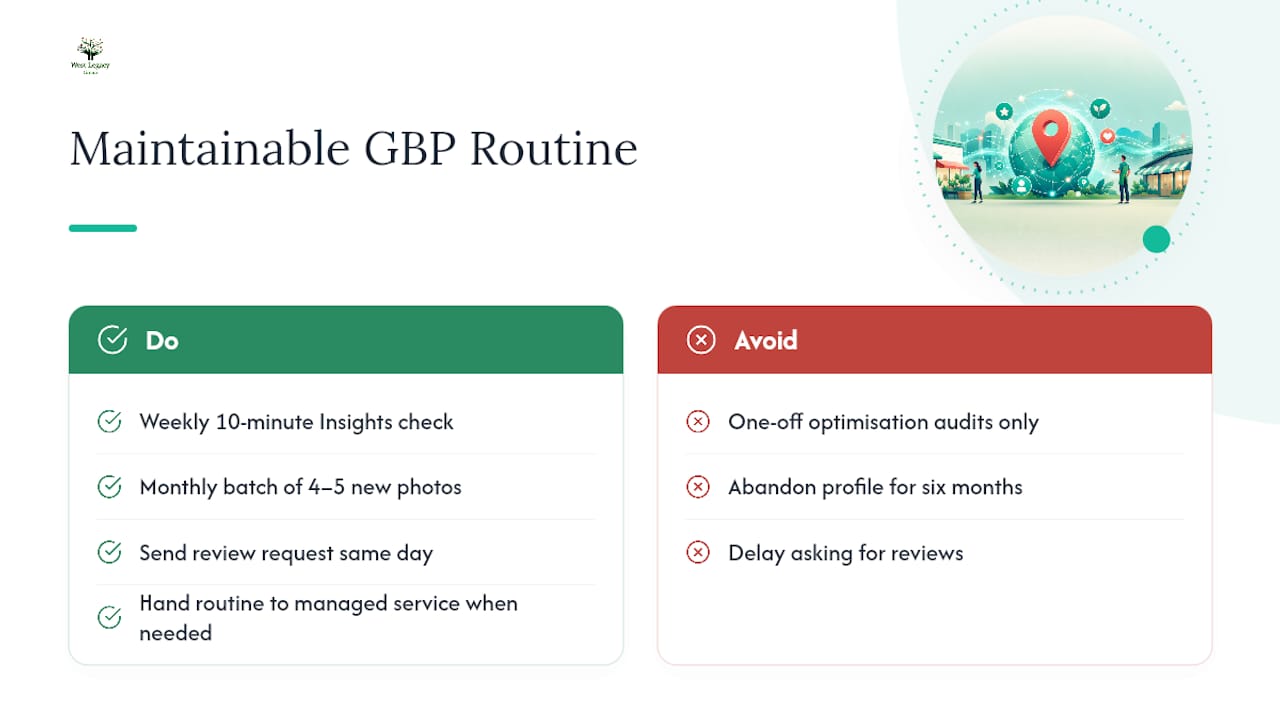
The honest truth about Google Business Profile SEO is that it rewards consistency over cleverness. A weekly ten-minute check of Insights, a monthly batch of four or five new photos, and a review request sent the same day every job finishes, that routine will outperform an expensive one-time “optimisation audit” almost every time.
There’s a point where the routine outgrows what an owner can sustain alone, usually when you’re managing multiple locations, running paid Google Ads campaigns alongside your organic profile, or drowning in review volume across several platforms. That’s the signal it’s time to hand the weekly grind to a managed service, one that reports back monthly with the same metrics you’d track yourself, just without you having to remember to do it.
— Christopher
Get your Google Business Profile managed properly
Running this playbook solo works, right up until you’re juggling five other jobs and the weekly Insights check slips to once a quarter. West Legacy Group exists for exactly that gap, an affordable, ongoing service that keeps your profile, reviews and posting cadence moving without you having to think about it.

Our managed Google Business Profile service covers a full field audit, category and description rewrites built for both human searchers and AI extraction, a review request and response workflow, and monthly reporting against the same metrics covered in this guide, views, queries, calls and direction requests. It’s built around the LEGACY Framework, our repeatable methodology for recurring local SEO tasks, so nothing falls through the cracks between reporting cycles.
If you’d rather stay hands-on but want a structured plan, you can also build your own SEO plan and pick only the services you need. Either way, the next step is simple: book a profile audit with West Legacy Group and find out exactly where your listing is losing visibility right now.