

Onsite search analytics is the most direct first-party intent signal your website produces. When a visitor types a query into your search bar, they are telling you exactly what they want, in their own words, with no inference required. Visitors who use onsite search are more likely to convert than non-searchers, which means the data your search bar generates is not a technical log — it is a revenue signal.
The role of onsite search analytics goes well beyond measuring how often people search. Used properly, it shapes product decisions, informs content strategy, reduces support costs, and gives you a measurable lift in conversion rate. Here is what you can expect when you treat it seriously:
- Reveal product demand before it shows up in sales data
- Surface content gaps where users search and find nothing useful
- Reduce support volume by surfacing self-serve answers to common queries
- Increase conversion rate by fixing the friction between intent and purchase
Table of Contents
- What onsite search analytics captures and why it matters
- Why onsite search data drives UX, product and revenue decisions
- What makes onsite search effective — and how analytics helps you tune it
- How to measure onsite search: the volume, quality and outcomes framework
- Turning search data into fixes: a practical playbook
- Implementation options and what Australian SMBs should expect
- Your 30-day starter checklist to get value fast
- Privacy and data compliance for onsite search analytics in Australia
- Key takeaways
- Search analytics as a product signal, not a navigation widget
- West Legacy Group helps you turn search data into revenue
- Useful sources and platform guides
What onsite search analytics captures and why it matters
Onsite search analytics (also called internal site search analytics) is the practice of capturing and analysing the queries visitors submit to your site’s internal search engine, along with every measurable outcome that follows. It is distinct from external search analytics, which tracks how people find your site via Google or Bing. Internal search data tells you what happens after they arrive.
The raw data points a well-configured system captures include:
- Query text — the exact words the user typed
- Timestamp — when the search occurred
- Zero-results flag — whether the query returned any results
- Refinements — follow-up queries in the same session
- Result clicks — which result (if any) the user selected
- Filters used — facets or categories applied after the initial query
- Session ID — to tie searches to a full user journey
- Conversion tie-ins — whether the session ended in a purchase or goal completion
A typical query-log entry looks like this:
| Field | Example value |
|---|---|
| query_text | “waterproof hiking boots women” |
| zero_results | false |
| refinements | “waterproof boots size 8” |
| result_clicked | product_id |
| filter_used | category: footwear, size: 8 |
| session_id | sess_a7fc |
| converted | true |
This data can come from several sources. GA4 logs search queries as event parameters — the search_term parameter is the most common — and requires either enabling the built-in site search tracking or wiring a custom event. Hosted search platforms such as Algolia and Elastic provide their own analytics dashboards. Open-source engines like OpenSearch can feed query logs into a custom analytics pipeline.
Why onsite search data drives UX, product and revenue decisions
Searchers behave differently from browsers. A visitor who types a query has already committed to finding something specific — their intent is explicit, their patience is shorter, and their likelihood of converting is higher. Industry practitioners describe onsite search terms as the most reliable owned intent signal available, because the user is speaking directly to you without the noise of keyword inference.
Visitors who use site search often generate a disproportionate share of revenue relative to their traffic share. That asymmetry means even modest improvements to search relevance or zero-result handling can move your overall conversion rate meaningfully.
The strategic uses extend well beyond the search results page:
- Inventory prioritisation — high-volume queries for out-of-stock products signal restocking urgency
- Landing page creation — popular searches that return weak results justify dedicated category or content pages
- SEO and PPC targeting — internal search trends often mirror external demand, giving you low-effort, high-relevance keyword ideas
- Support deflection — rising searches for terms like “track my order” or error codes are early warnings of support spikes; surfacing a status page in results can deflect tickets before they are lodged
Framing this data as product intelligence, not a technical log, is what secures budget for ongoing maintenance. When you present search data to stakeholders as demand signals, the conversation shifts from “fix the search box” to “here is what our customers want that we are not yet delivering.”
What makes onsite search effective — and how analytics helps you tune it
Effective onsite search is not a single feature; it is a stack of components that each require measurement and tuning. Analytics tells you which component is failing.

| Feature | What it does | Metric that signals a problem |
|---|---|---|
| Visibility | Search bar placement and prominence | Low % of sessions with search |
| Autocomplete | Predictive query suggestions | High refinement rate on short queries |
| Typo tolerance | Handles misspellings gracefully | Zero-result spikes on near-match queries |
| Synonyms | Maps equivalent terms to the same results | Zero-result rate for known product names |
| Facets/filters | Lets users narrow results by attribute | High refinement rate after first results page |
| Ranking relevance | Best results appear first | Low CTR on top result |
| Merchandising slots | Pins promoted or high-margin items | Low click share on pinned items |
| Zero-result handling | Fallback content or suggestions when nothing matches | Higher than recommended zero-result rate |
| Mobile experience | Touch-friendly, fast, keyboard-aware | Higher exit rate on mobile search sessions |
Most teams focus on zero-result rate because it is the most visible failure. But a query that returns results and gets no clicks can be more damaging to revenue than a zero-result, because the user expected something relevant, found nothing useful, and left disappointed. Low CTR on your top result is the signal to watch.
Pro Tip: The most common hidden issue is a naming mismatch — your catalogue uses “trainers” but your customers search “sneakers.” A synonym audit of your top 50 zero-result queries will surface these gaps faster than any technical review.
How to measure onsite search: the volume, quality and outcomes framework
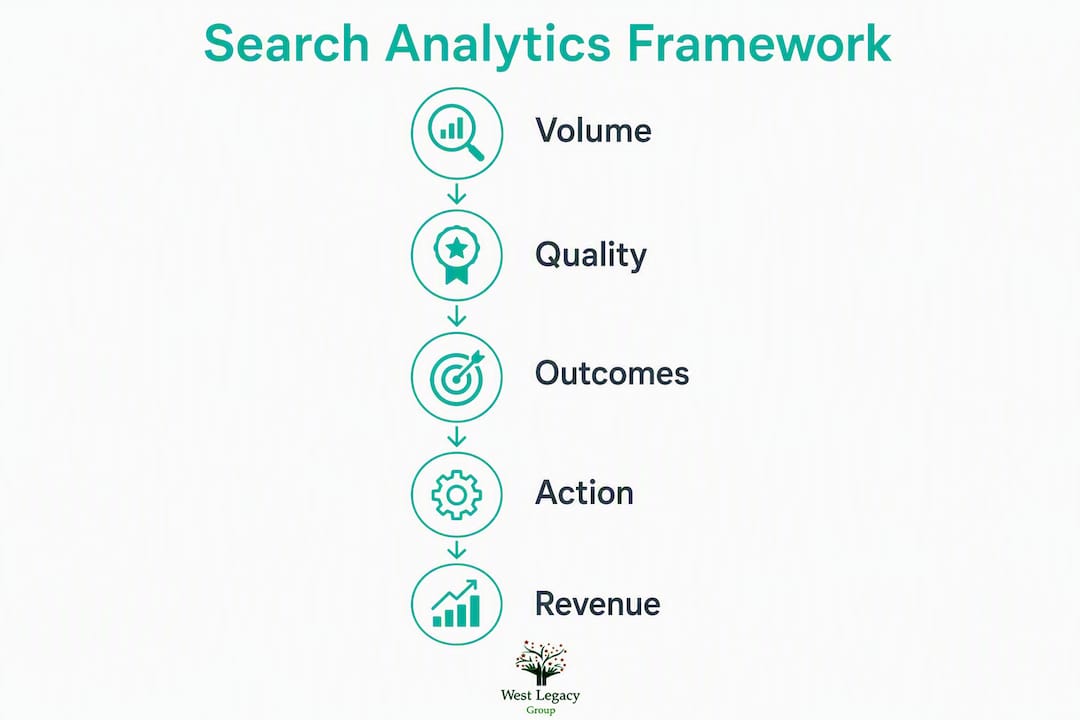
A three-lens framework makes search analytics actionable for stakeholders: volume (how much search is used), quality (how relevant the results are), and outcomes (whether search drives revenue or reduces costs).
| KPI | Formula / definition | Target direction |
|---|---|---|
| % sessions with search | (sessions with ≥1 search ÷ total sessions) × 100 | Benchmark, then improve |
| Search CTR | (result clicks ÷ searches) × 100 | Higher is better |
| Zero-result rate | (zero-result queries ÷ total queries) × 100 | Below 10% |
| Refinement rate | (sessions with >1 query ÷ sessions with search) × 100 | Lower is better |
| Search exit rate | (exits after search ÷ sessions with search) × 100 | Lower is better |
| Conversion after search | (conversions from search sessions ÷ search sessions) × 100 | Higher is better |
| Revenue per search session | Total revenue from search sessions ÷ search sessions | Higher is better |
| AOV from search | Revenue from search orders ÷ number of search orders | Compare to site-wide AOV |
Example calculation (mock AUD figures): Suppose your store records 4,000 search sessions per month, with 320 conversions at an average order value of $145. Revenue influenced by search = 320 × $145 = $46,400. If your site-wide monthly revenue is $180,000, search influences roughly 26% of revenue from a fraction of your sessions. That figure is your stakeholder headline.
Reporting checklist — what to show and when:
- Weekly: zero-result rate, top 20 queries, new zero-result queries
- Monthly: search CTR, refinement rate, search exit rate, conversion after search, revenue per search session
- Quarterly: full synonym audit, ranking rule review, AOV from search vs site-wide AOV, support ticket correlation
- Ad hoc: spike alerts for zero-result rate or search exit rate above threshold
Turning search data into fixes: a practical playbook
Analytics without action is just reporting. Here is how to move from data to measurable improvement.
Quick wins (low engineering effort)
- Add synonyms for your top 20 zero-result queries — map customer language to catalogue terms.
- Pin high-value items in merchandising slots for your top 10 revenue-driving queries.
- Fix redirects for common misspellings that currently return zero results.
- Resurface buried pages — if a high-volume query leads to a page buried in navigation, add it to your internal linking structure. Your ecommerce internal linking guide covers this in detail.
Medium-term optimisations
- Update product names and metadata to match the language customers actually use in searches.
- Build dedicated landing pages for high-volume queries that currently return mixed or weak results.
- Improve facet labels so filter options match query language (e.g., “color” vs “colour” in an Australian store).
- Tune ranking rules to weight recency, stock availability, and margin alongside relevance score.
Testing ideas
Run A/B tests on merchandising slot assignments, ranking rule changes, and result labelling (e.g., “Best seller” badge vs no badge). Measure search-to-conversion lift as your primary metric, not click rate alone.

Pro Tip: Popular onsite searches that have no matching landing page are also your best candidates for new SEO content. The same language your customers use in your search bar is what they type into Google — use it to build your SEO plan around proven demand.
Maintenance cadence
Synonym sets decay as catalogues change. Review zero-result spikes monthly, run a full synonym audit quarterly, and do a seasonal tuning pass before major trading periods (e.g., pre-Christmas, EOFY sales). Effective onsite search requires continuous tuning — it does not self-heal the way a global search engine does.
Implementation options and what Australian SMBs should expect
Your implementation path depends on your platform, budget, and technical capacity. There are three broad categories:
- Platform-native search — built into Shopify, WooCommerce, or WordPress with minimal setup; analytics are basic (query logs, sometimes CTR). Good starting point, limited tuning.
- Hosted SaaS search with analytics — platforms like Algolia or Elastic provide real-time dashboards, query classification and CTR breakdowns tied to product performance. Faster to implement, subscription cost applies.
- Open-source/self-hosted engines — OpenSearch or similar, wired to GA4 custom events for analytics. Maximum control, higher setup cost and ongoing maintenance burden.
Integration notes by platform:
- Shopify — enable the
search_termparameter in GA4 via the Shopify Google & YouTube channel app, or use a hosted search app from the Shopify App Store. - WooCommerce — configure GA4’s enhanced measurement to capture the
squery parameter, or use a dedicated WooCommerce search plugin with built-in analytics. - WordPress (content sites) — GA4 built-in site search tracking covers most cases; set the query parameter to
sin GA4 admin.
Implementation timeline and cost bands for Australian SMBs:
| Phase | Typical tasks | Timeline | Cost band (AUD) |
|---|---|---|---|
| Setup | Enable tracking, configure GA4 or SaaS platform | 1–2 weeks | $500–$2,000 |
| Initial analysis | Review top queries, zero-result audit, synonym list | 2–4 weeks | $800–$2,500 |
| Quick-win fixes | Synonyms, pins, redirects, metadata updates | 2–4 weeks | $500–$1,500 |
| Ongoing tuning | Monthly reviews, A/B tests, reporting | Monthly | $300–$1,000/month |
Integration checklist:
- Confirm query parameter name in your platform (commonly
q,s, orsearch) - Enable or wire the GA4
search_termevent - Verify data is flowing in GA4 Realtime before going live
- Apply consent/privacy settings (see the compliance section below)
- Test zero-result tracking with a known nonsense query
- Set up a basic GA4 Exploration or Looker Studio dashboard
When you are evaluating whether a new product idea surfaced by search data has legs beyond your own site, a tool like Spark Concept’s idea checker can help you validate demand before committing to catalogue changes.
Your 30-day starter checklist to get value fast
Getting measurable results within a month is realistic if you timebox the work.
Week 1 — measurement setup
- Confirm search tracking is firing correctly in GA4 or your SaaS platform.
- Pull your first query report: top 50 queries by volume.
- Identify your current zero-result rate and search exit rate.
- Brief your team: analytics lead, product/merchandising owner, copywriter.
Week 2 — initial analysis
- Categorise top queries: navigational, product-specific, informational, support-related.
- Flag all zero-result queries and queries with CTR below 20%.
- Identify naming mismatches between catalogue terms and query language.
- Prioritise fixes using an impact × effort matrix — weight by query volume and estimated revenue influence, not raw query count alone.
Week 3 — quick-win fixes
- Add synonyms for the top 10 zero-result queries.
- Pin the highest-margin or best-converting product for your top 5 revenue queries.
- Fix any broken redirects surfaced by the analysis.
- Update metadata on the 3–5 products most frequently searched but rarely clicked.
Week 4 — A/B test planning and stakeholder reporting
- Design one A/B test: a merchandising slot change or a ranking rule adjustment.
- Prepare a one-page stakeholder report: revenue influenced by search, zero-result rate improvement, and one forward-looking recommendation.
- Schedule your first monthly review.
Who to involve: your analytics lead owns measurement; your product or merchandising manager owns ranking and synonym decisions; your copywriter handles metadata and landing page copy. A single owner for each lane prevents the work from stalling.
Privacy and data compliance for onsite search analytics in Australia
Onsite search analytics collects behavioural data, and in Australia that means the Privacy Act 1988 and the Australian Privacy Principles (APPs) apply. If your site serves consumers, you are almost certainly covered.
The key obligations for search analytics specifically:
- Collection notice — your privacy policy must disclose that you collect search query data and how it is used. Queries can contain personal information (e.g., a user searching their own name or account number), so the collection must be disclosed.
- Consent for cookies and tracking — if you use GA4 or a third-party SaaS platform to store query data, your consent banner must cover that data collection. The Office of the Australian Information Commissioner (OAIC) expects consent to be informed and specific.
- Data minimisation — avoid logging personally identifiable information from queries. Strip or hash session IDs before storing long-term. Most hosted platforms offer anonymisation settings.
- Data retention — set a retention period in GA4 (maximum 14 months for user-level data) and in any SaaS platform. Do not retain raw query logs indefinitely.
- Third-party data sharing — if your SaaS search provider processes data outside Australia, your privacy policy must disclose cross-border data flows under APP 8.
The Australian Government’s OAIC website is the primary reference for current obligations. This article is general information, not legal advice — confirm your specific obligations with a qualified privacy professional or the OAIC directly.
Key takeaways
Onsite search analytics is a first-party intent signal that directly influences conversion rate, product decisions, and revenue — and it requires continuous measurement and tuning to deliver those outcomes.
| Point | Details |
|---|---|
| Searchers convert at higher rates | Visitors who use onsite search are more likely to convert than non-searchers. |
| Use the three-lens framework | Measure search by volume, quality, and outcomes to make data meaningful to stakeholders. |
| Zero-result rate is not the only signal | Low CTR on top results can be more damaging than zero results — monitor both. |
| Treat search as a product | Synonyms, ranking rules, and merchandising need regular tuning; they do not self-maintain. |
| West Legacy Group can set this up | West Legacy Group offers measurement setup, synonym audits, and reporting for Australian small businesses. |
Search analytics as a product signal, not a navigation widget
Most ecommerce teams I work with treat their search bar as a utility — something that either works or does not. The more useful frame is to treat it as a continuous product survey. Every query is a customer telling you what they want, what they cannot find, and where your catalogue or content is falling short.
The teams that get the most from search analytics are not the ones with the most sophisticated tools. They are the ones that review their top 50 queries every week, act on what they see, and report the outcomes in commercial language. “Our zero-result rate dropped from 18% to 7% and search-influenced revenue increased by $12,000 this month” is a sentence that secures budget. “We improved our search relevance” does not.
The three-lens framework — volume, quality, outcomes — is the structure that makes this possible. It gives every stakeholder a number they can relate to, and it gives your team a clear priority order for where to spend time. Start with outcomes, work backwards to quality, and use volume to triage.
West Legacy Group helps you turn search data into revenue
If you have been collecting search data but not acting on it, or if your current setup is not capturing queries at all, West Legacy Group can close that gap quickly. The team works with Australian small businesses and ecommerce operators to set up search tracking, run an initial query audit, build synonym and merchandising recommendations, and deliver a monthly reporting dashboard your whole team can use.
The engagement starts with a practical audit of your current search setup — what is being captured, what is missing, and where the biggest conversion opportunities sit. From there, West Legacy Group can handle implementation on Shopify, WooCommerce, or WordPress, or work alongside your existing developer. There are no long-term lock-in contracts; you can start with a single audit or move to an ongoing monthly arrangement.
If you are ready to see what your search bar is actually telling you, get in touch with West Legacy Group to discuss a search analytics audit for your site. You can also explore reporting and dashboarding services if you need ongoing stakeholder visibility.
Useful sources and platform guides
Measurement and analytics foundations
- Internal Site Search Analytics for Ecommerce: A Complete Guide — covers conversion uplift evidence and how to structure an analytics programme; good starting reference for ecommerce managers.
- Internal Site Search Analysis: Simple, Effective, Life Altering! — the foundational practitioner piece on treating search data as a first-party intent signal; useful for framing the business case.
- Internal Search Analytics: What Visitors Look for on Your Site — covers the three-lens framework and the impact × effort prioritisation approach.
Implementation and tooling
- On Site Search Engine: What It Means and Why It Matters — practical notes on GA4
search_termconfiguration, synonym management, and why search requires ongoing tuning. - Why it pays to review your user search analytics — Algolia — vendor perspective on real-time dashboards, CTR breakdowns, and query classification; useful when evaluating hosted SaaS options.
- What Is Search Analytics? — Elastic — authoritative definition and step-by-step implementation guide; relevant for teams considering open-source or self-hosted engines.
Advanced tuning and strategy
- What Is Site Search? Definition, Benefits & Best Practices — covers autocomplete, typo tolerance, faceting, and the revenue asymmetry between search users and browsers.
- What is Conversion Rate Optimisation — West Legacy Group’s guide to CRO methods; useful companion reading when you are ready to extend search improvements into broader conversion work.