

Quote page SEO is the practice of optimising a “request a quote” or quote generator page so it ranks for purchase-intent searches and converts visitors into qualified leads. If you run a service business in Australia and your quote page is buried, slow, or missing key signals, you are losing high-intent prospects to competitors who have done the work.
Your 5-point action checklist:
- Write an H1 and title tag that targets a specific intent keyword (e.g. “Get a free roofing quote in Sydney”).
- Add one focused long-tail keyword per page, such as “how much does X cost” or “X quote near me.”
- Keep your form to five fields or fewer for first contact.
- Add FAQ schema and, where relevant, Offer schema to your page’s structured data.
- Pass Google’s Core Web Vitals on mobile before you publish.
Quick micro-benefits you will notice:
- Higher-intent traffic: visitors arriving via quote-specific queries are already in buying mode.
- Better lead quality: form fields pre-qualify scope, budget and location before you speak to anyone.
- Improved form completion: a short, fast, mobile-friendly form consistently outperforms a long one.
Success looks like this: your quote page ranks on page one for two or three purchase-intent terms, your form completion rate climbs, and the leads you receive are closer to ready-to-buy.
Key takeaways
Quote page SEO works when you combine purchase-intent keyword targeting, a short frictionless form, local signals, and FAQ schema into a single well-structured page that Google can rank and visitors want to complete.
| Point | Details |
|---|---|
| Define the page’s purpose | A quote page targets transactional queries and converts visitors into qualified leads, not general enquiries. |
| Use a five-field form maximum | Shorter forms consistently produce higher completion rates; collect more detail after the first submission. |
| Add FAQ schema | Structured data for cost and process questions improves visibility for long-tail purchase-intent queries. |
| Track form starts and completions | Measuring both reveals whether your problem is traffic volume or form friction. |
| Include local signals | A postcode field, suburb in the H1, and Google Business Profile linkage are non-negotiable for Australian service searches. |
Table of Contents
- Why optimising your quote page drives better leads than a generic contact page
- What quote page SEO actually includes, and how it differs from other page types
- Which businesses should make quote page SEO a priority
- Core goals and success metrics for your quote page
- Key elements every effective quote page needs
- How to structure your quote page from top to bottom
- Step-by-step optimisation checklist for your quote page
- What to measure and how to test your quote page changes
- Common mistakes that quietly kill quote page performance
- How West Legacy Group approaches quote page SEO
- A practical perspective on what actually moves the needle
- Sources
Why optimising your quote page drives better leads than a generic contact page
A contact page captures anyone. A well-optimised quote page captures people who are ready to spend money. That distinction shapes your entire lead pipeline.
When someone types “electrician quote Sydney” or “how much does a bathroom renovation cost in Melbourne,” they are not browsing. They have a job in mind, a rough budget forming, and they want a number. Intent-driven SEO in 2026 rewards pages that match this mindset precisely, with speed, helpful content and a clear path to action carrying more weight than keyword density alone.
For Australian service businesses, local commercial intent is particularly strong. Searches that include a suburb, postcode or “near me” signal that the user wants a local provider. Linking your quote page to your Google Business Profile and embedding your service area reinforces those local signals for both Google and your visitors.
Why this matters for your bottom line:
- Purchase-intent queries convert at a higher rate than informational ones because the visitor has already decided to act.
- A quote form with scope and budget fields pre-qualifies leads, so you spend less time on calls that go nowhere.
- Organic quote page traffic reduces your reliance on paid ads, improving cost-per-lead over time.
- Shorter sales cycles follow naturally when a prospect arrives knowing what they want and having already described their job.
Pro Tip: Link your quote page directly from your Google Business Profile as a “Get a quote” action button. This single step can push qualified local traffic to your most conversion-ready page.
What quote page SEO actually includes, and how it differs from other page types
Quote page SEO is a specific subset of landing page optimisation. The page sits at the bottom of the purchase funnel, just before a prospect becomes a lead. Its job is to rank for commercial and transactional queries, then convert that traffic into a submitted form.
That makes it different from a contact page, a pricing page, or a product landing page in important ways.
How the three page types compare:
| Page type | Primary intent | Typical fields | Best use case |
|---|---|---|---|
| Quote page | Transactional / commercial | Scope, postcode, budget, timeline | Variable-price services where a custom estimate is needed |
| Contact page | Navigational / general enquiry | Name, email, message | General questions, partnerships, support |
| Pricing page | Informational / comparison | None (static content) | Fixed-price or productised services |
A quote page earns its own SEO treatment because it targets queries a pricing page cannot answer (“how much does X cost for my specific job”) and captures intent a contact page is too vague to attract. Treating a quote page as a topic hub with a short contextual intro, thematic subheadings and brief explanations for each service type gives it the topical depth to rank for a cluster of related queries, not just one.
SEO tasks unique to quote pages include:
- Interactive quote tools or calculators that increase dwell time and target long-tail price queries.
- FAQ schema answering “how much does X cost” questions directly in search results.
- Offer or Service schema where applicable to signal pricing context to Google.
- Long-tail keyword targeting around cost, estimate and near-me variants.
Which businesses should make quote page SEO a priority
Not every business needs a dedicated quote page SEO strategy. The clearest signal is price variability. If your service price depends on scope, location, materials or job complexity, a quote page is your most important conversion asset and deserves serious SEO attention.
High-priority use cases:
- Tradies (plumbers, electricians, builders, roofers): job value is high, prices vary by scope, and local intent searches are frequent.
- Professional services (accountants, solicitors, consultants): clients want a cost estimate before committing to an engagement.
- Event suppliers (photographers, caterers, AV hire): every job is bespoke and pricing depends on date, guest count and location.
- Home services (landscapers, cleaners, pest control): recurring local searches with strong “near me” and postcode intent.
- Bespoke product providers (custom furniture, signage, print): price depends on specification and quantity.
Decision rules to apply:
- For jobs with moderate to high average value, a quote page SEO investment pays back quickly.
- When prices vary significantly across jobs, a static pricing page will not satisfy searchers.
- Lead qualification matters: if you waste time on unqualified enquiries, a structured form saves hours.
When to skip it: very low-ticket e-commerce with fixed prices (a $15 product does not need a quote page), or fully productised services where a published price table answers every question. DIY SEO is realistic for early wins in these cases, but a dedicated quote page strategy is overkill for simple fixed-price offerings.
Core goals and success metrics for your quote page
An optimised quote page has three primary goals: rank for purchase-intent keywords, increase the volume of qualified leads, and reduce the time between a visitor arriving and a lead being submitted. Everything else on the page serves one of those three outcomes.
Metrics worth tracking from day one:
- Organic sessions for your target query cluster (e.g. “electrician quote Brisbane”).
- Form starts: how many visitors click into the first field.
- Form completions: how many submit the form.
- Completion rate: completions divided by form starts, expressed as a percentage.
- Lead-to-sale conversion rate: how many submitted leads become paying clients.
Suggested OKRs you can copy:
- Objective: Rank on page one for three purchase-intent quote queries within 90 days.
- Key result 1: Organic sessions to the quote page increase month-on-month.
- Key result 2: Form completion rate reaches 40% or above.
- Key result 3: Lead quality score (self-assessed by sales team) improves compared to the previous quarter.
Interactive quote generators increase dwell time and on-page engagement, which supports organic visibility and can attract natural backlinks from industry directories and suppliers. Tracking average session duration alongside form completions gives you a fuller picture of whether your page is genuinely engaging visitors or just collecting bounces.
Key elements every effective quote page needs
A quote page that ranks and converts is built from a specific set of components. Missing even one of the trust or technical elements can quietly suppress both your rankings and your form completion rate.
Visible content elements
- H1 optimised for intent: “Get a free [service] quote in [city/region]” beats a generic “Contact us.”
- Short intro (2–3 sentences): State what you do, who you serve, and what happens after the form is submitted.
- Indicative price ranges where possible: Even a broad range (“most jobs fall between $X and $Y”) reduces form abandonment by setting expectations.
- Clear value proposition: Why should this visitor choose you over the next result?
Form design and field template
Keep first-contact forms to five fields. Progressive disclosure (asking for more detail after the initial submission) works better than a long upfront form.
| Field | Purpose | Required? |
|---|---|---|
| Full name | Personalise follow-up | Yes |
| Service needed | Qualify scope | Yes |
| Postcode / suburb | Confirm service area | Yes |
| Rough budget or timeline | Pre-qualify and prioritise | Optional |
| File upload (photo/plan) | Improve quote accuracy | Optional |

Pro Tip: Add a single line below your form that reads “Takes about 2 minutes to complete.” This small addition reduces perceived friction and lifts form starts noticeably.
Trust signals
- Testimonials with a first name, suburb and job type carry more weight than anonymous reviews.
- Accreditation logos (Master Builders, NECA, Law Society) placed near the form reinforce credibility at the decision moment.
- A one-line privacy note (“We never share your details. See our [Privacy Policy].”) directly below the submit button addresses the most common hesitation.
Technical elements
- FAQ schema targeting “how much does X cost” and “how long does X take” queries.
- Service or Offer schema where your service has a defined price range.
- Page speed passing Core Web Vitals on mobile, since most local service searches happen on a phone.
Treating the page as a topic hub with a short intro, thematic subheadings and brief explanations for each service type gives crawlers and users the context they need to understand the page’s full scope.
How to structure your quote page from top to bottom
The order of content blocks on your quote page affects both how Google crawls it and how quickly a visitor decides to act. Above the fold, your visitor should see one clear offer, one clear action, and nothing that distracts from either.
Recommended page structure (top to bottom):
- H1 heading with your primary intent keyword and location.
- Short intro paragraph (2–3 sentences): what you do, who you serve, what happens next.
- Primary quote form or a prominent anchor link to it if the form sits lower.
- Indicative price range or quick lead magnet (e.g. “Download our free scope checklist”).
- Social proof block: two or three testimonials with name, suburb and job type.
- FAQ section targeting cost, timeline and process questions with FAQ schema applied.
- Related internal links: link to relevant service pages and your local area landing pages.
Above-the-fold priorities:
- One headline that states the offer clearly.
- A short form or a single “Get my free quote” button anchored to the form below.
- Your core offer copy in two sentences or fewer.
On mobile, place the form or CTA button within the first screen. A sticky “Get a quote” button in the footer works well for longer pages where the form sits below supporting content. Google’s mobile-first indexing means the mobile layout is what gets crawled and ranked, so test your structure on a phone before you publish.
Step-by-step optimisation checklist for your quote page
Follow these steps in order. Each one builds on the last, and skipping ahead tends to create gaps that undermine the whole page.
Step 1: Map keyword intent
Start with the queries your ideal customer actually types. Focus on long-tail, purchase-intent variants.
| Intent type | Sample keyword | Page task |
|---|---|---|
| Cost query | “how much does roof restoration cost Sydney” | Answer in intro or FAQ |
| Local quote | “plumber quote near me Parramatta” | Add suburb/postcode to H1 and meta |
| Comparison | “electrician quote vs fixed price” | Add FAQ entry addressing this |
| Service-specific | “landscaping quote” | Add scope field to form |
A quote generator lets you target long-tail purchase-intent keywords like “how much does [service] cost” or “quote for [service] near me” that a static page cannot rank for as effectively.
Step 2: Write your meta, H1 and intro
- Title tag: 50–60 characters, include service, “quote” and location (e.g. “Free Plumbing Quote | Sydney & Greater NSW”).
- Meta description: 140–155 characters, include a benefit and a call to action.
- H1: Match the title tag intent but write it as a natural sentence or offer.
- Intro: Two to three sentences confirming what the visitor gets and what happens after they submit.
Step 3: Build and configure your form
- Five fields maximum for first contact.
- Add a postcode or suburb field to confirm service area and capture local intent data.
- Include a file upload option for jobs where a photo or plan improves quote accuracy.
- Display an estimated completion time below the form headline.
Step 4: Add schema and run technical checks
- Implement FAQ schema for your cost and process questions using Google’s recommended JSON-LD format.
- Add Service or Offer schema if your service has a defined price range.
- Run a Core Web Vitals check in Google Search Console and fix any mobile speed issues before launch.
- Confirm the page is crawlable and indexed via Search Console’s URL Inspection tool.
Step 5: CRO experiments and pre-launch QA
- Test your form on three different mobile devices.
- Check that your privacy note and data handling statement are visible without scrolling.
- Confirm all internal links point to live, relevant pages.
- Set up Google Tag Manager events for form start, form submit and file upload before you go live.
What to measure and how to test your quote page changes
Measurement without a clear framework produces noise. Set up your tracking before you launch, not after, so you have a clean baseline to compare against.
Core KPIs to track:
| KPI | What it tells you | Tool |
|---|---|---|
| Organic clicks for target queries | Whether your page is ranking | Google Search Console |
| Sessions from unbranded search | New audience reach | Google Analytics 4 |
| Form starts | Visitor intent to engage | Google Tag Manager event |
| Form completions | Actual lead volume | Google Tag Manager event |
| Completion rate | Form friction level | GA4 funnel report |
| Lead-to-sale rate | Lead quality | CRM or manual tracking |
Google Tag Manager events to configure:
form_start: fires when a visitor clicks into the first form field.form_submit: fires on successful form submission.file_upload: fires when a visitor attaches a file.cta_click: fires on any “Get a quote” button click.
A/B test ideas worth running:
- Shorter form (3 fields) vs standard form (5 fields): measure completion rate.
- Inline indicative price range vs no price: measure form starts and lead quality.
- “Get my free quote” vs “Request a quote” as CTA copy: measure click-through rate.
- Sticky mobile CTA button vs static button: measure scroll depth and form starts.
A rise in completion rate directly expands your pipeline. West Legacy Group’s reporting services can help you set up this tracking and interpret the results month by month.
Common mistakes that quietly kill quote page performance
Most quote page problems fall into a small number of repeatable patterns. Knowing them in advance saves you from rebuilding a page that looked right but never performed.
Mistakes to avoid:
- Forms that ask too much upfront. Requesting ABN, detailed specifications and three reference photos on first contact drives abandonment. Collect the minimum needed to start a conversation.
- Missing schema. A quote page without FAQ schema leaves “how much does X cost” queries to competitors who have it. Structured data is one of the highest-leverage technical tasks on this page type.
- No local signals. An Australian service business with no postcode field, no suburb mention in the H1, and no Google Business Profile link is invisible for local commercial searches.
- Slow mobile experience. Most local service searches happen on a phone. A page that takes more than three seconds to load on mobile loses a significant share of visitors before they see your form.
- No privacy note near the submit button. Visitors hesitate when they cannot see how their data will be used. A single sentence resolves this and is also required under the Australian Privacy Act 1988 for businesses collecting personal information.
- Generic page copy. “Contact us for a quote” ranks for nothing. Your H1, intro and meta must target a specific service and location to attract the right traffic.
Pro Tip: Run your quote page URL through Google’s PageSpeed Insights before and after any design change. A score below 70 on mobile is a ranking risk worth fixing before you invest in content or schema.
How West Legacy Group approaches quote page SEO
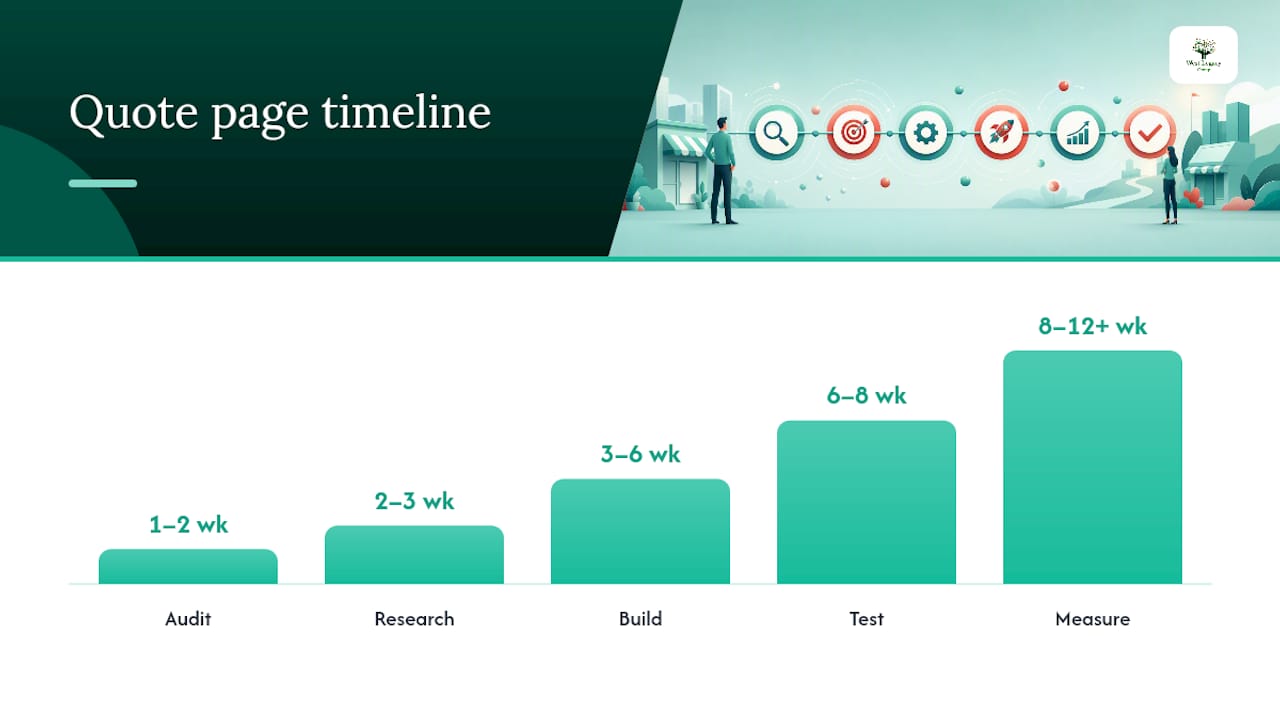
West Legacy Group works with small Australian businesses to audit, build and measure quote pages that rank and convert. The process is structured, transparent and designed to produce results within a realistic timeframe for a small team.
High-level process:
- Audit (weeks 1–2): Review the existing page (or confirm one needs to be built), assess current keyword rankings, form analytics and technical health.
- Research (weeks 2–3): Map purchase-intent keyword clusters, analyse local competitor pages, and define the form field set and schema requirements.
- Build (weeks 3–6): Implement the page structure, form, schema, trust signals and internal links. For businesses without a suitable CMS, West Legacy Group’s small business website design packages include quote page builds as part of a full site.
- Test (weeks 6–8): QA on mobile and desktop, configure Google Tag Manager events, confirm indexing in Search Console.
- Measure (weeks 8–12+): Review organic click data, form completion rates and lead quality. Adjust copy, form fields or schema based on real data.
What to expect at each milestone:
| Milestone | Typical outcome |
|---|---|
| End of week 2 | Baseline audit complete, keyword targets confirmed |
| End of week 6 | Page live, schema validated, tracking active |
| End of week 12 | First organic ranking data available, initial CRO findings |
| Month 6 | Measurable lift in qualified leads from organic search |
Outcomes vary by industry, competition and starting point. West Legacy Group frames expectations conservatively: most small service businesses see meaningful organic visibility improvements within three to six months when the page is built correctly and the keyword targets are realistic.
For deeper reading on page-level SEO structure, West Legacy Group’s product page SEO guide covers on-page structure and schema in detail and adapts well to quote page contexts.
Build your own SEO plan with West Legacy Group to see which package fits your business size and budget.
A practical perspective on what actually moves the needle
The most common mistake small Australian service businesses make with their quote page is treating it as a form container rather than a content asset. They build a page, drop a form on it, and wait. Nothing happens, because Google has no reason to rank a page with three lines of text and a form.
The fix is not complicated, but it does require a shift in thinking. Your quote page needs to answer the questions your ideal customer is typing into Google before they even reach your form. “How much does a kitchen renovation cost in Brisbane?” “What does a commercial cleaning contract include?” “How long does a solar installation take?” These are not just FAQ entries. They are the keywords your page should rank for, and they belong on the page as real, helpful content.
The second thing most businesses underestimate is the privacy note. Under the Australian Privacy Act 1988, any business with an annual turnover above $3 million (and many smaller ones in specific sectors) must handle personal information in accordance with the Australian Privacy Principles. A one-line note near your submit button is not just a conversion tool. It is a legal obligation for many operators. Get it right from the start.
DIY SEO is genuinely achievable for the early wins: writing a better H1, adding a postcode field, publishing two FAQ entries with schema. These tasks take hours, not weeks, and they compound over time. Where most small businesses stall is in the measurement phase. Without tracking form starts separately from form completions, you cannot tell whether your problem is traffic, friction or lead quality. Set up the events in Google Tag Manager before you launch, even if you never look at them for the first month. The data will be there when you need it.
Sources
- Build a Custom Quote Generator and Win at SEO | MicroEstimates
- SEO for Quote Pages: Build Topic Hubs
- DIY SEO In 7 Easy Steps – Surfer