

The fastest way to lift organic traffic on your category pages is to treat each one as a distinct commercial landing page. Map a single primary head keyword to it, protect your crawl budget by controlling which facet URLs get indexed, and use two-layer content: a short intro above the product grid and structured buying guidance below. That combination serves both users and search engines without sacrificing conversion.
Here is your 80/20 priority checklist to get started:
- Map one primary head keyword per category (no overlap with product pages)
- Write a unique title tag, H1, and meta description for every category
- Control faceted navigation with canonical tags, noindex, or robots.txt rules
- Confirm all product links are crawlable HTML anchor tags, not JavaScript-only
- Add Schema.org BreadcrumbList and ItemList structured data
- Fix Core Web Vitals issues flagged in Google PageSpeed Insights
Timeline to expect: metadata and content changes typically show impressions and clicks in Google Search Console within 2–8 weeks. Meaningful organic revenue gains from technical fixes and authority-building usually take 3–6 months, depending on crawl frequency and your site’s domain authority.
West Legacy Group runs category-page audits for Australian ecommerce businesses regularly, and the pattern is consistent: stores that treat category pages as proper landing pages outperform those that treat them as navigation menus. SEO remains a growing discipline in 2026, with E-E-A-T and technical correctness continuing to drive rankings.
Table of Contents
- What types of category pages does your store actually have?
- How to do keyword research for category pages
- How should you structure your category hierarchy and URLs?
- What on-page elements should you optimise on category pages?
- How do you handle faceted navigation without wasting crawl budget?
- What technical SEO does your category page need?
- How internal linking strengthens your category pages
- How do you measure category page SEO performance?
- Your 10-step implementation roadmap
- Common category page mistakes found in Australian ecommerce audits
- Key takeaways
- Why category pages are the most underinvested asset in ecommerce SEO
- West Legacy Group can handle the heavy lifting for you
- Useful tools and sources for your category page audit
What types of category pages does your store actually have?
Not all category pages are the same, and applying the wrong SEO pattern to the wrong page type is a common source of wasted effort. There are four main types you will encounter in Australian ecommerce stores.
Primary category and collection pages
These are your top-level groupings: “Women’s Shoes,” “Power Tools,” “Skincare.” They target broad commercial head terms with high search volume and act as hubs linking to subcategories and individual products. Every store has these, and they are usually the highest-priority pages for category SEO work.
Brand hub pages
A brand page collects all products from a single manufacturer or label, for example “Nike” or “Weber.” These pages serve a distinct search intent (brand + category queries) and deserve their own keyword mapping, unique metadata, and intro copy. Do not simply duplicate the brand’s own marketing copy here — write original content that describes what your store offers from that brand.
Faceted filter pages promoted to landing pages
Faceted navigation generates URLs for every filter combination: size, colour, material, price range. Most of these should be noindexed. However, when a specific filter combination matches real, repeatable search demand, you can promote it to an indexable landing page with its own title, H1, and canonical URL. A practical example: “waterproof work boots” as a filter combination on a footwear site may have enough consistent search volume to justify a dedicated indexable page, while “blue size 9 work boots” almost certainly does not.
Shopify’s guidance is clear on this: create collection pages only when they have at least a few products and a distinct search intent. Avoid near-duplicate collections that dilute your crawl budget and confuse Google about which page to rank.
Seasonal and promotional category pages
Sale pages, Christmas gift guides, and clearance categories need a different approach. If the page returns every year (e.g. “Boxing Day Sale”), keep the URL stable and update the content rather than creating a new URL each season. If it is a one-off promotion, use a canonical pointing to the parent category once the promotion ends, or redirect to the closest evergreen equivalent.
How to identify which type you have: pull your landing page report from Google Search Console, filter by category-level URLs, and check which queries are driving impressions. Cross-reference with your internal site search data to see what customers are actually looking for. Use onsite search analytics to surface demand signals you might otherwise miss.
Category pages are organic landing pages that require a combined technical and content approach. Keyword mapping, metadata, canonical signals, and mobile performance are all part of the same system — fixing one without the others leaves ranking potential on the table.
Pro Tip: Check your competitors’ SERP presence for filter-based queries before you decide whether to index a facet URL. If three competitors have dedicated indexable pages for a filter combination and they are ranking, that is a strong signal the query has enough demand to justify your own.
How to do keyword research for category pages
Category pages work best when they target broad commercial head terms, while product pages handle specific SKU-level queries. The discipline here is assigning one primary head term per category and never letting two pages compete for the same intent.
Step-by-step keyword mapping process
- Export candidate head terms — from SEMrush’s Keyword Overview. Filter for commercial intent keywords with meaningful monthly search volume. Focus on terms a buyer would use when browsing a category, not when searching for a specific product model.
Checking for cannibalisation
Cannibalisation is the most common mistake practitioners see: two pages targeting the same intent split the ranking signals and neither performs as well as one consolidated page would. To check for it:
- Run a
site:yourdomain.com.au "running shoes"query in Google to see which pages surface for the same term - Pull the Queries report in Google Search Console and look for the same keyword appearing against multiple landing page URLs
- Run a Screaming Frog crawl and use the custom search function to find duplicate title tags across category pages
- Review your product page SEO to confirm product pages are targeting specific SKU queries, not the same broad terms as your categories
Pro Tip: When you find cannibalisation between a category and a product page, the fix is usually to update the product page’s title and meta to target the specific model name or SKU, then consolidate the broader head term on the category page. Do not delete the product page — just redirect its keyword targeting.
The practical output of this process is a category keyword map: one primary keyword plus 4–8 supporting modifiers per category. This map feeds your title tags, H1s, intro copy, and Schema.org markup. It also tells your content writer exactly what to cover in the below-the-grid buying guide.
How should you structure your category hierarchy and URLs?
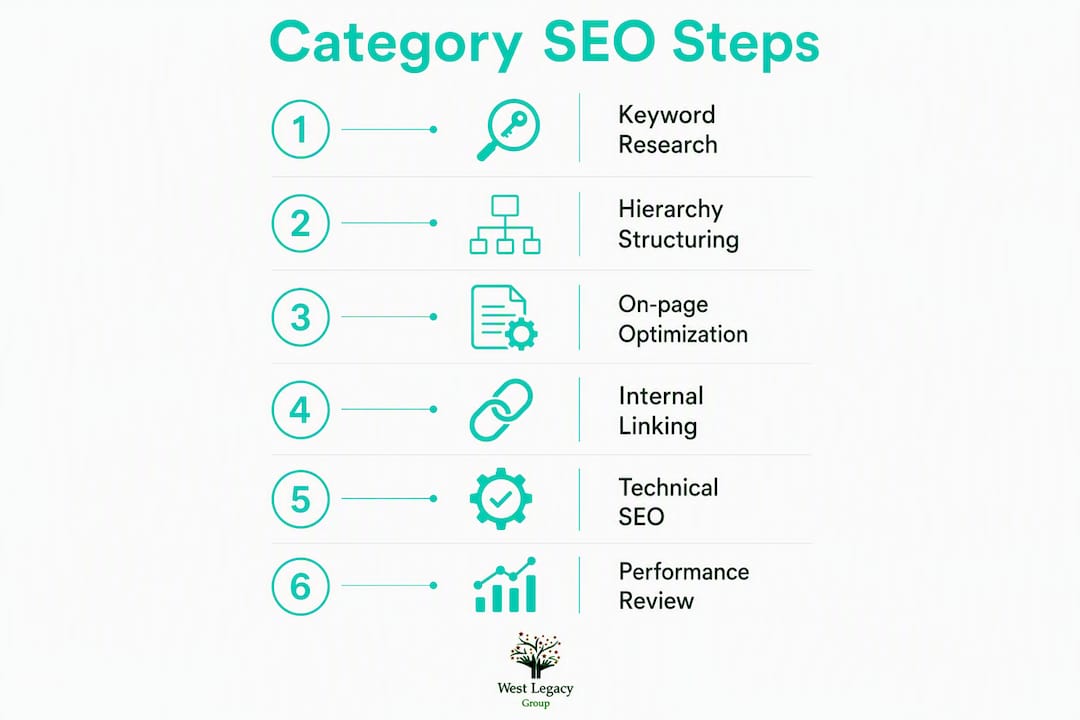
Site architecture directly affects how deeply Google crawls your store and how much authority flows to your category pages. A flat, poorly organised structure means important categories sit too far from the homepage to receive adequate crawl attention.
The recommended hierarchy is:
- Home → Department → Category → Subcategory → Product
This pyramid keeps your most important category pages within two clicks of the homepage and ensures product pages are reachable within three to four clicks. Every level you add pushes products further from the crawl entry point, so keep the hierarchy as shallow as the catalogue allows.
URL strategy rules
- Use readable, keyword-rich slugs:
/womens-running-shoes/not/cat?id=4821 - Avoid session IDs, tracking parameters, and sort-order parameters in indexable URLs
- When you change a URL permanently, implement a 301 redirect from the old URL to the new one, update your XML sitemap, and update all internal links pointing to the old URL
- Keep URLs consistent with your category hierarchy so the URL itself signals the page’s position in the site structure
Breadcrumbs and authority flow
Visible breadcrumbs serve two purposes: they help users understand where they are in the store, and they distribute internal link authority back up the hierarchy. Add Schema.org BreadcrumbList markup alongside the visible breadcrumbs so Google can display the breadcrumb path in search results, which improves click-through rates.
For cross-category authority, include contextual links between related categories. A “Women’s Running Shoes” page should link to “Women’s Running Apparel” and “Running Accessories” where relevant. This shortens click depth for users and spreads authority across related sections of the store. For a deeper look at how homepage links feed into this structure, the ecommerce homepage best practices guide covers the home-to-category linking patterns in detail.
Pro Tip: Ask your developer to confirm that all product links on category pages are standard HTML anchor tags. JS-only product links are a common technical issue that prevents crawlers from discovering products — even if the page looks fine in a browser, Googlebot may not see those links at all.
What on-page elements should you optimise on category pages?
Every category page needs five on-page elements working together: a unique title tag, a compelling meta description, a clear H1, a short above-the-grid intro, and structured buying guidance below the product grid.

Title tags and H1s
Front-load the primary keyword in your title tag and keep each title unique across the catalogue. A reliable pattern:
Primary Keyword + Modifier | Brand Name
For example: Running Shoes for Women | YourStore Australia
The H1 should match the primary search intent directly. It does not need to be identical to the title tag, but it must target the same head term. Avoid H1s that read like navigation labels (“Shop Running Shoes”) — write them as descriptive headings that confirm the page’s topic.
Above-the-grid intro copy
Keep the intro to 50–100 words so products remain visible above the fold, especially on mobile. This intro should include the primary keyword naturally, set context for the category, and give users a reason to browse. It is not a place for keyword stuffing — it is a brief orientation paragraph.
Below-the-grid buying guidance
This is where you target supporting long-tail queries and reduce thin-content flags. Structure it as a short buying guide covering: what to look for in this category, common use cases, size or specification guidance, and links to subcategories and top products. FAQs work well here too, particularly for categories where buyers have common questions before purchasing.
Meta descriptions
Write buyer-focused meta descriptions that include the head term and a clear call to action. Before and after examples:
| Version | Example |
|---|---|
| Before | “Browse our range of running shoes.” |
| After | “Shop women’s running shoes at YourStore — lightweight, trail and road styles with free shipping across Australia.” |
The “after” version includes the head term, a modifier, a benefit, and a location signal. It gives the searcher a reason to click.
Product card microcopy
Each product card should show a visible price, stock availability, and star rating if you have review data. Critically, the product title on the card must be a crawlable HTML anchor link to the product page. This is both a UX requirement and a technical SEO requirement. For guidance on connecting product-level copy to category content, the product description SEO guide covers templates that work well at both levels.
Pro Tip: Write meta descriptions as if they are a paid ad headline. You have roughly 155 characters to tell a buyer why your category page is the right result. Include a differentiator — free returns, Australian stock, next-day dispatch — that your competitors’ meta descriptions do not mention.
How do you handle faceted navigation without wasting crawl budget?
Faceted navigation is one of the most technically complex areas of ecommerce SEO. Left uncontrolled, it can generate thousands of indexable URLs for filter combinations that have no search demand and near-identical content. This wastes crawl budget and dilutes your site’s authority.
The decision framework
- Does the filter combination have stable, repeatable search demand? — Check GSC impressions and SEMrush volume for the specific query the filtered URL would target.
If a filter combination passes all four checks, promote it to an indexable landing page with its own canonical URL. If it fails any check, apply the appropriate control.
Index and canonical controls
- Noindex: apply to low-value filter combinations (colour-only filters, sort orders, price-range-only filters)
- Canonical to parent: use when the filtered view is a subset of the parent category with no distinct search value
- Self-referencing canonical: use on the promoted landing pages themselves and on paginated pages
- robots.txt: block crawling of session parameters and sort-order parameters at the server level
Pagination handling
Each paginated page (page 2, page 3, etc.) should have a unique, crawlable URL and a self-referencing canonical. Do not canonical all paginated pages back to page one — this tells Google that pages 2 and 3 have no independent value, which can prevent product discovery for items that only appear on those pages.
- Block
?sort=and?session=parameters in robots.txt or via Google Search Console’s URL parameter tool - Expose product links on every paginated page as standard HTML links
- Avoid creating indexable URLs for sort orders (price low-to-high, newest first) — these are user convenience features, not search landing pages
Pro Tip: Run a Screaming Frog crawl filtered to your category URL pattern and sort by “Indexable” status. If you see hundreds of near-duplicate titles across filter URLs, you have an uncontrolled faceted navigation problem that needs fixing before any content work will have full impact.
What technical SEO does your category page need?
Technical correctness underpins everything else. You can have perfect keyword mapping and great content, but if your structured data is wrong, your Core Web Vitals are poor, or your product links are JavaScript-only, you are leaving ranking potential on the table.
Structured data for category pages
Implement Schema.org BreadcrumbList on every category page to support rich breadcrumb display in search results. Add ItemList or CollectionPage markup to describe the products on the page. Do not add Product or AggregateRating schema at category level — those belong on individual product pages. Mixing schema types incorrectly can confuse Google’s parser and suppress rich results.
| Schema type | Where to use | What it does |
|---|---|---|
| BreadcrumbList | All category pages | Enables breadcrumb display in SERPs |
| ItemList | Category pages with product listings | Describes the list of products on the page |
| CollectionPage | Brand or curated collection pages | Signals a curated product collection |
| Product + AggregateRating | Product pages only | Enables star ratings in product SERPs |
Core Web Vitals checklist
- LCP (Largest Contentful Paint): optimise the hero image or first product image with WebP format, correct dimensions, and a
loading="eager"attribute for above-the-fold images - CLS (Cumulative Layout Shift): set explicit width and height attributes on all product card images to prevent layout shifts as images load
- INP (Interaction to Next Paint): minimise JavaScript execution on page load; defer non-critical scripts
- Add
preconnecthints for your CDN and any third-party font or analytics domains
Rendering and product discovery
Ensure product card links are server-rendered or progressively enhanced so crawlers see them. A category page that looks fully populated in a browser but relies on client-side JavaScript to render product links is effectively invisible to Googlebot for product discovery purposes.
Tool checks to run
Run Google PageSpeed Insights on your top five category pages and note the LCP and CLS scores. Use Screaming Frog to validate that all category URLs have correct canonical tags and that no category page is accidentally noindexed. Test your structured data with Google’s Rich Results Test to confirm BreadcrumbList and ItemList are parsing correctly.
How internal linking strengthens your category pages

Internal links do two things for category pages: they pass authority from high-equity pages (homepage, popular blog posts) down to categories, and they help crawlers discover every product in your catalogue.
How many product links to show
Show a crawlable set of 10–24 products per category page, depending on category size. Every product in your catalogue should be reachable from at least one category or subcategory page. If a product is only linked from a paginated page 4 or deeper, it is effectively an orphan from a crawl perspective.
- Prioritise your best-selling and highest-margin products in the visible product grid
- Use subcategory pages to distribute products that do not fit naturally in the top-level category
- Check for orphaned products using Screaming Frog’s “Inlinks” report — any product with zero inlinks from category pages needs to be added to a relevant category
Hub-and-spoke linking from blog content
Buying guides and blog posts are powerful authority sources for category pages. A “How to Choose Running Shoes” guide that links to your “Running Shoes” category page funnels topical authority directly where you need it. This is the hub-and-spoke model: category pages are the hubs, and supporting content pieces are the spokes. The internal linking for ecommerce guide covers how to build a link distribution spreadsheet to manage this systematically.
Cross-category and breadcrumb links
Include breadcrumb markup and contextual links to related categories on every category page. “Women’s Running Shoes” should link to “Women’s Training Shoes” and “Running Accessories” where the relationship is genuine. These cross-category links shorten click depth, distribute authority, and help users discover related products.
Pro Tip: Use your internal site search data to find which categories users navigate to after landing on a specific category page. Those navigation paths are your best candidates for contextual cross-category links.
How do you measure category page SEO performance?
Measurement without a clear framework produces noise. Set up these KPIs before you make any changes so you have a baseline to compare against.
Primary KPIs
- Impressions and clicks (Google Search Console, filtered by category landing page URLs)
- Average position (GSC, per category page and per primary keyword)
- Organic sessions (GA4, landing page report filtered to category URLs)
- Conversion rate (GA4, organic channel, category landing pages)
- Revenue per organic session (GA4, ecommerce reporting, organic channel)
Reporting setup checklist
- In Google Search Console, create a saved filter for each priority category URL and export the Queries report monthly
- Link GSC to GA4 so you can see organic clicks and conversions in the same report
- In GA4, set up a custom exploration report with landing page as the primary dimension, filtered to organic traffic, showing sessions, conversions, and revenue
- Use SEMrush’s Position Tracking to monitor keyword rankings for your primary category head terms over time
- Run a monthly Screaming Frog crawl to check that no category pages have been accidentally noindexed or have broken canonical chains
Timeline expectations
| Change type | Expected signal | Typical timeframe |
|---|---|---|
| Metadata updates (title, meta, H1) | Impressions and CTR improvement in GSC | 2–8 weeks |
| Content additions (intro, buying guide) | Ranking for long-tail supporting queries | 2–8 weeks |
| Technical fixes (canonicals, crawlable links) | Improved crawl coverage, new products indexed | 4–8 weeks |
| Authority building (internal links, hub content) | Organic session and revenue growth | 3–6 months |
Your 10-step implementation roadmap
This roadmap is ordered by impact-to-effort ratio. Start at step one and work down. Each step includes a priority label and a suggested owner.
- Map keywords and stop cannibalisation — audit all category URLs, assign one primary keyword per page, and resolve any overlap with product pages. Quick win. Owner: SEO analyst. Time: 1–2 days.
- Write unique title tags, H1s, and meta descriptions — use the keyword map from step one. Quick win. Owner: content writer. Time: 2–4 hours per category.
- Add short above-the-grid intro and buying guide below — 50–100 words above, structured guidance below. Quick win. Owner: content writer. Time: 1–2 hours per category.
- Fix crawlable product links — confirm all product card links are HTML anchor tags. Quick win. Owner: developer. Time: 1–4 hours.
- Implement faceted navigation index rules — apply noindex, canonical, and robots.txt controls to filter URLs. Medium. Owner: developer + SEO analyst. Time: 1–3 days.
- Add BreadcrumbList and ItemList structured data — implement and validate with Rich Results Test. Medium. Owner: developer. Time: 4–8 hours.
- Fix Core Web Vitals issues — address LCP, CLS, and INP flags from Google PageSpeed Insights. Medium to long-term. Owner: developer. Time: 1–5 days depending on severity.
- Build internal linking and hub content — link buying guides into category pages; add cross-category links. Medium. Owner: content writer + SEO analyst. Time: ongoing.
- Set up GSC and GA4 monitoring — configure the reporting framework from the measurement section above. Quick win. Owner: analyst. Time: 2–4 hours.
- Run CRO tests and iterate — test product card layout, filter usability, and CTA placement. Review conversion rate strategies to prioritise which tests to run first. Long-term. Owner: marketing + developer. Time: ongoing.
Briefing your developer
When you hand this checklist to a developer, be specific:
- Name the exact files or templates that control category page output (e.g.
collection.liquidin Shopify,archive.phpin WooCommerce) - Specify which URL parameters to block in robots.txt
- Provide the exact canonical logic: “self-referencing canonical on all promoted filter pages; canonical to parent on all other filter URLs”
- List the sitemap files to update after URL changes
- Define the QA tests: check canonical tags with Screaming Frog, validate structured data with Rich Results Test, and confirm product links render in a JavaScript-disabled browser
| Task | Priority | Owner | Effort |
|---|---|---|---|
| Keyword mapping | Quick win | SEO analyst | Low |
| Unique metadata | Quick win | Content writer | Low |
| Crawlable product links | Quick win | Developer | Low |
| Faceted navigation rules | Medium | Developer + analyst | Medium |
| Structured data | Medium | Developer | Medium |
| Core Web Vitals | Long-term | Developer | High |
| Hub content and internal links | Long-term | Content + SEO | High |
Common category page mistakes found in Australian ecommerce audits
The issues West Legacy Group sees most often in Australian ecommerce stores are predictable, and most of them are fixable within a single sprint.
Category and product cannibalisation is the most frequent problem. A store selling outdoor furniture might have a “Garden Chairs” category page and a “Garden Chair” product page both targeting the same head term. Neither ranks as well as one consolidated page would. The fix is to update the product page’s title to target the specific model name and reserve the head term for the category.
Thin or duplicate category copy is the second most common issue. Many stores either have no category description at all or copy the manufacturer’s boilerplate across multiple categories. Google treats this as thin content, and it suppresses rankings. Writing a unique 50–100 word intro and a short buying guide for each priority category resolves this quickly.
Uncontrolled faceted URLs are particularly common on WooCommerce and Magento stores where the default configuration indexes every filter combination. A store with 10 filter attributes and 20 values each can generate tens of thousands of indexable URLs, most of them near-duplicate. Implementing noindex and canonical rules as described in the faceted navigation section above is the fix. For a broader view of recurring ecommerce SEO errors, the common ecommerce SEO mistakes guide covers the full pattern.
Missing or incorrect canonicals often appear after platform migrations or theme updates. A canonical pointing to the wrong URL, or a self-referencing canonical missing entirely from a promoted filter page, can quietly suppress rankings for months before anyone notices.
The most common mistake is failing to distinguish category intent from product intent. When two pages target the same query, they split ranking signals and neither performs as well as one well-optimised page would.
When to bring in an agency
If your store has more than 500 category URLs, bespoke faceted navigation, or an internationalised catalogue, the complexity of canonical strategy and crawl budget management usually warrants professional support. West Legacy Group works with Australian small businesses on technical audits, faceted navigation rules, content templates, and GA4/GSC reporting setup. The work is scoped to what your store actually needs, not a generic package.
Pro Tip: Before any agency engagement, run a Screaming Frog crawl of your category pages and export the “Indexable” and “Canonicals” tabs. This single export gives an agency everything they need to scope the technical work accurately and avoids paying for discovery time you could have done yourself.
Key takeaways
Treating each category page as a distinct commercial landing page, with one mapped head keyword, controlled facets, and two-layer content, is the single most effective approach to improving ecommerce category page SEO.
| Point | Details |
|---|---|
| One keyword per category | Map a single primary head term to each category and resolve any overlap with product pages. |
| Two-layer content | Keep the above-the-grid intro to 50–100 words; add structured buying guidance below the product grid. |
| Control faceted navigation | Apply noindex, canonical, or robots.txt rules to filter URLs; only index combinations with real search demand. |
| Implement BreadcrumbList and ItemList | Add Schema.org structured data and validate with the Rich Results Test before publishing. |
| Measure with GSC and GA4 | Track impressions, clicks, organic sessions, and revenue per organic session; expect revenue gains in 3–6 months. |
| West Legacy Group audits | West Legacy Group runs category-page audits for Australian ecommerce stores, covering technical fixes, content templates, and reporting setup. |
Why category pages are the most underinvested asset in ecommerce SEO
Most ecommerce SEO effort goes into product pages and homepage optimisation. That is understandable — product pages are where transactions happen, and the homepage is the brand’s front door. But category pages sit between those two layers and do something neither can do alone: they capture broad commercial intent at scale.
A well-optimised category page ranks for dozens of related queries simultaneously. It funnels authority down to product pages through crawlable internal links. It is the page a buyer lands on when they know what type of product they want but have not yet decided on a specific item. That is a high-value moment, and most stores handle it poorly.
The pattern West Legacy Group sees in audits is consistent: stores with strong category pages convert organic traffic at a higher rate than stores that rely on product pages to do all the heavy lifting. The reason is simple. A buyer who lands on a well-structured category page with clear filtering, a short buying guide, and visible product options is further along the decision process than a buyer who lands on a single product page and has no context.
The technical work — canonical rules, structured data, Core Web Vitals — matters because it determines whether Google can crawl and rank the page at all. But the content work matters just as much. A category page with perfect technical SEO and no useful content will not rank for competitive head terms. Both layers are required.
If you have been deferring category page work because it feels less urgent than product page updates or paid campaigns, reconsider that priority. The organic traffic gains from a properly optimised category structure compound over time in a way that paid traffic does not.
West Legacy Group can handle the heavy lifting for you
If the 10-step roadmap above looks like more than your team can take on alongside day-to-day operations, West Legacy Group offers practical, affordable support for Australian ecommerce businesses.
The services most relevant to category page SEO include technical audits (covering canonical chains, faceted navigation rules, and crawlable product links), content templates for category intros and buying guides, Core Web Vitals remediation, and GA4/GSC reporting setup so you can track the impact of every change. West Legacy Group works with stores on Shopify and WooCommerce, and the work is scoped to your catalogue size and priorities, not a one-size-fits-all package.
The starting point is a mini-audit of your top 10 category pages: keyword mapping, metadata review, canonical check, and a Core Web Vitals snapshot. You get a prioritised fix list with developer-ready instructions, typically delivered within five business days.
To get started, build your own SEO plan or reach out directly to discuss what your store needs. If you are looking at a broader website rebuild to support better category architecture, the small business website design packages include category template design as part of the scope.
Useful tools and sources for your category page audit
Run through these tools in sequence for a complete category-page health check in a single working day.
- Google Search Console — filter the Performance report by your category URL pattern to see impressions, clicks, and average position per page. Check the Coverage report for any category pages flagged as “Excluded” or “Crawled but not indexed.”
- Google PageSpeed Insights — run your top five category pages and note LCP, CLS, and INP scores. Any LCP above 2.5 seconds needs attention.
- Screaming Frog SEO Spider — crawl your site and filter by category URL pattern. Export the Indexable, Canonicals, and Page Titles tabs to find duplicate titles, broken canonicals, and uncontrolled filter URLs.
- SEMrush — use Keyword Overview for head-term research and Position Tracking to monitor category keyword rankings monthly.
- Google’s Rich Results Test — validate BreadcrumbList and ItemList structured data on your category pages before and after implementation.
- Schema.org BreadcrumbList reference — the authoritative specification for breadcrumb markup.
- Google Analytics (GA4) — set up a custom exploration with landing page as the primary dimension, filtered to organic traffic, to track sessions, conversions, and revenue by category page.
| Tool | Primary check | Time needed |
|---|---|---|
| Google Search Console | Category impressions, clicks, coverage | 20 minutes |
| Google PageSpeed Insights | LCP, CLS, INP per category page | — |
| Screaming Frog | Duplicate titles, canonicals, indexable URLs | — |
| SEMrush | Head-term volume, position tracking | 20 minutes |
| Rich Results Test | Structured data validation | 10 minutes |
| GA4 | Organic sessions and revenue by landing page | 20 minutes |
Save these as a bookmarks folder labelled “Category SEO Audit” and share the folder with your developer alongside the 10-step implementation checklist. That combination gives any developer or agency everything they need to start work without a lengthy briefing session.