

An AI audit gives your website a fast, evidence-backed list of fixes and a prioritised plan you can verify and act on, often for a fraction of traditional consultancy costs. In this context, an “AI audit” means an AI-assisted website and SEO audit, not an audit of an AI model itself. You get:
- Prioritised fixes ranked by impact and effort
- The exact affected URLs, not vague category warnings
- Evidence snippets (status codes, code, screenshots) behind every finding
- A verification step so you know a fix actually worked
If you’d rather hand the follow-up work to someone who does this daily, West Legacy Group can run the audit and manage the fixes for you.
Key Takeaways
An effective AI audit combines automated evidence collection with prioritised, human-verified action steps, not an automated report left to sit unread.
| Point | Details |
|---|---|
| Evidence before action | Every finding should show the affected URL, the evidence, and a way to confirm the fix worked. |
| Follow the priority tiers | Fix access blockers first, then high-value pages, then scaled template issues, then editorial hygiene. |
| Verify, don’t assume | Check the affected URL and Search Console before and after any change, since AI recommendations are hypotheses. |
| Run audits on a cadence | A full audit every three to six months suits most small sites, with immediate audits after redesigns or traffic drops. |
| Match the fix to the fixer | Text and metadata edits suit DIY; redirects, schema, and scaled fixes suit a developer or a provider like West Legacy Group. |
Table of Contents
- What is an AI audit and how does it actually work?
- Practical checklist: what an audit actually checks
- How do you turn an audit report into a plan you can act on?
- When should you run an AI audit?
- Typical findings and how they’re prioritised
- What does AI actually do versus what needs human judgement?
- DIY fixes or hiring a provider: what makes sense for your budget?
- What compliance and ethics questions should an audit raise?
- How do you prepare before running an audit?
- Where do AI audits fall short?
- What does this look like in practice?
- Where does an AI audit actually help most?
- Get your fixes actioned, not just listed
- Frequently asked questions
- Sources
What is an AI audit and how does it actually work?
An AI audit starts with a crawl, not a guess. The crawler discovers your pages through your homepage, your sitemap, any URLs you upload manually, and (for the most accurate results) a connected Google Search Console account. From there, it records concrete evidence: HTTP status codes, canonical tags, heading structure, structured data markup, and both lab and real-user performance metrics.
The process generally runs in three stages:
- Crawl — the tool visits every accessible page and logs what it finds, the same way Googlebot would.
- Evidence collection — status codes, redirects, missing meta tags, image sizes, and Core Web Vitals scores get recorded against each URL.
- Interpretation — rules-based logic and AI layers classify the evidence, explain why it matters, and rank it by priority.
That third step is where deterministic checks and AI judgement diverge. A status code is a fact. Whether a slow-loading product page is costing you sales is an interpretation, and a credible audit tool clearly separates the two rather than blending them into one confident-sounding verdict. The best audits pull from Google PageSpeed Insights for performance data, Search Console for indexing and query data, and analytics where it’s connected, because relying on lab data alone can miss what your actual visitors experience.
Practical checklist: what an audit actually checks
Most AI-assisted audits work through four layers, and small business sites tend to fail in predictable spots.
Access and crawlability
- Robots.txt accidentally blocking important folders
- Pages carrying a stray “noindex” tag from a staging site that never got removed
- Redirect chains (page A to B to C) that waste crawl budget and slow load times
- Broken or missing XML sitemaps
On-page signals
- Missing or duplicated page titles across product or service pages
- Templated pages with identical, thin content
- Heading hierarchies that skip from H1 straight to H4
- Content that doesn’t match what the searcher actually wants (a service page ranking for “how to” queries, for instance)
Performance and user experience
Pro Tip: Google’s Core Web Vitals targets are Largest Contentful Paint (LCP) under 2.5 seconds, Interaction to Next Paint (INP) under 200 milliseconds, and Cumulative Layout Shift (CLS) under 0.1. Oversized hero images and heavy JavaScript are the two most common reasons local business sites miss these targets.
Structured data and AI visibility
- JSON-LD schema for your business type, products, or services
- Whether your site has an llms.txt file or structure that helps AI answer engines find and cite you
- General AI visibility scoring that checks how clearly your site states what you sell and where
A high-value finding looks like this: “Product page /widgets/blue-widget returns a 404. Fix: restore the page or 301 redirect to the current equivalent.” Specific, testable, and immediately actionable, which is exactly what separates a useful report from a generic checklist.
How do you turn an audit report into a plan you can act on?
A report full of findings is useless if you don’t know where to start. The standard approach is to sort every issue by impact versus effort, then work through four priority tiers.
- P1: Access blockers. Anything stopping Google from crawling or indexing pages at all, robots.txt errors, accidental noindex tags, broken sitemaps. Fix these first because nothing else matters if Google can’t see your site.
- P2: High-value pages. Your homepage, top service pages, and best-selling product pages. A slow-loading product page losing conversions costs you more than a slow blog post from 2022.
- P3: Scaled template issues. A missing meta description on one page is minor. The same gap across 200 templated product pages is a real problem worth fixing in one pass.
- P4: Editorial hygiene. Typos, outdated dates, minor formatting, worth doing, but only after the first three tiers are handled.
This tiered approach mirrors the priority framework used by professional audit tools, and it works because it stops you fixing comfortable, low-impact issues while ignoring the ones actually costing you traffic.
Before you touch anything, verify the finding. Open the affected URL in your browser. Check its status in Search Console. AI-generated recommendations are hypotheses worth testing, not orders to follow blindly, and a five-minute check saves you from “fixing” something that was never broken.
Once you’ve made a change, recrawl the page immediately to confirm it worked, then watch Search Console and your analytics over the following weeks for indexing and impression changes.
Pro Tip: Simple text and metadata fixes are usually fine to do yourself. Redirect logic, schema implementation, and anything touching your site’s core code is where a developer or managed service earns its fee.
When should you run an AI audit?
Run one immediately after a website redesign, a platform migration, or any sudden drop in rankings or traffic. Template updates count too, since a single careless theme change can break canonical tags across multiple pages.
For cadence, a full audit every three to six months suits most small business sites. If you’re running an active eCommerce store with frequent new product listings, lean toward the shorter end of that window.
- After any fix, recrawl the specific page straight away to confirm it’s resolved
- Give Search Console and analytics several weeks to reflect the real-world impact
- Treat these two tools as your long-term proof, not the audit report itself, since only they show what Google and your visitors actually did next
Skipping this cadence is how small issues, like a redirect chain nobody noticed, quietly compound over a year into a real traffic problem.
Typical findings and how they’re prioritised
Across hundreds of small business audits, the same pattern repeats: a handful of access blockers, a longer tail of high-value page issues, a cluster of scaled template problems, and a pile of minor editorial mess.
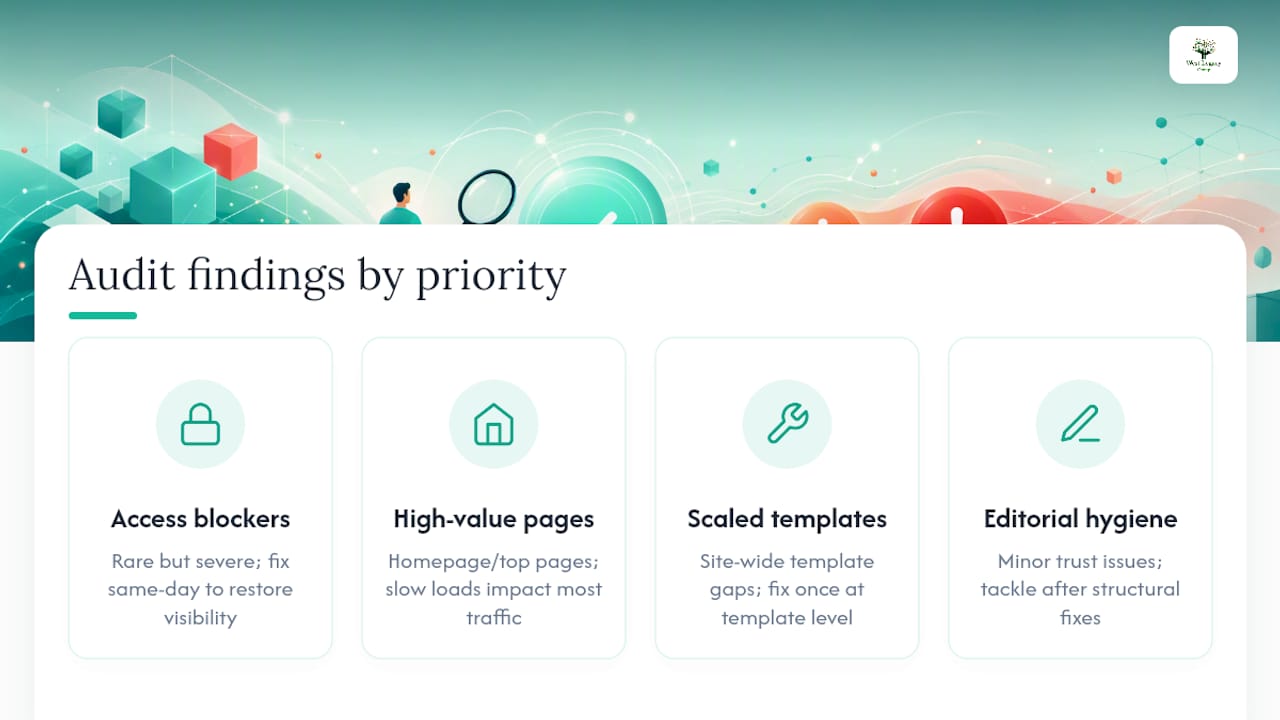
Access blockers are rare but severe: an accidental robots.txt disallow on your entire site, or a noindex tag left over from a staging environment. These get fixed same-day because every day they persist is a day of lost visibility.
High-value page issues sit next. Your homepage, top three service pages, and highest-converting product pages deserve individual attention, slow load times, thin content, or missing schema on these pages has outsized impact because they carry the most traffic.
Scaled issues are the sneaky ones. A missing alt tag on one image is nothing. The same gap across your entire 150-product catalogue, generated by the same theme template, is worth fixing once at the template level rather than page by page.
Editorial hygiene, broken internal links, outdated pricing mentions, inconsistent formatting, matters, but it’s genuinely last on the list. It affects trust and polish more than crawlability or rankings, so it’s the tier you tackle once the structural work is done.
Good audit tools flag which tier each finding belongs to rather than presenting a flat, unordered list. If your report doesn’t sort by priority, you’re doing that triage work yourself, which defeats much of the point of running an automated audit in the first place.
What does AI actually do versus what needs human judgement?
AI is excellent at pattern recognition across evidence: it can flag that 40 pages share a duplicate title tag, or that your LCP score is failing on mobile, faster and more consistently than a human scanning page by page. What it cannot do is know your business intent, your brand voice, or which pages actually drive revenue for you specifically.
Treat AI-generated recommendations as hypotheses, not verdicts. An AI audit might flag a page’s meta description as “too short” when, in reality, that shorter description was a deliberate choice that’s converting well in search results. The evidence (status codes, load times, missing tags) is fact. The interpretation of what to do about it is a prediction that deserves a second look before you act.
This matters more with content and metadata than with technical fixes. AI can draft a batch of meta descriptions or suggest schema markup in seconds, but a human still needs to check it reads naturally and matches how your business actually talks to customers. If you’re using AI tools to draft on-page copy following an audit, reviewing that output before publishing is a step worth building into your workflow.
Some platforms now offer autopilot or co-pilot modes that apply certain fixes automatically rather than just flagging them. That can be genuinely useful for low-risk, repetitive changes, but the level of automation you choose should match your appetite for risk, not the platform’s default setting. Retaining review control over anything touching your site’s core structure is the safer default for a small business without a dedicated technical team.
DIY fixes or hiring a provider: what makes sense for your budget?
Cost is usually the deciding factor for small business owners, and the good news is that a technical audit itself has become genuinely affordable. Many AI-assisted tools can scan a smaller site and return a full report in under a minute, a task that once required a paid consultant and a week’s wait.
The real cost decision isn’t the audit. It’s the implementation. Ask yourself three questions before deciding who does the work:
- Is the fix text-based? Title tags, meta descriptions, alt text, and heading structure are all things most owners can edit themselves through their content management system.
- Does the fix touch code or server configuration? Redirect chains, canonical logic, and schema implementation carry more risk of breaking something else if done incorrectly.
- How many hours will this actually take you? If a “quick fix” is eating an entire weekend you don’t have, that’s the real cost, not the invoice.
A hybrid approach works well for most small businesses: run the audit yourself or with an affordable tool, handle the straightforward text fixes in-house, and bring in a provider for anything structural. West Legacy Group offers exactly this flexibility, single fixes, ongoing retainers, or subscription packages, so you’re never paying for more than the situation calls for. If you want to understand what you’re agreeing to before signing anything longer-term, reviewing your service contract upfront is worth the ten minutes it takes.
What compliance and ethics questions should an audit raise?
AI audits touch a handful of governance questions that small business owners often overlook. The first is data handling: connecting your Search Console or analytics account to a third-party audit tool means that provider now has access to your traffic and query data. Check what happens to that data before you connect anything, particularly around retention and whether it’s used to train other systems.
The second is content provenance. If your audit tool suggests AI-drafted metadata or blog copy, publishing it without disclosure or review carries reputational risk if it doesn’t match your actual brand voice or, worse, contains a factual error the AI invented. Human review before publishing isn’t optional here, it’s the difference between a helpful suggestion and a liability.
Bias is a smaller concern for website audits than for AI systems making decisions about people, but it’s still worth a mention: an audit tool trained predominantly on large eCommerce sites may weight recommendations in ways that don’t suit a two-person trades business. Read recommendations with that context in mind rather than treating every suggestion as universally applicable.
Transparency matters too. A trustworthy audit tool shows its evidence, the actual status code, the actual snippet of code, the actual affected URL, rather than asking you to trust a confident-sounding summary. If a tool won’t show its working, treat its conclusions with more scepticism, not less. For businesses handling customer data alongside their website, broader AI privacy compliance guidance is worth a read before allowing any external crawler broad access to your systems.
How do you prepare before running an audit?
A few minutes of preparation makes an audit far more useful. Start by gathering access: your Google Search Console account (or set one up if you haven’t already), your analytics login, and admin access to your content management system.
Next, get clear on what you actually want to learn. “Is my site technically healthy?” is a different objective from “why did my traffic drop last month?” and it changes which parts of the report you focus on first. If you run the business with a partner or staff member who manages the website, loop them in before the audit, not after, so nobody’s surprised by a list of fixes landing in their inbox.
Finally, connect your data sources properly. An audit run without Search Console access can still flag technical issues, but it can’t tell you which pages are actually driving impressions and clicks, which is often the more useful half of the picture. Similarly, connecting your analytics and CRM data to your marketing tools more broadly makes it far easier to see whether a technical fix actually moved the needle on enquiries or sales, not just rankings.
Set a rough time budget too. Reviewing a full report properly, checking evidence, prioritising fixes, deciding who does what, usually takes an hour or two for a small site. Rushing this step is how good findings get buried under the ones that are easiest to action first.
Where do AI audits fall short?
The biggest limitation is discovery. A crawler can only find what it’s told to look for, through your sitemap, your homepage links, or a connected Search Console account. Pages sitting outside those discovery paths, an orphaned landing page from an old campaign, for instance, can be missed entirely, leaving you with a report that looks complete but isn’t.
Lab performance data is another gap. Core Web Vitals scores generated in a controlled test environment don’t always match what your real visitors experience on their actual phones, on actual mobile networks, in actual traffic conditions. A page that scores well in the lab can still frustrate real users, which is why field data from Search Console matters alongside any lab report.
AI interpretation itself has a ceiling. It’s genuinely strong at pattern recognition, spotting that 60 pages share a duplicate title tag, for instance. It’s weaker at understanding business context: why a particular page exists, who it’s really for, or why a seemingly “broken” pattern was actually a deliberate choice. Recommendations should be read as informed suggestions, not final answers.
There’s also a false confidence risk. A polished report with clean formatting can feel more authoritative than it deserves to, especially if a reader assumes every AI-generated recommendation carries the same weight as a hard technical fact. The fix findings, status codes and broken links, are solid ground. The strategic suggestions layered on top deserve a more sceptical read before you act on them.
What does this look like in practice?
Consider a typical trades business website: a plumber running a five-page WordPress site with a blog they update occasionally. An audit on a site like this commonly turns up the same pattern, a handful of P1 issues (perhaps a robots.txt line accidentally blocking the blog folder after a plugin update), several P2 issues on the homepage and service pages (missing schema markup, an oversized hero image dragging LCP past 4 seconds), and a batch of P3 issues across service pages sharing a template with no unique meta descriptions.

The fix sequence in a case like this usually follows the priority tiers closely. The robots.txt issue gets corrected first, since it’s a five-minute fix with outsized impact on visibility. The hero image gets compressed and the homepage recrawled to confirm the LCP improvement. The template-level meta description issue gets solved once, applied across all service pages, rather than fixed one page at a time.
For a local eCommerce example, a scaled issue often shows up differently: duplicate product descriptions copied straight from a supplier’s catalogue across 80 or more listings. That’s a P3 finding with real consequences, duplicate content across that many pages can suppress how any of them rank, even the well-written ones. The fix is slower (rewriting at scale takes time) but the audit at least tells you exactly which pages to prioritise first, rather than leaving you to guess.
Where does an AI audit actually help most?
The straightforward fixes, title tags, missing alt text, broken internal links, are genuinely within reach for most owners with an hour and a content management system login. Where things get trickier is anything touching redirect logic, schema markup, or a scaled template issue across dozens of pages. That’s where a developer or a managed provider earns their keep, not because the fix itself is exotic, but because getting it wrong at scale costs more time to unwind than doing it right the first time.
West Legacy Group built its small business services around exactly that gap. Some clients want a single audit and a list of fixes to hand to their own developer. Others want an ongoing retainer where we handle implementation, recrawling, and monitoring every quarter so nothing slips. Both are available, along with subscription packages for businesses that want steady attention without a large upfront cost.
Get your fixes actioned, not just listed
West Legacy Group runs the audit and does the follow-through, so the list of fixes doesn’t sit in your inbox for another three months. Where a DIY tool hands you a report and leaves you to work out the rest, our small business packages cover the audit, a prioritised plan, the implementation, and the recrawl to confirm it actually worked.

The typical engagement runs in four stages: audit, plan, fixes, verification, with pricing that scales to what you actually need. If you just want the audit and a plan to hand to your own developer, that’s available on its own. If you’d rather we build and maintain the fixes on an ongoing basis, our small business website design packages cover implementation from the ground up, and our reporting services keep you across the results month to month.
For businesses that want a flexible, build-as-you-go option rather than a full package, build your own SEO plan lets you pick exactly the services you need now and add more later. Get in touch to book an audit and see your prioritised fix list within the week.
Frequently asked questions
What is an AI audit for a small business website?
An AI audit is an AI-assisted scan of your website that checks technical health, on-page content, performance, and structured data, then returns a prioritised list of fixes with supporting evidence for each one.
How much does an AI audit cost compared to a traditional SEO consultant?
Many AI-assisted tools can scan a small site and return a report in under a minute at minimal or no cost, though implementing the fixes properly, particularly technical ones, is where most of the real cost sits.
Can I trust AI-generated audit recommendations without checking them myself?
Treat AI recommendations as hypotheses rather than verdicts. Verify the underlying evidence, the affected URL, the status code, the actual page, before making any change based on the suggestion.
How often should I run an AI audit on my website?
A full audit every three to six months suits most small business sites, with an extra audit run immediately after a redesign, migration, or a sudden drop in traffic or rankings.
What’s the difference between an AI audit and a machine learning audit?
An AI audit, in this context, examines your website’s SEO, performance, and content health. A machine learning audit is a different discipline entirely, focused on evaluating an AI model’s fairness, accuracy, or governance, and isn’t what small business website audits cover.
Sources
- AI SEO Analyzer: How Automated Audits Work | SEO Analyser
- Free AI SEO Audit for Small Businesses | Revenue Ring AI
- AI SEO Tool for Small Business | Approve AI Suggestions | Rabbit SEO
- Features — Seology AI SEO Agent | Seology