

The fastest return on marketing automation comes from three flows: a welcome sequence for new subscribers, an abandoned cart or inquiry recovery flow, and a post purchase review request. Each one runs on free or low cost tools, takes a few hours to build, and starts producing measurable results within weeks. Everything else, from CRM upgrades to multichannel orchestration, comes later once these three are working and you can prove the return.
TL;DR:
- Building just three automations—the welcome sequence, cart recovery, and review request—can generate measurable revenue within a few weeks at minimal cost.
- Use simple email-first platforms for under 1,000 contacts, adding features like CRM or SMS support only as your business scales or needs grow.
- Focus on proper setup: authenticate domains, create segmented workflows, and test thoroughly before launching to ensure high deliverability and accurate tracking.
- Avoid common mistakes such as overbuilding automations upfront, importing contact lists without consent, or neglecting regular monitoring and updates.
- Ensure compliance by obtaining explicit consent, maintaining functioning unsubscribe links, and exporting data to prevent vendor lock-in or legal issues.
Table of Contents
- Why marketing automation matters for small business
- The three highest leverage automations to build first
- Which tool category actually fits your business?
- How do you choose the right automation tool?
- Setting up your first automations step by step
- What does marketing automation cost, and what’s the ROI?
- Scaling roadmap: foundation, optimisation, orchestration
- West Legacy Group: practical experience and tools we use to implement automations
- How does GDPR or CAN-SPAM apply to small business automation?
- What are the most common automation mistakes small businesses make?
- What does this look like across different small business industries?
- Author perspective: a recommended first 30 day plan
- How West Legacy Group can help you set up and maintain automation
- Sources
- FAQ
Why marketing automation matters for small business
Most small business owners already know they should be “doing” marketing automation. Few have actually built anything beyond a Mailchimp account gathering dust. The gap isn’t ambition, it’s time. You’re juggling operations, customers, and cash flow, and automation sounds like another project competing for the same three hours you don’t have.
Here’s the reframe that actually helps: marketing automation for small business isn’t a big software project. It’s a small number of triggered messages that fire automatically when a customer does something, so you stop losing revenue to silence. A person signs up and hears nothing for a week. A shopper fills a cart and abandons it, and you never follow up. A customer buys, has a great experience, and you never ask them to say so publicly. Each of those is a leak, and each one is fixable with a workflow you set up once.
The industry term for this category is marketing automation, sometimes narrowed to email marketing automation when the channel is email specifically. Whatever you call it, the mechanics are the same: a trigger (someone joins your list, abandons a cart, completes a purchase), a delay, and a message. Practical guides on small-business automation consistently point to the same three starting flows because they map directly to money already sitting on the table, not hypothetical future campaigns.
The three highest leverage automations to build first
Build these three flows in this order. Each one addresses a different point where you’re currently losing customers to silence.
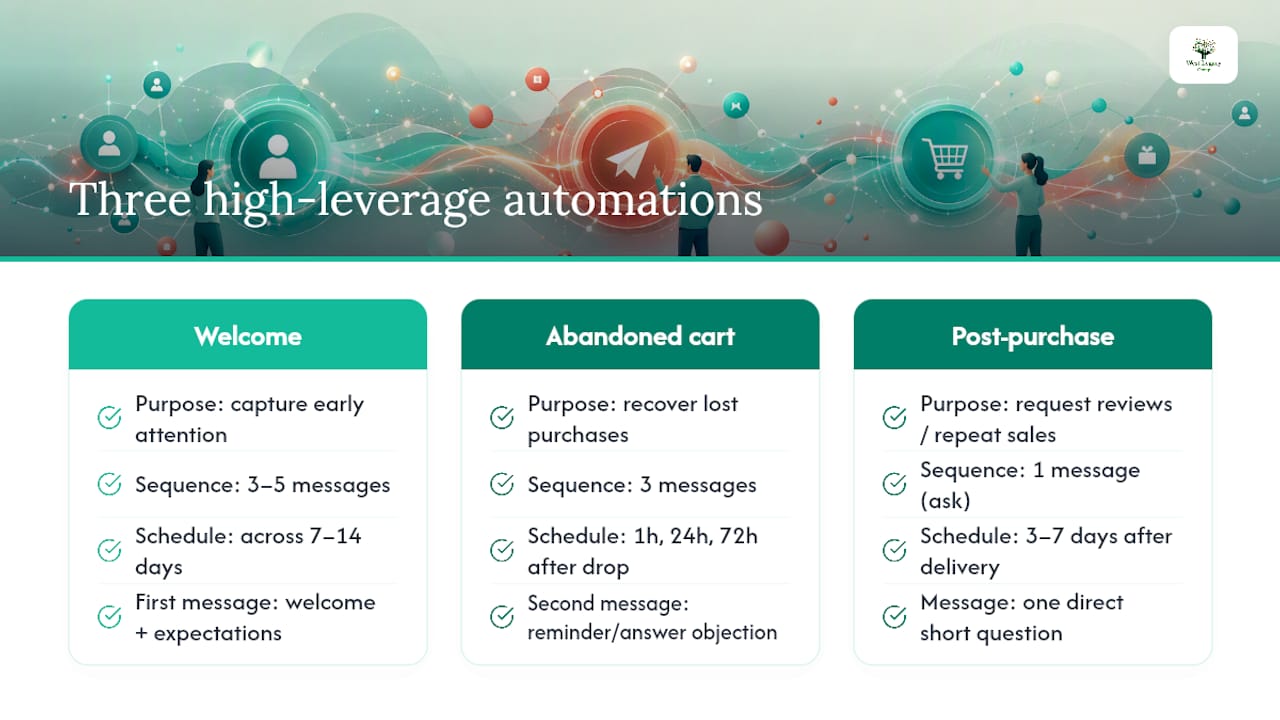
Welcome or onboarding sequence. When someone joins your list, they’re paying the most attention they’ll ever pay. A 3 to 5 message sequence spread across 7 to 14 days works well for most small businesses. Message one welcomes them and sets expectations, message two delivers real value (a guide, a tip, a story), and message three makes a soft offer. Well built welcome sequences convert in the range of 3 to 8% during those early weeks, according to small-business automation guidance, well above what a single newsletter blast typically achieves.
Abandoned cart or inquiry recovery. This is the biggest single leak for anyone selling online, and it applies just as much to service businesses whose “cart” is an unfinished contact form. Fire the first message within an hour of abandonment, a second at 24 hours with a reminder or answer to a likely objection, and a third at 72 hours with a nudge or incentive. Done well, this sequence recovers 5 to 15% of abandoned carts, based on figures cited in the same automation guidance.
Post-purchase and review requests. Send this 3 to 7 days after delivery or service completion, once the customer has actually experienced what they bought. Ask one direct question, keep it short, and link straight to the review platform you care about most. Bundling a review ask with a discount code for a repeat purchase does double duty without feeling like a sales pitch.
A café that builds a welcome sequence for loyalty sign ups, a cart recovery flow for online orders, and a review request three days after pickup has covered the three highest leverage points in the customer journey without touching a single piece of enterprise software.
Which tool category actually fits your business?
Before you pick a tool, work out which category you actually need. Small businesses routinely overbuy, landing on an enterprise platform built for a marketing team of ten when a $20 monthly plan would have done the job.
Email-first automation platforms handle the welcome, recovery, and review flows above and nothing more ambitious. They’re the right starting point for almost every small business under a few thousand contacts.
Light CRM plus email adds contact records, deal stages, and basic pipeline tracking on top of the email engine. Worth it once you’re juggling repeat customers or a sales process with more than one touchpoint.
All-in-one small-business suites bundle email, light CRM, forms, and sometimes SMS into one subscription. They suit businesses that want a single login rather than three tools talking to each other.
No-code workflow connectors sit on top of whatever tools you already use and pass data between them. They speed up setup considerably, but check exportability and data ownership before you build anything complex on top of one, since some make it genuinely hard to get your data back out.
AI agent platforms are the newest category, proposing and sometimes executing campaign changes with minimal human input rather than just reporting on results. They cost more, suit larger operations with existing automation maturity, and are rarely the right first purchase for a business still building its first welcome sequence.
When you’re comparing options, look for these features specifically:
- A visual workflow builder that shows the trigger, delay, and message logic without needing code
- Deliverability controls, including domain authentication support and sender reputation monitoring
- Ready-made templates for welcome, cart recovery, and review request flows
- A contact limit that matches your actual list size, not a padded higher tier
- Native integrations with whatever platform runs your store or bookings, rather than a generic API you’d need a developer to use
- SMS support, if your customers respond better to texts than email
- Straightforward data exportability, so you’re never locked into one vendor
A solo tradie with 200 contacts needs an email-first platform and nothing else. A retail store running Shopify with 5,000 customers probably needs the CRM layer. Neither needs an AI agent platform in year one, no matter how the sales page reads.
How do you choose the right automation tool?
Match the tool to what your business actually looks like today, not where you hope to be in three years. Work through these criteria before you commit to anything:
- List size and growth rate. A tool priced for 10,000 contacts is wasted spend on a list of 300.
- Channels you actually use. If your customers respond to SMS more than email, that needs to be a native feature, not a bolt-on.
- Team capacity. One person building and monitoring automations needs a simpler interface than a team of three.
- Budget as a percentage of revenue, not a fixed dollar figure you picked at random.
- Integrations with your existing store, booking system, or CRM. A tool that doesn’t talk to what you already run creates manual work, which defeats the purpose.
During any free trial or demo, ask the vendor these questions directly:
- Can I export my full contact list and automation history if I leave?
- What happens to pricing once I cross the next contact tier?
- What’s your actual delivery rate, and can you show data, not just a claim?
- What onboarding support is included, and is it human or self-serve only?
- Are welcome, recovery, and review templates included, or do I build from scratch?
- Is there API access if I need to connect a tool you don’t natively support?
Watch for a few warning signs during that process. A vendor that won’t discuss deliverability rates in specific terms is hiding something. Multi-year contracts with cancellation penalties are a red flag for any small business still validating its approach. Pricing tiers that hide the real cost until you’ve built your entire workflow inside the platform are designed to trap you, not serve you.
Pro Tip: Run your trial with real seed data, not a demo account. Send test emails to your own inbox and a colleague’s, and check spam placement before you commit to a monthly plan.
Setting up your first automations step by step
Building your first three flows follows the same sequence regardless of which tool you pick.
Before you touch any software:
- Decide your goals and the metrics you’ll track: open rate, click rate, conversion rate, and recovered revenue.
- Map your suppression list, meaning anyone who has unsubscribed, bounced, or asked not to be contacted.
- Confirm your data source, whether that’s a store platform, booking system, or a simple spreadsheet.
During setup:
- Authenticate your sending domain (SPF, DKIM, and DMARC records) before sending anything at volume, since unauthenticated domains land in spam far more often.
- Create segments for new subscribers, cart abandoners, and recent purchasers.
- Draft your three or four templates for each flow, keeping the tone conversational rather than corporate.
- Build the actual workflow logic: trigger, delay, message, and any branching based on whether someone opens or clicks.
- Add UTM parameters to every link so your analytics tool can attribute revenue back to the specific automation.
Before launch, test thoroughly:
- Send every message to an internal seed list first, checking formatting on both desktop and mobile.
- Click every link in every message to confirm it lands where intended.
- Run a deliverability check using your platform’s built-in tools or a free spam-testing service.
- Confirm unsubscribe links work, since a broken one is both a compliance risk and a trust problem.
Once live, check performance daily for the first week, watching for wildly low open rates (a sign of deliverability trouble) or a spike in unsubscribes (a sign your messaging missed the mark). From week two onward, a weekly check is enough, tracking open rate, click rate, and any revenue your platform attributes to the automation.
What does marketing automation cost, and what’s the ROI?
Most small businesses can run all three starter automations on a free or near-free plan while under 1,000 contacts. Guidance on early-stage automation points to a fairly consistent pattern: free tiers cover the basics comfortably, and mid-market plans in the $29 to $79 monthly range become worthwhile once you need more contacts, deeper segmentation, or SMS.
The math on a welcome sequence: if 500 new subscribers a month see a 5% conversion from a welcome sequence at a $50 average order value, that’s $1,250 in monthly revenue from a flow you built once and barely touch again.
The same logic applies to cart recovery. If your store sees 200 abandoned carts a month at an average value of $80, recovering even 8% of them (within the 5 to 15% range typically reported) adds roughly $1,280 a month, often for the cost of a $30 monthly plan.
If you can’t yet attribute revenue to the platform, that’s a sign to fix your tracking before you spend more on the tool itself.
Before upgrading tiers, validate that you’re actually using what you already pay for. A business paying for advanced segmentation while running one generic newsletter is wasting money that would be better spent finishing the abandoned cart flow it hasn’t built yet.
Scaling roadmap: foundation, optimisation, orchestration
Growth in marketing automation for small business tends to follow three phases, and phased roadmaps consistently outperform businesses that try to build everything at once.
Foundation is where you build and stabilise the three starter automations, typically while under 1,000 to 2,000 contacts and running the business solo or with a very small team. The task here is simple: get welcome, recovery, and review flows working reliably and start tracking open rate, conversion rate, and recovered revenue against them.
Optimisation kicks in once those three flows are stable and you’ve got a few months of data. This is where you add segmentation (splitting your list by behaviour or purchase history), A/B test subject lines and send times, and refine message copy based on what’s actually converting.
Orchestration is the multichannel phase: coordinating email, SMS, and sometimes ads around a single customer journey rather than treating each channel separately. Most small businesses reach this only once revenue and team size justify the added complexity.
- Schedule a maintenance check quarterly, or immediately after any major change to your store platform or CRM.
- Keep a human reviewing automated messages before major sends, since automation still needs oversight to catch broken personalisation tokens or outdated offers.
- Bring in a contractor or fractional specialist once orchestration genuinely requires skills your team doesn’t have, rather than before.
Pro Tip: Don’t move to the next phase just because a competitor has. Move when your current automations are producing consistent, measurable results and you have spare capacity to manage more complexity.
West Legacy Group: practical experience and tools we use to implement automations
A small business service provider has spent many years offering services designed to be affordable and genuinely useful, not just impressive on a sales call. Their small business division covers website content, tracking, design and development, digital transformation, and SEO, all built as single services or subscription packages.
We’ve written detailed guides on the practical side of this work. If you’re weighing up autonomous marketing tools against simpler workflows, our AI growth plan for small businesses walks through how to keep the focus on strategy rather than chasing every new feature. If tracking is your weak point (and for most small businesses, it is), our guide on tracking website leads covers the fundamentals you need before any automation can prove its worth. And our AI audit walkthrough covers the maintenance side, including the kind of quick fixes that keep automations from quietly breaking.
[Client testimonials, credentials, and awards to be added]
If you want a practical next step, start with a small audit of your current setup: what’s tracked, what’s automated, and what’s leaking revenue right now. From there, most small businesses find one of our smaller packages is enough to get the three starter automations built properly.
How does GDPR or CAN-SPAM apply to small business automation?
Data protection rules aren’t optional extras bolted onto automation, they’re built into how you’re allowed to run it. The European Union’s GDPR applies whenever you hold data on EU residents, regardless of where your business is based, and it requires clear consent before you email someone, an easy way to withdraw that consent, and a genuine reason for holding their data in the first place.
The US CAN-SPAM Act sets different but overlapping requirements: accurate sender information, a working unsubscribe link honoured within 10 business days, and no misleading subject lines. If your customer base includes US or EU contacts, both frameworks apply to you regardless of where your business operates.
Closer to home, Australia’s Spam Act and Privacy Act set out similar obligations: consent before sending commercial electronic messages, clear sender identification, and a functioning unsubscribe mechanism in every message.
The practical takeaway for small business owners is straightforward. Get explicit consent before adding anyone to an automated sequence, never buy or scrape contact lists, keep unsubscribe links working and honoured immediately, and document where your contact data came from. Most automation platforms include compliance tooling, like automatic unsubscribe handling, but the responsibility for using them properly sits with you, not the software.
What are the most common automation mistakes small businesses make?
The most expensive mistake is building too much at once. A business that tries to launch five automations in its first month usually ends up with none of them working properly, because nobody has time to test and fix all five.
The second common mistake is skipping deliverability setup. Sending automated emails from an unauthenticated domain gets messages routed to spam, which quietly kills every automation’s performance without an obvious cause.
Buying a contact list, or importing an old one without checking consent, is the third mistake and the most legally risky. It violates the Spam Act, GDPR, and CAN-SPAM simultaneously, and it tanks your sender reputation with the platforms you’re trying to build trust on.
A fourth mistake is treating automation as “set and forget.” Automations left unmonitored drift out of date, referencing discontinued products or outdated pricing, because nobody checked them after the initial build.
Finally, many small businesses over-personalise too early, inserting merge tags and dynamic content before they’ve mastered the basics, and a broken token (showing “Hi [FirstName]” in a live email) undermines trust faster than a plain, well-written message ever would.
Avoiding these five mistakes is mostly about restraint: build fewer automations well, get the technical setup right before scaling volume, and check on your workflows regularly instead of assuming they’ll keep working forever.
What does this look like across different small business industries?
A hairdressing salon typically starts with a review request automation, since word of mouth and Google reviews drive most new bookings in that industry. A message sent two days after an appointment, asking for a quick Google review, tends to outperform any paid advertising the salon could run in its first year.
An online retailer selling through Shopify usually gets the biggest win from cart recovery, since checkout abandonment is often the single largest revenue leak in ecommerce. Combining the recovery flow with authenticated sending and a modest discount in the final message is a common, effective pattern.
A trades business, like a plumber or electrician, benefits most from inquiry recovery rather than cart recovery, since most of their “carts” are unanswered quote requests. An automated follow-up within an hour of a missed call or unanswered form dramatically improves booking rates compared to waiting for the office to catch up at the end of the day.
A café or local hospitality business tends to lean on the welcome sequence tied to a loyalty sign-up, using it to introduce the menu, mention any loyalty perks, and set expectations for how often they’ll hear from the business. One partner case study describes a single focused workflow producing measurable revenue inside 6 to 12 weeks, a timeline that holds up well across most of these industry examples when the automation is kept simple and well maintained.
Author perspective: a recommended first 30 day plan
Build all three automations inside 30 days, with a checkpoint every week. Week one, get the welcome sequence live and authenticated. Week two, build cart or inquiry recovery. Week three, add the review request flow. Week four, review the numbers across all three: open rate, conversion rate, and recovered revenue, and fix whatever’s underperforming before adding anything new.
Resist feature creep during this window. It’s tempting to add segmentation or a fourth automation before the first three are proven, and that’s exactly the mistake that produces half-finished workflows nobody trusts. If deliverability looks broken (low opens across the board) or an integration keeps failing after two genuine attempts to fix it, that’s the point to call in a specialist rather than losing another month guessing.
— Christopher
How West Legacy Group can help you set up and maintain automation
There are practical alternatives to hiring a full marketing team when automation needs to be set up properly the first time. Unlike generic software subscriptions where you build, test, and troubleshoot yourself, some small business services cover the setup work directly: authenticating your sending domain, building the three starter workflows, and connecting them to real tracking so you can see what’s actually converting.

Most engagements start the same way: a look at what you’re currently tracking, what’s automated already, and where the obvious gaps sit. From there, we build using the LEGACY Framework™, our approach to digital authority and measurement that goes beyond a one-off automation build into ongoing reporting you can actually read. If you’re weighing up a full website rebuild alongside your automation setup, our small business website design packages bundle both together at a scale built for businesses, not big agencies. Get in touch and we’ll start with a straightforward look at what your current setup is missing.
Sources
- Marketing Automation for Small Businesses: Start Simple, Scale Smart | itsdeep
- Australian Centre for Entrepreneurship Research — capability directory
- Make.com + OpenAI: Automate Business Workflows Without Code 2026 | Kreante
FAQ
What is the best marketing automation approach for a small business?
Start with three automations: a welcome sequence, an abandoned cart or inquiry recovery flow, and a post-purchase review request. These three cover the biggest revenue leaks and can run on free or low-cost tools before you invest in anything more complex.
How much does marketing automation cost for a small business?
Most small businesses run their first automations free while under 1,000 contacts, moving to plans in the $29 to $79 monthly range as their list and feature needs grow. West Legacy Group’s current setup and package pricing is available directly on the site rather than listed here, since it depends on scope.
How long does it take to see results from marketing automation?
Welcome sequences and cart recovery flows typically start showing measurable conversions within the first few weeks of launch. One partner case study found a single well-built workflow turned into measurable revenue within 6 to 12 weeks of focused setup and monitoring.
Do I need a CRM to start with marketing automation?
No. An email-first automation platform is enough to run a welcome sequence, cart recovery, and review requests without a CRM. Add a light CRM only once you’re tracking a genuine sales pipeline or repeat-customer relationships that a simple contact list can’t handle.
How do I stay compliant when automating marketing emails?
Get explicit consent before adding anyone to an automated sequence, keep unsubscribe links working, and never import or buy a contact list. These requirements sit across Australia’s Spam Act, the EU’s GDPR, and the US CAN-SPAM Act, and most automation platforms include tools to help you meet them, though the responsibility for using them properly stays with your business.