

The two methods worth setting up now are Google Ads call conversions using forwarding numbers, and a dynamic number insertion (DNI) call-tracking platform for full cross-channel attribution. Click-to-call event tracking on mobile is a fine stopgap if you’re short on time or budget, but it only tells you someone tapped a number, not whether the call led anywhere.
TL;DR:
- Setting up Google Ads call conversions with forwarding numbers is ideal for proving paid search ROI and requires minimal setup time.
- Dynamic number insertion platforms are necessary if you want to attribute calls across multiple channels, including organic search, social media, and email campaigns.
- Small businesses with low call volume and single-channel ads can handle DIY setup, but multi-channel or fast-growing businesses benefit from professional installation and ongoing management.
- Proper call tracking requires setting minimum call durations to filter out noise and regularly reviewing call quality to improve lead conversion.
- Integrating call data with CRM and analytics platforms unlocks full attribution, enhances follow-up, and improves marketing decision-making.
Table of Contents
- Click-to-call vs Google Ads conversions vs DNI call tracking: which one fits?
- How to set up Google Ads call conversions for calls from your website
- How to set up dynamic number insertion for full call attribution
- Turning call data into decisions that actually move the needle
- Connecting call tracking to the rest of your marketing stack
- Tracking calls that start online but happen offline
- When to DIY and when to bring in help
- Get your calls tracked properly, without the trial and error
- Where to check the technical details yourself
- Sources
- FAQ
Click-to-call vs Google Ads conversions vs DNI call tracking: which one fits?
Each method answers a different question, and picking the wrong one for your situation wastes budget or leaves you flying blind.
Click-to-call event tracking fires a tag in Google Analytics or Google Tag Manager whenever someone taps your phone number on mobile. It’s fast to set up and free, but it measures intent, not outcome. You’ll never know if that tap became a two-minute time-waster or a $3,000 job.
Google Ads phone call conversions use forwarding numbers to swap your site number for a trackable one, but only for visitors who arrived through an ad click. You get real call data (duration, time, even AI-scored content) tied directly to the campaign and keyword that drove it, as Google’s own conversion workflow explains.
DNI call-tracking platforms go further again, swapping numbers based on session data for every visitor, regardless of how they arrived. That means organic search, social, email campaigns and direct traffic all get attributed, not just paid clicks, according to Nimbata’s breakdown of tracking methods.
Here’s how that maps to real business scenarios:
- Low call volume, single channel: click-to-call events are enough. You don’t need the overhead.
- Running Google Ads and want to prove ROI: Google Ads call conversions with forwarding numbers, no extra software cost.
- Multi-channel marketing (SEO, social, email, ads): a DNI platform, because it’s the only method that attributes calls across all of them.
- Growing fast with no time to manage tags yourself: a managed setup makes more sense than DIY.
How to set up Google Ads call conversions for calls from your website
This is the method most small businesses should tackle first if paid search drives meaningful traffic.
- Create a phone call conversion action. In Google Ads, go to Goals, then Conversions, then Conversion Actions. Choose “Phone calls” as the source, then select either “Calls from website” or “Calls from ads” depending on where the number appears.
- Install the global site tag. Add Google’s gtag.js snippet to every page of your site, ideally in the header so it loads before anything else.
- Add the phone snippet to pages showing your number. This snippet is what triggers the forwarding number swap. Only pages carrying it will show a Google forwarding number to ad-clicked visitors, as Google Ads Help details.
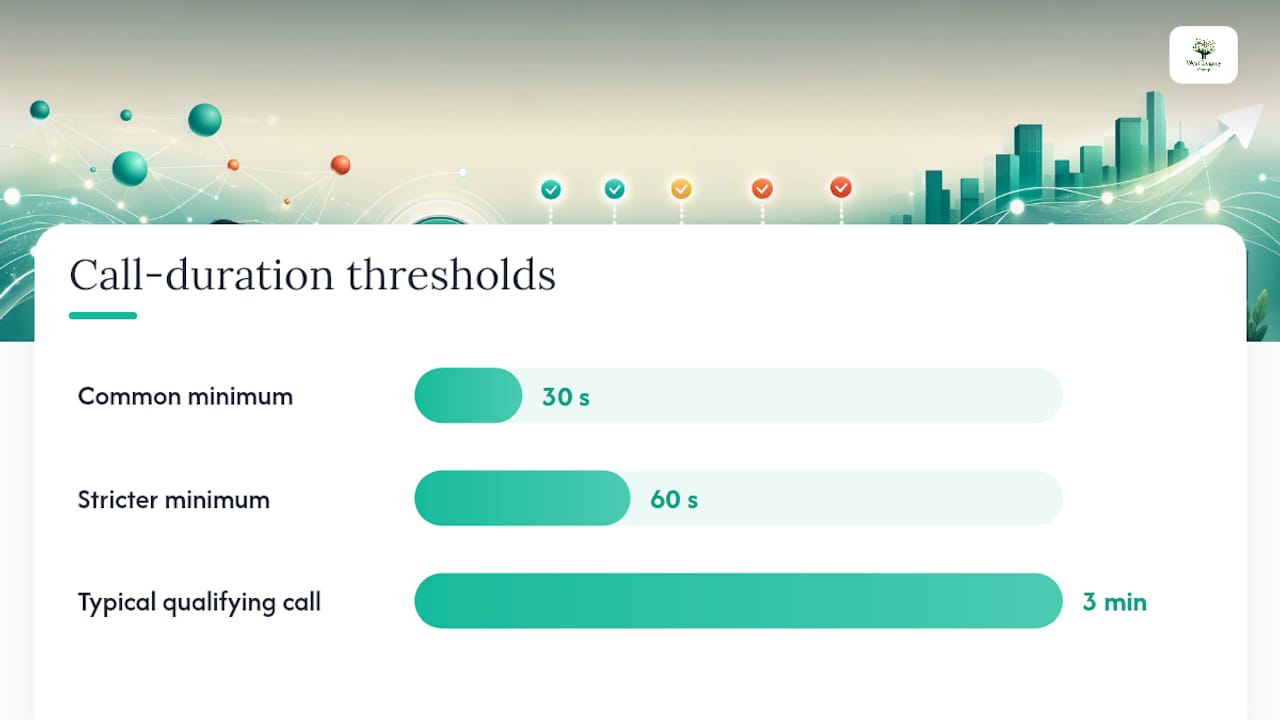
- Set a minimum call duration. This sits inside the conversion action settings and filters out calls under, say, 30 or 60 seconds so a butt-dial or wrong number doesn’t count as a lead. Google’s guidance confirms you can count conversions either by duration or by AI analysis of call content.
- Test and verify. Install the Tag Assistant browser extension, click through from a test ad, and confirm your on-page number changes to a forwarding number. Then check the Conversions column in Google Ads over the next 24 to 48 hours.
If Tag Assistant shows an “Inactive Tag” status, the snippet is either missing from that page or misconfigured, a common and fixable issue flagged in Google’s troubleshooting notes.
Pro Tip: Set your minimum call duration to match your average sales conversation, not a generic default. If your typical qualifying call runs three minutes, a 30-second filter still lets through a lot of noise.
If Google Ads and conversion tracking still feel like a foreign language, our guide on tracking website leads for your small business walks through the basics in plainer terms.
How to set up dynamic number insertion for full call attribution
DNI works by swapping the phone number displayed on your site with a unique tracking number, assigned per visitor session and tied to whatever brought them there, whether that’s a Google search, a Facebook ad, or a direct visit. According to CallScaler’s explanation of the process, that session mapping returns traffic source, landing page, and even the pages visited before the call.
Setting it up involves a few more moving parts than the Google Ads method:
- Install the vendor’s JavaScript snippet across your site, usually via Google Tag Manager for a cleaner rollout.
- Choose your swap method: exact match (the platform looks for the specific number string on the page) or CSS selector targeting (useful when your number appears inside a styled button or widget).
- Set the forwarding destination, which is typically your existing business line, so the swap is invisible to the caller.
- Connect the platform to Google Analytics 4 so call events show up alongside your other conversions, and import them into Google Ads if you want them influencing bid strategies.
- Push completed call data into your CRM or via webhooks so sales follow-up happens automatically rather than manually.
Most small-business DNI platforms bundle quick setup with AI transcription and lead scoring, plus the option to keep your existing number as the forwarding destination, per CallScaler’s small business feature summary.
Watch for two technical traps. Caching plugins can serve a cached page with the old number still showing, so exclude tracking scripts from cache rules. Single-page applications (built in React or Vue, for example) often don’t reload the DOM the way DNI scripts expect, so you may need to trigger a manual re-swap on route changes.
Pro Tip: If you run more than one location or department, map each phone number separately in the platform rather than relying on one global swap rule. It stops calls for your Melbourne office landing in the Perth team’s report.
Turning call data into decisions that actually move the needle
Raw call logs are useless until you turn them into numbers you can act on. The core metrics worth tracking every week are:
- Total calls and answered calls — a gap between these tells you if you’re losing leads to a missed-call problem, not a marketing one.
- Average call duration — a rough proxy for lead quality, especially once you’ve set a minimum duration filter.
- Call outcome and lead score — did it convert to a booking, quote, or sale?
- Cost per call and conversions by source — the number that actually justifies (or kills) an ad spend decision.
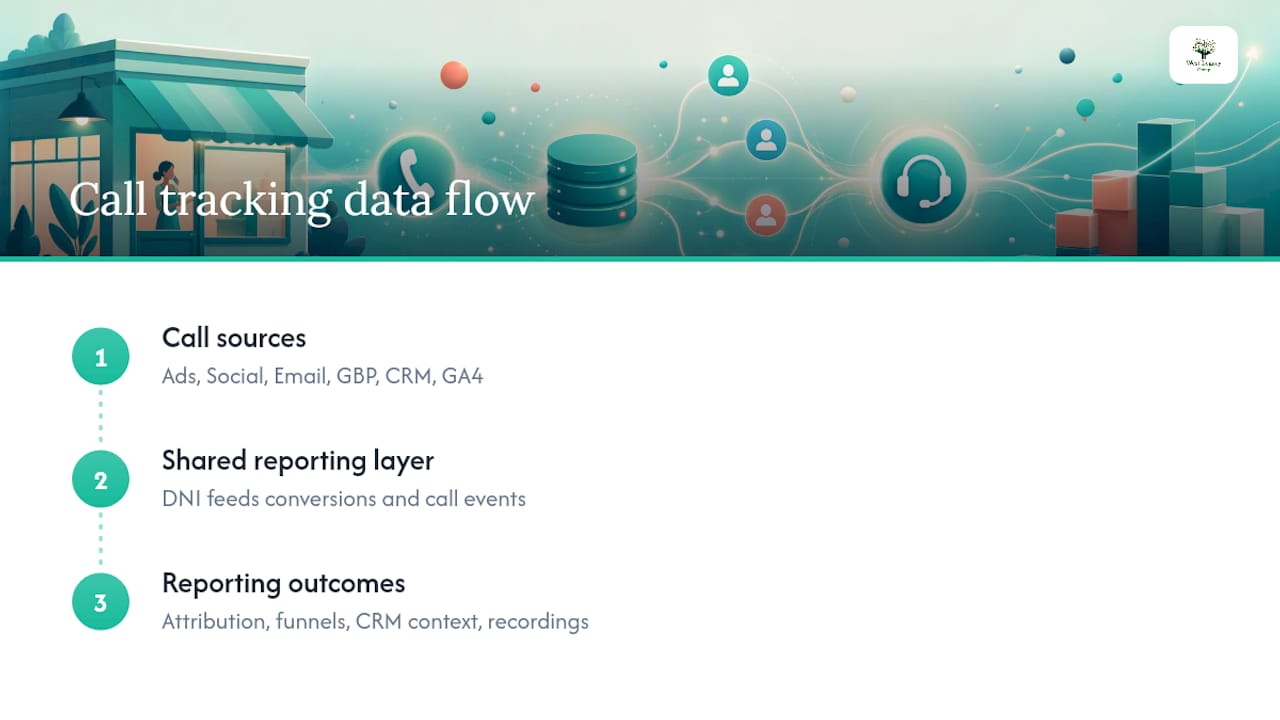
Attribution ties these numbers to a channel. If you’re using DNI, this happens automatically at the session level. If you’re relying on Google Ads conversions alone, you’ll only see the paid-ad slice, so push call events into GA4 to catch organic and referral traffic too.
Quality control matters as much as volume. Spot-check a sample of recorded calls each month against what your dashboard says happened. AI transcription scoring, the kind referenced in 42Voice’s work on call-conversion tracking with CRM and AI, can flag genuinely qualified leads versus tyre-kickers without you listening to every recording.
Build a simple dashboard that shows call-driven ROI by campaign, and review it monthly against three questions: which ads are producing calls that convert, which landing pages are producing calls that don’t, and where does your team need better phone training.
Connecting call tracking to the rest of your marketing stack
Google Ads isn’t the only channel sending you callers, and treating it as the only one is where a lot of small businesses undercount their real return.
Most DNI platforms integrate with Facebook and Meta Ads Manager, feeding call events back as conversions the same way Google Ads does, so you can see which social campaigns are actually generating phone leads rather than just clicks. The same applies to email marketing platforms: a tracking number embedded in an email footer or automated sequence tells you whether that nurture campaign is producing calls, not just opens.
CRM integration is where the real value shows up. Once call data lands in a platform like a CRM through webhooks or native connectors, sales reps see the caller’s traffic source, landing page, and call recording right alongside the lead record, no manual note-taking required. That context changes how a follow-up conversation goes.
Analytics integration matters too. Pushing call events into GA4 as a conversion lets you build the same audience and funnel reports you already use for form fills, so calls stop being a separate, siloed metric. If you’re also running local SEO, tying call volume back to your Google Business Profile listing shows whether local visibility is translating into phone leads, something worth pairing with the checklist in our Google Business posts guide.
The businesses getting the most out of call tracking treat it as one input feeding a shared reporting layer, not a standalone report nobody checks.
Tracking calls that start online but happen offline
Plenty of valuable calls never touch your website’s tracking number at all. Someone finds you on Google, checks your Google Business Profile, and calls the number listed there directly, or worse, drives to your store after browsing online and never phones at all.
A separate tracking number on your Google Business Profile listing (distinct from your website number) catches the first case. Google Business Profile lets you monitor call volume directly through its own insights, so pairing that with your website’s DNI number gives you a clearer split between “found us on Google Maps” and “clicked through from our site.”
Store visit conversions, available inside Google Ads for businesses with a physical location, estimate how many ad clicks led to an actual visit using aggregated location data. It’s not perfect, and it relies on statistical modelling rather than a direct call, but it’s the closest thing to closing the loop between an online ad and an offline outcome for businesses that don’t rely purely on phone leads.
Coupon codes, “mention this ad” offers, and unique promo landing pages tied to specific campaigns are blunter but reliable fallbacks. If a customer walks in mentioning a specific offer, you know exactly which campaign drove that. None of these methods are as clean as a DNI number, but stacking two or three of them gives you a reasonable picture of the online-to-offline gap that pure call tracking misses.
When to DIY and when to bring in help
Small volume, single-channel ads? Set it up yourself. Google Ads conversion tracking with forwarding numbers is genuinely manageable in an afternoon.
Once you’re running multi-channel campaigns, integrating calls into a CRM, or managing a single-page app where DNI scripts misbehave, the maths changes fast. Professional services handle tag installation, tag verification, and ongoing dashboard reporting for businesses at that stage, because a misconfigured snippet silently costs weeks of conversion data.
Before hiring anyone, ask three questions: what’s their reporting cadence, who owns the underlying data once the engagement ends, and can they show you a past setup that’s still running cleanly months later. Those answers separate a proper partner from someone who installs a tag and disappears.
— Christopher
Get your calls tracked properly, without the trial and error
Professional services offer an alternative to piecing this together yourself on evenings and weekends. They install and verify the tags, build dashboards that show which campaigns actually produce calls, and set up reporting you can check quickly rather than digging through Google Ads and a call-tracking platform separately.

Whether you need a one-off implementation project or an ongoing retainer that covers reporting and optimisation, our small business website design packages cover the setup work end to end. For businesses that want a lighter, self-serve option, our build-your-own SEO plan lets you add tracking and reporting to a package sized for your budget. Fewer misconfigured tags, faster setup, and one dashboard instead of three browser tabs. Get in touch and we’ll tell you honestly whether your setup needs a professional hand or a quick DIY fix.
Where to check the technical details yourself
If you’d rather verify the setup steps directly against Google’s own documentation, these are the guides worth bookmarking:
- Track phone calls from your website — the core Google Ads conversion setup guide.
- Set up call conversions for calls from your website — the global site tag and phone snippet instructions.
- Track calls to a phone number on a website — Google Tag Manager specific configuration.
- 4 ways to track phone calls — a practical comparison of methods by budget and volume.
Sources
- Track phone calls from your website (Google Ads Help)
- Set up call conversions for calls from your website (Google Ads Help)
- Track calls to a phone number on a website (Google Ads Help)
- 4 ways to track phone calls (Nimbata)
- How to Track Phone Calls from Your Website | CallScaler
FAQ
What is the easiest way to track calls from a website?
For most small businesses running Google Ads, setting up a phone call conversion action with forwarding numbers is the simplest reliable method, since it needs no extra software cost.
Do I need Google Tag Manager to track calls?
No. You can add the global site tag and phone snippet directly to your site’s code, though Google Tag Manager makes the rollout and future edits easier to manage.
What minimum call duration should I use for conversions?
Match it to your typical qualifying sales call length. Many businesses start with a short minimum duration and adjust once they see how many short calls are genuine leads versus noise.
Can I track calls from organic search and social media, not just ads?
Yes, but only with a dynamic number insertion platform, since Google Ads forwarding numbers only capture visitors who clicked a Google ad.
Should I hire someone to set up call tracking?
If you’re running a single ad channel with low call volume, DIY setup is manageable. Once you’re juggling multiple channels, CRM integration, or a single-page app, a managed setup from a professional team avoids the weeks of lost data a misconfigured tag can cause.