

Mobile page speed directly affects your search visibility, user experience and revenue. Fix it now using Google PageSpeed Insights, track your progress through Core Web Vitals, and if you want expert help, West Legacy Group offers prioritised audits built for Australian small businesses.
Three quick wins you can act on today:
- Optimise your hero image. Convert it to WebP or AVIF, compress it, and add
fetchpriority="high"to the<img>tag so the browser loads it first. - Enable native lazy loading. Add
loading="lazy"to every image below the fold. One attribute, zero plugins. - Set
font-display: swap. This stops invisible text blocking your page while a custom font downloads, which directly improves perceived load time.
These three changes address the most common reasons Australian small-business sites fail Core Web Vitals on mobile.
Key takeaways
Mobile page speed is a direct revenue lever for Australian small businesses: fix LCP first, track field data in Google Search Console, and use Rel mCvR to measure the commercial return on every improvement.
| Point | Details |
|---|---|
| Audit before you act | Run Google PageSpeed Insights and save your Search Console Core Web Vitals report before making any changes. |
| Fix images and fonts first | Hero image optimisation and font-display: swap deliver the largest LCP gains for the least effort. |
| Field data drives rankings | Google Search Console Core Web Vitals (field data) is what affects your ranking, not lab scores. |
| Quantify the return | Use Rel mCvR to estimate revenue uplift from speed improvements across comparable periods. |
| West Legacy Group | Offers mobile speed audits, prioritised fixes and monthly reporting for Australian small businesses. |
Table of Contents
- Why does mobile speed matter so much for your small business?
- Which mobile metrics should you track, and how do you measure them?
- What is making your mobile pages slow?
- What should you fix first, and in what order?
- How do you calculate the revenue impact of speed improvements?
- Your mobile speed implementation checklist
- Why West Legacy Group treats mobile speed as a revenue problem
- West Legacy Group’s mobile speed services for small businesses
- Sources
Why does mobile speed matter so much for your small business?
A 2026 audit of 292 small-business sites found that 96.9% failed at least one Core Web Vital on mobile. That is not a niche technical problem. It means almost every competitor you have is leaving conversions on the table, and so are you if your site hasn’t been audited recently.
Google uses Core Web Vitals as a ranking tiebreaker. When two pages are equally relevant, the faster one ranks higher. For local search, where you are competing against a handful of nearby businesses, that tiebreaker is decisive. Mobile-first indexing makes your mobile score the one that counts, not your desktop score.
Speed also shapes buying behaviour directly. A page that loads in 4 seconds instead of 2 can see conversion rates drop. For an eCommerce operator running paid ads, that drop means you are paying for clicks that never convert. Shopify’s research confirms that faster load times improve engagement and that mobile eCommerce volume magnifies the commercial cost of every second of delay.
Australian mobile users are often browsing on 4G networks in regional areas or on busy urban networks during peak hours. Your site needs to perform under those real-world conditions, not just on a fast office Wi-Fi connection.
Which mobile metrics should you track, and how do you measure them?
Three Core Web Vitals metrics drive most of the commercial impact:
INP replaced FID as the primary interaction metric, and field data from real users is what Google uses for ranking signals. Lab tools are for diagnosis.
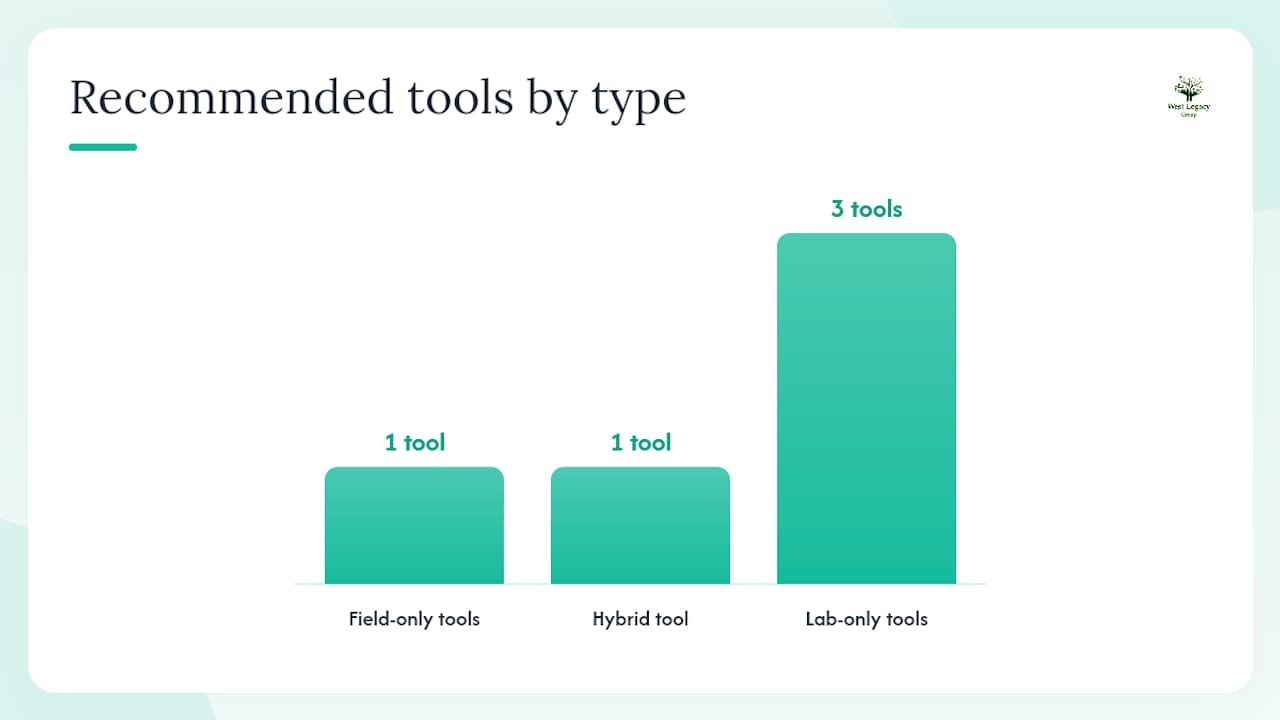
Field data vs lab data: Field data reflects what real visitors experience on real devices and networks. Lab data is a controlled simulation. Both matter, but they serve different purposes.
- Google Search Console (Core Web Vitals report): Your field data source for ranking decisions. Check this first.
- Google PageSpeed Insights: Blends field data (from the Chrome User Experience Report) with a lab run. Run it on your homepage and your top product or service page.
- Lighthouse via Chrome DevTools: Lab-only, but gives you a detailed breakdown of exactly what is slowing each page down. Open Chrome DevTools, go to the Lighthouse tab, select Mobile, and run the audit.
- WebPageTest: Use this when you need a filmstrip view and waterfall chart to see the exact loading sequence. Choose an Australian server location and a mid-range Android device preset.
- GTmetrix: Useful for a second opinion and for clients who want a shareable PDF report.
Pro Tip: Before making any changes, take screenshots of your Search Console Core Web Vitals report and run a PageSpeed Insights test. Save both. You will need them to calculate your before/after improvement and to show a developer or agency what you are starting from.
What is making your mobile pages slow?
Most small-business sites fail mobile performance for a handful of predictable reasons, not exotic architecture problems.
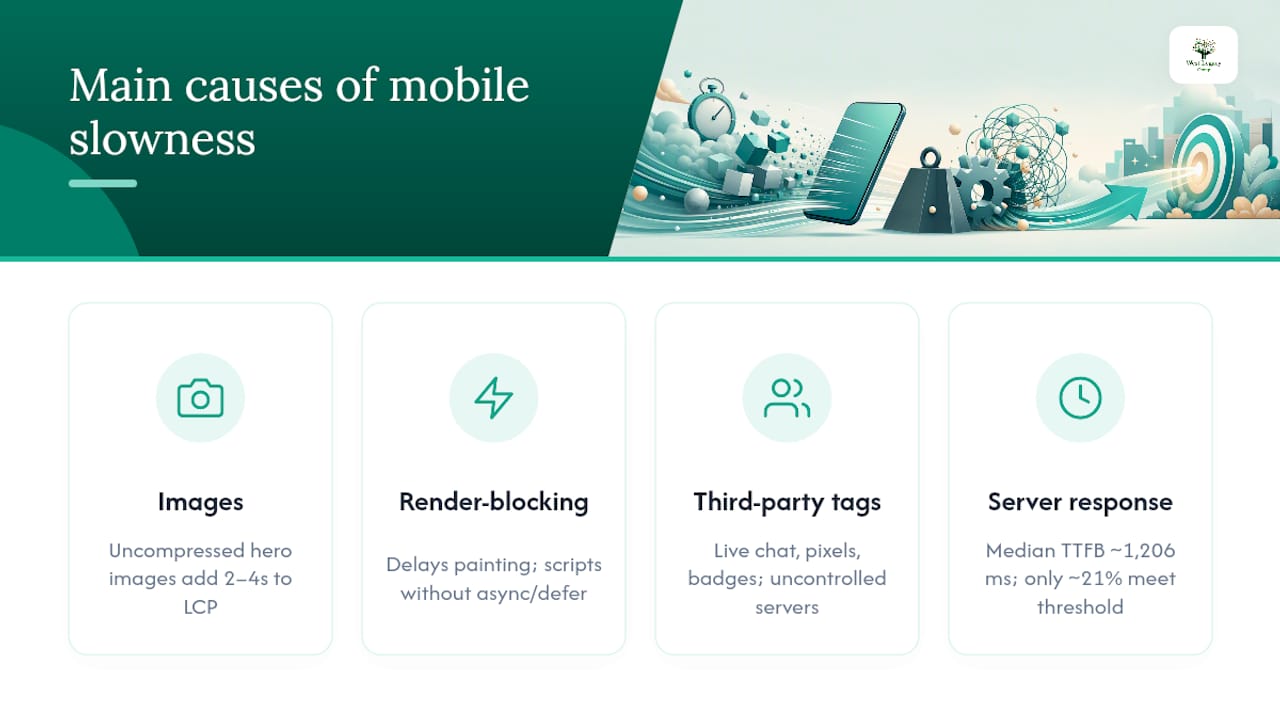
Images are the most common culprit. An uncompressed hero image served at desktop dimensions to a mobile screen can add 2–4 seconds to LCP alone. Images and fonts are the most frequent root causes of poor LCP, and fixing them moves many sites from a poor score to a passing one without touching any code beyond the HTML.
Render-blocking JavaScript and CSS delay the browser from painting anything visible. Every script loaded in the <head> without async or defer is a potential bottleneck. Third-party tags, including live chat widgets, marketing pixels and review badges, compound this problem because you cannot control how fast their servers respond.
Slow server response is underappreciated. A crawl of small-business homepages found a median time to first byte of around 1,206ms, with only about 21% meeting Google’s recommended server response threshold. Shared hosting on an overseas server is often the single biggest drag on TTFB.
In Chrome DevTools, check the Network tab filtered to “Doc” to see your time to first byte (TTFB). In PageSpeed Insights, look for “Reduce initial server response time” in the Opportunities section. For Shopify stores, the platform handles hosting, so focus your audit on app scripts and theme code. For WordPress sites, start with your hosting tier and caching plugin before touching theme files.
Pro Tip: On WordPress, install a caching plugin such as WP Rocket or W3 Total Cache before anything else. On Shopify, audit your installed apps and remove any you are not actively using. Each unused app script still loads on every page.
What should you fix first, and in what order?
First 48 hours (low effort, high impact)
- Convert your hero image to WebP and add
fetchpriority="high"to its<img>tag. - Add
loading="lazy"to all images below the fold. - Add
font-display: swapto your@font-facedeclarations and preload your primary font file. - Remove or defer any third-party scripts you do not need on page load (live chat, non-essential pixels).
Next phase (medium effort, high impact)
- Defer non-critical JavaScript with
deferorasyncattributes. - Minify and inline critical CSS; move non-critical CSS to load asynchronously.
- Implement browser caching headers and serve assets through a CDN with an Australian edge node.
- Audit and reduce third-party tags to the minimum required for operations.
Later or with developer help (higher effort, lasting gains)
- Upgrade to managed hosting with servers in Australia if your TTFB is consistently above 800ms.
- Enable HTTP/3 if your host supports it.
- For heavily interactive Shopify storefronts, consider whether a headless approach is warranted.
Effort vs impact at a glance:
| Fix | Effort | Impact on LCP/INP/CLS |
|---|---|---|
| Hero image: WebP + fetchpriority | Low | High (LCP) |
| Native lazy loading | Low | Medium (LCP) |
| font-display: swap | Low | Medium (LCP) |
| Defer/async JS | Medium | High (INP) |
| CDN with AU edge | Medium | High (LCP, TTFB) |
| Managed AU hosting | High | High (TTFB, LCP) |
For eCommerce product pages, moving LCP below 2.5 seconds is the standard conversion-focused target. Pair speed work with solid on-page content so you protect rankings while improving performance.
How do you calculate the revenue impact of speed improvements?
The most practical method for small businesses is the relative mobile conversion rate (Rel mCvR), developed by Google’s web performance team. It estimates how much of a conversion change is attributable to speed rather than to seasonal or channel shifts.
- Choose comparable periods. Pick a “before” period and an “after” period of equal length, ideally avoiding major promotions or seasonal peaks in both.
- Extract mobile and desktop conversion rates from your analytics platform for each period.
- Calculate Rel mCvR for each period: divide your mobile conversion rate by your desktop conversion rate. Example: mobile CVR 1.2%, desktop CVR 3.0% gives Rel mCvR of 0.40.
- Compare Rel mCvR before and after. If it rises from 0.40 to 0.48, that 20% relative improvement is likely attributable to speed work rather than external factors.
- Apply to revenue. Multiply your after-period mobile revenue by the percentage improvement in Rel mCvR to estimate incremental revenue. If mobile revenue was $50,000 in the after period and Rel mCvR improved 20%, the estimated speed-driven uplift is around $10,000.
Caveats: other site changes, new ad campaigns and seasonal shifts all affect conversion rates. If you changed multiple things at once, Rel mCvR gives a directional estimate, not a precise attribution. For higher-traffic sites, an A/B test is more reliable. For most small businesses, Rel mCvR is the practical starting point. Pair it with lead tracking to capture non-eCommerce conversions too.
Your mobile speed implementation checklist
- Audit first. Run PageSpeed Insights and save your scores. Check Search Console Core Web Vitals. [Low effort, do today]
- Fix hero image. WebP format, right-sized for mobile,
fetchpriority="high". [Low effort, high LCP impact] - Enable lazy loading. Add
loading="lazy"to below-fold images. [Low effort, same day] - Set font-display: swap. Stops invisible text on load. [Low effort, same day]
- Remove unused third-party scripts. Audit every tag in your tag manager. [Medium effort, high INP impact]
- Defer non-critical JS. Ask your developer to add
deferorasync. [Medium effort] - Add a CDN. Choose a provider with Australian edge nodes. [Medium effort, strong TTFB gain]
- Check hosting. If TTFB is above 800ms, upgrade or migrate. [Higher effort, lasting gain]
- Re-test and document. Run PageSpeed Insights and WebPageTest again. Screenshot Search Console. [Low effort, critical for ROI proof]
- Monitor monthly. Set a Search Console alert for Core Web Vitals regressions. [Ongoing]
When hiring a developer or agency, give them your before/after PageSpeed Insights screenshots, your Search Console Core Web Vitals report, and a WebPageTest waterfall. Ask for LCP, INP and CLS targets in the brief, and request a post-deploy report showing field data improvement within 28 days of launch.
Why West Legacy Group treats mobile speed as a revenue problem
From Christopher at West Legacy Group:
Speed work that doesn’t connect to revenue is just housekeeping. After more than 20 years working with Australian small businesses, the pattern is consistent: the sites that convert best are the ones where someone has deliberately connected technical performance to commercial outcomes. LCP, INP and CLS are not abstract scores. They are proxies for whether a customer stayed, tapped, and bought.
At West Legacy Group, we measure success by conversion lift alongside metric improvement, and we report both on a monthly cadence. The goal is always to show you what changed, why it changed, and what it was worth.
West Legacy Group’s mobile speed services for small businesses
Slow mobile pages cost you rankings and revenue. West Legacy Group delivers speed audits, prioritised fixes and ongoing monitoring built specifically for Australian small businesses, with no lock-in contracts and packages priced to suit a small-business budget.

The process is straightforward: a technical audit identifies your biggest LCP, INP and CLS issues; a prioritised fix plan tells you exactly what to address and in what order; and monthly performance reporting keeps you across field data changes before they affect rankings. West Legacy Group covers both Shopify and WordPress sites, and can handle the full implementation or work alongside your existing developer.
Ready to see where your site stands? View our small business website packages or get in touch to request a fast mobile audit.
Sources
- Web
- Mobile site speed optimization | Shopify (AU)
- Core Web Vitals in 2026: Why Website Speed Equals Revenue | Vero Scale
- State of Small Business Websites (2026 Study): We Audited 292 Sites. 96.9% Fail Core Web Vitals – Coder Legion
- Small Business Website Speed Study 2026 | Christoph Olivier Consulting