

Product feed optimisation is the process of improving the structured data you send to advertising platforms and marketplaces so your products are eligible to appear, relevant to the right searches, and more likely to convert. A product feed is a structured data file containing titles, descriptions, prices, availability and images that serves as the primary data source for Google Merchant Center, Meta Commerce Manager, Amazon Australia, and comparison engines. Optimising that data is how you move from simply being listed to actually winning impressions and sales.
Two actions to start right now:
- Run a feed validation check in Google Merchant Center or your feed management platform to surface disapprovals and eligibility errors.
- Identify your most important SKUs by revenue or margin and prioritise those for title, description and identifier improvements first.
Validation is the floor. A clean, error-free feed is the minimum requirement for eligibility, but it does not guarantee your products will appear ahead of competitors. Optimisation is the performance lever that determines whether your products win impressions, clicks and conversions once they are eligible.
Table of Contents
- What is a product feed and how does it work?
- Why product feed optimisation matters for your sales
- Field-by-field checklist: which attributes actually move the needle
- How to optimise your product feed step by step
- Platform requirements and common disapprovals
- Which feed management tools work for Australian stores?
- How to measure whether your optimisation is working
- Common mistakes and how to fix them
- Timeline and cost expectations for Australian small businesses
- Quick audit checklist you can run in 30–90 minutes
- How West Legacy Group helps Australian small businesses with product feed optimisation
- Key takeaways
- A practitioner’s view on Australian feed optimisation
- West Legacy Group’s ecommerce SEO and feed services
- Official docs and useful further reading
What is a product feed and how does it work?
A product feed is a structured data file that lists every product in your catalogue along with its key attributes. Platforms read this file to understand what you sell, match your products to relevant search queries, and decide how to display them in shopping results and ads.

Common feed formats include CSV, XML, TXT and direct API connections. The format you use depends on the platform: Google Merchant Center accepts both XML and CSV uploads, while many feed management tools connect via API to pull data directly from your store.
| Attribute | Example value |
|---|---|
| Title | Nike Air Max 270 Running Shoe Black Size 10 |
| Availability | in stock |
| Image link | https://yourstore.com.au/images/airmax270-black.jpg |
| Google product category | Apparel & Accessories > Shoes |
The channels that consume product feeds include Google Merchant Center (which powers Google Shopping and free listings), Meta Commerce Manager (Facebook and Instagram Shopping), Amazon Australia, Microsoft Advertising, and price comparison engines like PriceMe. Each platform reads your feed and uses it as the single source of truth for external discovery. Your on-site product pages and your feed should always be consistent, because platforms cross-check them.
Pro Tip: Set your feed to refresh at least daily. Price and stock changes on your site that are not reflected in the feed quickly cause price mismatch disapprovals, which pull your products from display entirely.
Why product feed optimisation matters for your sales
Most Australian ecommerce merchants focus on getting their feed accepted and then stop there. That is the validation trap. Feed validation ensures the feed is ingested without errors but does not ensure products will win impressions. Optimisation is the layer on top that improves title structure, attribute completeness, categorisation and image quality.
The commercial difference between a validated feed and an optimised one shows up across several outcomes:
- Impressions: Platforms use your title, category and attributes to match products to queries. Generic titles mean fewer matches and lower impression share.
- Click-through rate (CTR): A well-structured title with the brand, product type and a key differentiator gives shoppers the information they need to click with confidence.
- Conversion rate: When your feed data matches your landing page exactly, shoppers arrive with accurate expectations, which reduces bounce and cart abandonment.
- Cost per click (CPC): Higher relevance scores on Google Shopping and Meta typically reduce the cost you pay per click for equivalent placement.
- ROAS: All of the above compound into better return on ad spend across every channel your feed touches.
Feeds increasingly impact organic visibility via free listings and generative shopping experiences, so investing in feed quality compounds across paid and organic channels simultaneously. Think of your feed as a content layer that speaks directly to shopping algorithms on your behalf. DataFeedWatch describes the feed as a conversational tool with customers because the feed controls the ad message and must therefore match user intent precisely.
Poor feed quality also affects returns and brand trust. If your feed shows the wrong colour, an outdated price, or an incorrect size range, customers who click through and find a discrepancy are unlikely to complete the purchase, and even less likely to return.
Field-by-field checklist: which attributes actually move the needle
Every attribute in your feed either helps platforms classify your products correctly or gives shoppers the information they need to choose you. The fields below are the ones that have the most direct impact on eligibility, ranking and conversion.
Core attributes you must get right
- Title: The single most influential field for matching and ranking. Use a structured template:
[Brand] + [Product type] + [Key feature] + [Size/Colour]. A weak title like “Running Shoe” becomes “Nike Air Max 270 Running Shoe Black Size 10.” - Description: Write for search intent, not just product copy. Include key specifications, materials, use cases and any differentiating features. Aim for 500–1,000 characters.
- Google product category: Use Google’s official taxonomy. Incorrect mapping reduces relevance and can trigger disapprovals.
- Product type: Your own internal category hierarchy. Use it alongside Google’s taxonomy for more granular targeting.
- Brand: Required for most branded products. Missing brand data triggers disapprovals in brand-required categories.
- GTIN (Global Trade Item Number): The barcode number for your product. Google requires GTINs for products that have them. If you manufacture your own products, use
identifier_exists: noand supply brand and MPN instead. - MPN (Manufacturer Part Number): Required when GTIN is unavailable for a branded product.
- Price: Must match the price on your landing page exactly, including GST where applicable for Australian stores.
- Availability: Use
in stock,out of stock, orpreorder. Stale availability data is one of the most common disapproval triggers. - Link: The exact URL of the product page. Must be live, crawlable and consistent with the feed data.
- Image link: High-resolution image (minimum 800 x 800 pixels for apparel, 100 x 100 for non-apparel). No watermarks, no promotional overlays.
- Condition:
new,used, orrefurbished. Required for all products. - Shipping: Australian stores must include accurate shipping costs and delivery times. Google uses this data in Shopping results.
- Tax: For Australian merchants, GST is typically included in the displayed price. Confirm your tax settings in Google Merchant Center match your pricing.
Structured title templates are not a cosmetic fix. Optimising titles using structured templates significantly improves classification and relevance for shopping algorithms, which means your products appear for more of the right queries.
Before and after: title optimisation
| Version | Title |
|---|---|
| Before | Blue Dress |
| After | Zimmermann Linen Wrap Dress Navy Blue Size 10 AU |
| Before | Coffee Machine |
| After | Breville Barista Express Espresso Machine Stainless Steel |
The “after” titles include brand, product type, a key differentiator and a size or model reference. That structure gives platforms the signals they need to match your product to specific, high-intent queries.
How to optimise your product feed step by step
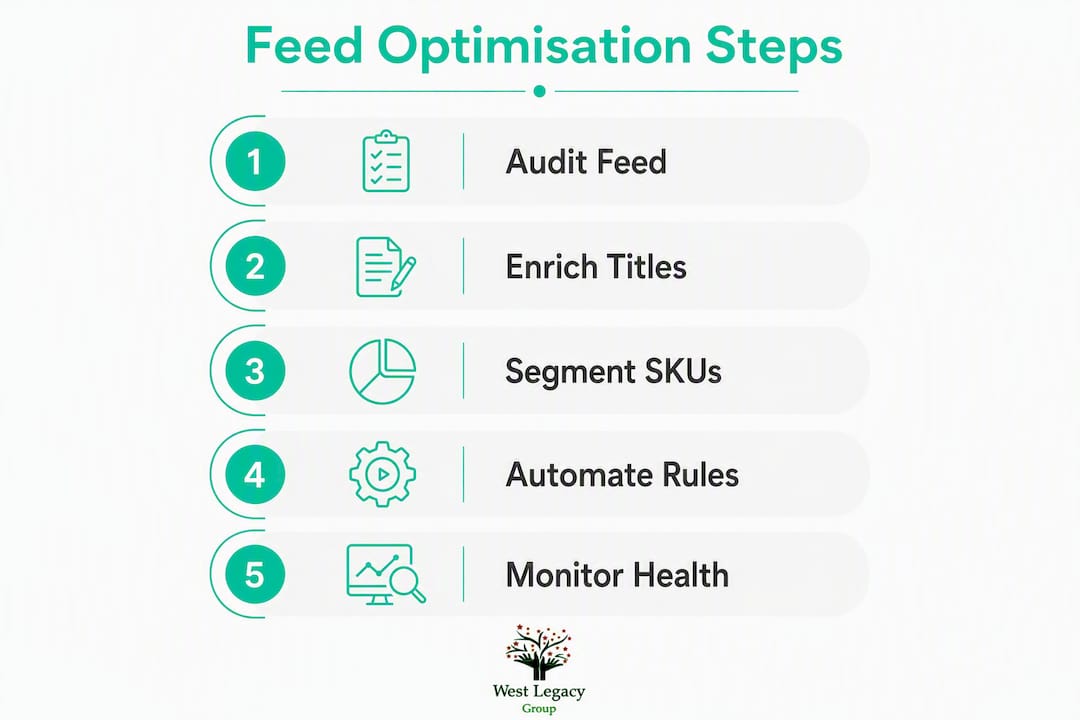
Follow this sequence for any new optimisation project. The order matters because fixing eligibility errors first means your enrichment work actually reaches shoppers.
- Audit your feed. Pull a diagnostics report from Google Merchant Center or your feed management platform. Note every disapproval, warning and missing recommended attribute. Capture the total number of active SKUs versus disapproved SKUs.
- Fix eligibility errors first. Common disapprovals include price mismatch, invalid image link, missing GTIN/brand for brand-required categories, and restricted product rules. Resolve these before touching titles or descriptions, because disapproved products are not shown regardless of how good the copy is.
- Enrich your attributes. Apply title templates to your priority SKUs. Improve descriptions with search-intent language. Map products to the correct Google product category. Add GTINs where you have them, and backfill brand and MPN where GTINs are unavailable.
- Test changes safely. Use a supplemental feed or a separate campaign to test enriched data against your existing feed. Measure impressions, CTR and conversion rate over a two-to-four week window before rolling changes across the full catalogue.
- Automate with rules. Express every improvement as a rule that re-applies on each feed refresh so your optimisations do not decay when the catalogue updates. A title template written as a rule applies to every new product automatically.
- Monitor and iterate. Review disapprovals daily, performance metrics weekly, and run a full strategy review monthly. Feed optimisation is not a one-off project.
Pro Tip: Use custom labels to segment your SKUs by margin, seasonality or conversion history. Assign a label like high-margin or seasonal-peak and then apply separate bidding strategies to each segment in Google Ads. This gives you surgical control over where your budget goes without restructuring your entire campaign.
Platform requirements and common disapprovals
Each channel has its own feed specification. What passes in Google Merchant Center may still fail in Meta Commerce Manager or Amazon Australia. The table below summarises the top requirements and most frequent disapprovals per platform.
| Platform | Key requirements | Common disapprovals |
|---|---|---|
| Google Merchant Center / Google Shopping | GTIN for branded products, price matches landing page, high-res images, AUD currency, accurate shipping/tax | Price mismatch, invalid image, missing GTIN, restricted product, unavailable item |
| Meta Commerce Manager (Facebook & Instagram) | Product catalogue with title, description, image, price, URL; Facebook Pixel or Conversions API active | Image quality issues, landing page mismatch, missing availability, policy violations |
| Amazon Australia | ASIN or UPC/EAN, brand registry for brand-owned listings, category-specific required attributes, AUD pricing | Incorrect category, missing identifiers, title length violations, restricted product categories |
| Microsoft Advertising | Accepts Google Merchant Center feed import; same core attributes apply | Inherits Google disapprovals; additional policy checks on ad copy |
For Google Merchant Center specifically, supplemental feeds let you add or override attributes without modifying your primary feed. This is useful for adding custom labels, correcting categories for a subset of SKUs, or testing title changes before a full rollout.
Which feed management tools work for Australian stores?
The right tool depends on how many SKUs you manage and how often your prices and stock change. Feed management tool selection depends on catalogue size and update rate: spreadsheets may suffice for small, stable catalogues, while dedicated feed managers are recommended for large or fast-changing inventories.
- Channable: — A feed management and PPC automation tool that supports rule-based feed transformations, dynamic ad creation and multi-channel distribution. Used by Australian agencies and mid-market retailers.
For most Australian small businesses, starting with the native Shopify or WooCommerce connector and graduating to DataFeedWatch or Channable when catalogue complexity grows is a practical path. Australian stores also need to confirm that their chosen tool correctly handles GST-inclusive pricing and Australian shipping zones, as some tools default to US or EU tax logic.
Pro Tip: If you are on WooCommerce, check that your feed plugin exports prices inclusive of GST. Some plugins export the ex-GST price by default, which causes price mismatch disapprovals in Google Merchant Center because your site displays the GST-inclusive price to shoppers.
How to measure whether your optimisation is working
Optimisation without measurement is guesswork. Set up a monitoring routine before you make changes so you have a baseline to compare against.
Primary performance KPIs
- Impressions: Are more of your products appearing in shopping results?
- Clicks and CTR: Are shoppers choosing your products over competitors?
- Conversion rate: Are clicks turning into purchases at a healthy rate?
- ROAS: Is your ad spend generating proportional revenue?
- Cost per conversion: Is the cost to acquire each sale trending down as relevance improves?
Operational feed health metrics
| Metric | What to monitor | Target |
|---|---|---|
| Feed error rate | Percentage of SKUs with active disapprovals | Below 2% |
| Disapproval count | Total disapproved items by error type | Trending down week-on-week |
| GTIN coverage | Percentage of SKUs with a valid GTIN | Above 80% for branded products |
| Category mapping accuracy | SKUs mapped to correct Google product category | Above 95% |
| Image quality pass rate | SKUs with compliant, high-resolution images | 100% |
Monitoring cadence
- Daily: Check Google Merchant Center diagnostics for new disapprovals or feed processing errors.
- Weekly: Review impressions, CTR, conversion rate and ROAS in Google Ads and Meta Ads Manager. Compare against the prior week and your pre-optimisation baseline.
- Monthly: Run a full feed audit. Reassess category mappings, title templates and custom label assignments. Identify SKUs that have dropped in performance and investigate feed-level causes.
Common mistakes and how to fix them
Treating validation as the finish line
A feed with zero errors can still underperform badly if titles are generic and categories are wrong. Fix: after clearing disapprovals, move immediately to enrichment. Apply title templates, improve descriptions and verify category mappings.
Price and availability mismatches
This is the most common disapproval trigger for Australian merchants. Your feed price and your website price must match exactly, including GST. Fix: audit your price rules and currency settings in your feed tool. Set your feed to refresh at least daily so stock changes propagate quickly.
- Check that your feed tool exports GST-inclusive prices if your site displays them that way.
- Verify that sale prices in your feed use the
sale_priceandsale_price_effective_dateattributes correctly. - For WooCommerce stores, confirm that variable product pricing exports correctly for each variant.
Generic titles and wrong categories
A title like “Women’s Top” matches almost nothing specific. Wrong category mapping sends your product to the wrong auction entirely. Fix: apply the [Brand] + [Product type] + [Key feature] + [Size/Colour] template as a feed rule so it applies to every product automatically. Re-map categories using Google’s official taxonomy browser.
- Export your current category mappings to a spreadsheet.
- Identify the top 10 most common categories in your feed.
- Cross-reference each against Google’s taxonomy and correct any mismatches.
- Express the corrected mappings as rules in your feed tool.
Image issues and slow-loading URLs
Low-resolution images, images with promotional text overlaid, and slow-loading image URLs all cause disapprovals or poor ad performance. Fix: host product images on a reliable CDN. Use the additional_image_link attribute to supply multiple angles. Confirm your image URLs return a 200 status code and load within two seconds.
Timeline and cost expectations for Australian small businesses
An initial optimisation project has three distinct phases, each with different time and cost profiles.
- Audit phase (half a day to one full day): Pull diagnostics, document disapprovals, assess title quality and category accuracy. This can be done internally with Google Merchant Center’s free tools or by an agency.
- Fix and enrich phase: A small catalogue of under 500 SKUs typically takes one to three weeks to fix eligibility errors and apply title templates. A large or complex catalogue with thousands of SKUs and multiple channels can take four to eight weeks or longer.
- Ongoing monitoring: Feed optimisation is not a set-and-forget task. Budget for a monthly review at minimum, either internal hours or an agency retainer.
Rough cost ranges for Australian small businesses
- Low scenario (DIY with native platform tools): Primarily internal time. Shopify and WooCommerce connectors are free or low-cost. Expect to invest 10–20 hours of staff time for the initial audit and enrichment on a small catalogue.
- Medium scenario (feed management tool + internal management): Tool subscriptions for platforms like DataFeedWatch or Channable typically range from a few hundred to several hundred Australian dollars per month depending on SKU count and channels. Add internal hours for setup and ongoing management.
- High scenario (agency-managed): A full-service feed audit and optimisation project with an Australian agency typically runs from a few thousand dollars for a small catalogue up to significantly more for enterprise-scale work, plus an ongoing monthly retainer for monitoring and iteration.
The decision between DIY and agency comes down to catalogue complexity and your team’s available time. For most small Australian ecommerce businesses, the fastest path to results is a one-off agency audit followed by internal management using a dedicated feed tool.
Quick audit checklist you can run in 30–90 minutes
Work through these five fixes in priority order. Each one has a direct, measurable impact on feed performance.
- Fix disapproved SKUs. Open Google Merchant Center diagnostics. Filter by disapproval type. Start with price mismatch and missing identifier errors, as these affect the most products and are usually quick to resolve.
- Correct price and availability mismatches. Compare your feed’s price and availability values against your live website for your top 20 SKUs. Correct any discrepancies and trigger a manual feed refresh.
- Improve your main product image. Check that your top-revenue SKUs have a high-resolution image (minimum 800 x 800 pixels) with a clean white or neutral background and no promotional text.
- Restructure 10–20 titles. Apply the
[Brand] + [Product type] + [Key feature] + [Size/Colour]template to your highest-revenue SKUs. Use a supplemental feed to test the new titles without overwriting your primary feed. - Add GTINs where available. Check your supplier data or product packaging for barcodes. Add GTINs to your feed for any branded products that have them. For products without GTINs, set
identifier_exists: noand supply brand and MPN.
How to prioritise SKUs for fastest ROI
- Sort your product catalogue by revenue, then by margin, then by historical conversion rate.
- Focus the first sprint on the top 20 SKUs by revenue. These drive the most ad spend and have the most to gain from improved relevance.
- Log every change you make, including the date, the field changed, and the before/after values. This makes it straightforward to attribute performance shifts to specific optimisations.
Use a supplemental feed or a separate test campaign to deploy title changes safely. Measure impressions and CTR over two to four weeks before rolling the template across your full catalogue.
How West Legacy Group helps Australian small businesses with product feed optimisation
West Legacy Group works with Australian small businesses and ecommerce operators to audit, fix and maintain product feeds across Google Shopping, Meta and other channels. The process follows a clear sequence:
- Audit: Pull a full diagnostics report, document all disapprovals, assess title quality, category accuracy and identifier coverage.
- Fix eligibility: Resolve price mismatches, image errors and missing identifiers so products are eligible to appear.
- Enrich: Apply title templates, improve descriptions, correct category mappings and add GTINs across priority SKUs.
- Automate: Express all improvements as feed rules so they reapply on every refresh and do not decay as the catalogue changes.
- Report: Track impressions, CTR, ROAS and feed error rate on a regular cadence, with clear reporting on what changed and why.
The most common situation we encounter with Australian merchants is a feed that passes validation but has never been enriched. Products are eligible but invisible because the titles are too generic to match specific queries and the categories are mapped incorrectly. Fixing those two things alone typically produces a measurable lift in impression share within the first few weeks.
Pro Tip: For Shopify and WooCommerce stores, aligning your product page SEO with your feed titles and descriptions creates a consistent signal across both paid and organic channels, which compounds the impact of your optimisation work.
Key takeaways
Product feed optimisation works when you fix eligibility first, then enrich titles and attributes, then automate rules so improvements persist across every catalogue update.
| Point | Details |
|---|---|
| Validation is not optimisation | A clean feed is the minimum for eligibility; enriched titles and correct categories are what win impressions. |
| Title templates drive relevance | Use [Brand] + [Product type] + [Key feature] + [Size/Colour] on priority SKUs to improve matching and CTR. |
| Automate every improvement as a rule | Rules that reapply on each feed refresh prevent optimisations from decaying when products update. |
| Monitor daily, review weekly | Check Google Merchant Center diagnostics daily and compare performance metrics weekly against your baseline. |
| West Legacy Group offers feed audits | West Legacy Group audits, fixes and maintains product feeds for Australian small businesses as part of its ecommerce SEO services. |
A practitioner’s view on Australian feed optimisation
The gap I see most often with Australian merchants is not a lack of effort. It is a misunderstanding of where the effort should go. Most store owners spend time on their Google Ads campaigns and almost none on the feed that powers those campaigns. The feed is upstream of everything: your bids, your targeting, your ad copy. If the feed is weak, the campaign cannot compensate.
There is also a local nuance worth naming. Australian stores frequently run into GST-related price mismatches because their feed tool exports ex-GST prices while the site displays GST-inclusive prices. This is a five-minute fix once you know it exists, but it can silently pull hundreds of SKUs from display for weeks before anyone notices it in the data.
For stores on Shopify or WooCommerce, the practical starting point is to audit your feed export settings before touching anything else. Confirm that prices, shipping zones and tax settings are exporting correctly for the Australian market. Once that foundation is solid, title templates and GTIN backfills are where the real performance gains come from. And if you are selling on ecommerce organic traffic as well as paid channels, a well-structured feed also improves your free listing visibility, which means the same work pays off in two places.
West Legacy Group’s ecommerce SEO and feed services
West Legacy Group offers feed audits, ongoing feed management and ecommerce SEO for Australian small businesses, with a focus on Shopify and WooCommerce stores. Rather than paying for an enterprise feed platform you do not need, you get a practical, hands-on service that covers the full cycle: audit, fix, enrich, automate and report.

The service is built for small businesses that want professional results without a large agency price tag. Feed work sits inside West Legacy Group’s broader ecommerce SEO offering, so your feed improvements connect directly to your on-site product page SEO, your Google Business Profile and your organic traffic strategy.
To see what is included and get a clear picture of costs, view the digital marketing services or explore the full SEO service options and book a discovery call to discuss your feed and campaign goals.
Official docs and useful further reading
The sources below are the primary references for feed specifications and optimisation guidance. Which one to consult first depends on your immediate problem.
- If you have disapprovals: Start with Google Merchant Center’s product data tips, which covers the most common error types and their fixes directly from Google.
- If you are building or auditing a feed: FeedArc’s product feed optimisation guide covers the full audit-to-automation workflow in practical detail.
- If you want a channel-by-channel checklist: FeedOn’s 2026 product feed optimisation checklist is a thorough reference covering disapproval prevention through to advanced tactics.
- If you are evaluating feed management tools: DataFeedWatch’s product feed optimisation study explains how feed data functions as a customer communication layer and when to invest in a dedicated tool.
- If you are starting from scratch on feed strategy: SharpFeed’s SEO, GEO and PPC feed guide covers how feeds connect paid, organic and generative shopping channels.
- For on-site product content that aligns with your feed: The West Legacy Group guide on why product descriptions affect SEO explains how feed content and on-site copy work together.