
A crawlable site is the sole prerequisite for any organic search visibility: if search engines cannot access your pages, those pages cannot be indexed, cannot rank, and cannot bring you customers. As Search Engine Journal explains, a page that is not crawled will not appear in search results, full stop. That is why understanding why your small business needs a crawlable site is the most practical first step in any SEO effort.
Three things follow directly from that:
- Discoverability: every page blocked from crawling is invisible to Google, regardless of how good the content is.
- Speed of updates: price changes, new services, and event pages only go live in search results after Googlebot re-crawls them.
- Local visibility: your Google Business Profile and location pages only convert local searchers when the underlying site can be crawled and rendered correctly.
Your immediate next step: open Google Search Console and check the Index Coverage report, or ask your host whether any pages are returning 5xx errors to bots.
Key takeaways
A crawlable site is the non-negotiable foundation of organic search visibility: without it, no content, no backlinks, and no Google Business Profile optimisation will produce results.
| Point | Details |
|---|---|
| Crawlability gates all SEO | A page that is not crawled cannot be indexed or ranked, regardless of content quality. |
| Check GSC first | Use URL Inspection and the Coverage report to confirm revenue pages are indexed before doing anything else. |
| Fix blocking errors immediately | Remove accidental noindex tags, correct robots.txt rules, and submit a clean sitemap.xml as first-priority tasks. |
| Prioritise revenue pages | Fix homepage, services, and location pages before blog or archive content for the fastest commercial impact. |
| Monitor weekly | Review GSC Coverage errors weekly and run a URL Inspection on key pages after every site update. |
| West Legacy Group | Offers small-business technical audits, crawl-fix implementation, and ongoing GSC monitoring retainers. |
Table of Contents
- Why does crawlability matter for your business outcomes?
- What technical problems block crawlers from your site?
- How do you check whether crawlers can reach your pages?
- What fixes should you prioritise first?
- Which pages should a small business fix first?
- How do you know whether your crawlability fixes worked?
- An editorial perspective on crawlability and small business SEO
- West Legacy Group can audit and fix your site’s crawlability
- Sources
Why does crawlability matter for your business outcomes?
Search engines work in a chain: crawl → render → index → rank. Googlebot first fetches your page (crawl), then processes its HTML, CSS, and JavaScript to understand what a user would see (render), then stores that understanding in its index (index), and finally decides where to show it for relevant queries (rank). Break the first link and nothing downstream happens.
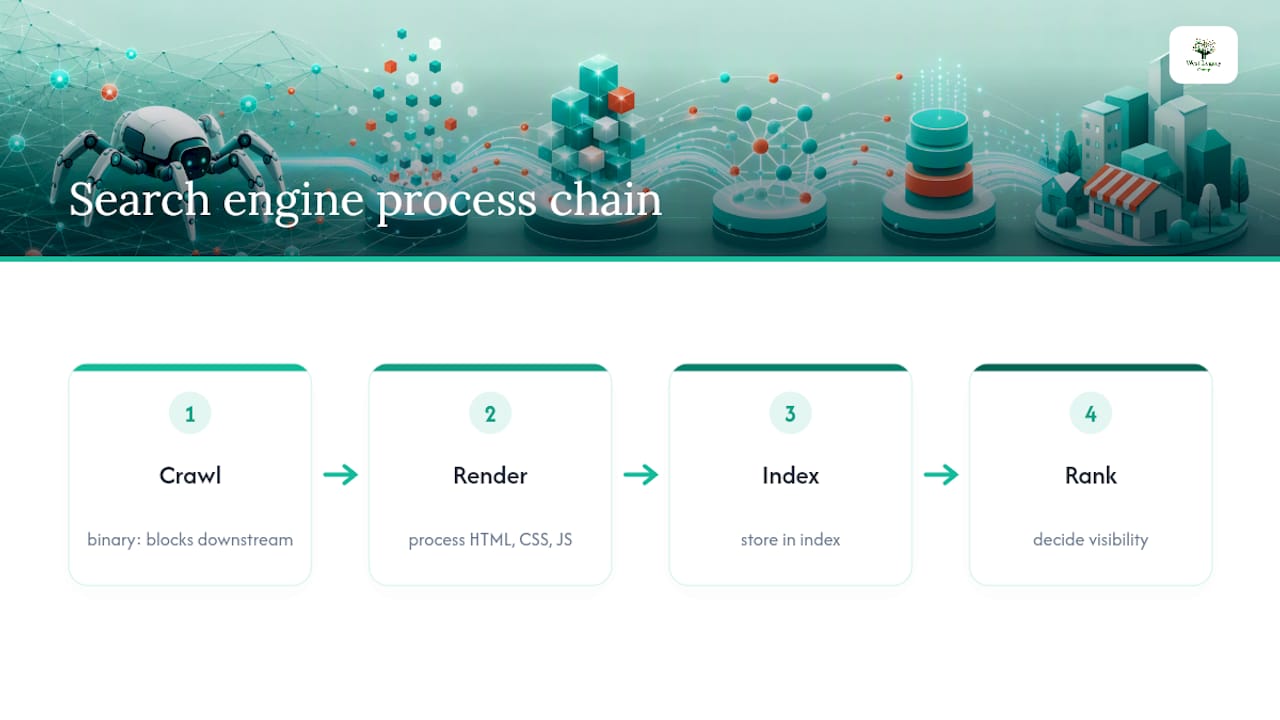
Crawlability is a binary precondition: a page is either accessible to a crawler or it is not, and each bot evaluates access separately. Googlebot, Bingbot, and AI crawlers each make their own fetch request. A misconfigured robots.txt or a stray noindex tag can block all of them at once.
For time-sensitive content, this chain has real commercial weight. If you update your service pricing on a Monday but Googlebot does not re-crawl that page until Thursday, searchers see the old price in the snippet for three days. The same delay hits event pages, product stock status, and promotional offers. A highly performant server encourages Googlebot to crawl more frequently, which shortens that gap.
Local SEO amplifies this further. Local mobile searches frequently lead to same-day in-person visits and purchases, but those local signals only work when Google can crawl and render your site correctly. Your Google Business Profile listing can drive intent; however, if the linked website is partially blocked, Google cannot verify the business details or surface your location pages for “near me” queries. Pairing solid crawlability with your local area landing pages is where the real local SEO payoff sits.
Investopedia notes that SEO is one of the most accessible and cost-effective tactics available to small businesses, with Google Search Console and PageSpeed Insights providing a clear starting path. Crawlability is where that path begins.
What technical problems block crawlers from your site?
Most crawl failures come from a short list of fixable issues. Recognising the symptom is half the battle.
- robots.txt blocking: your robots.txt file at
yoursite.com/robots.txtcontains aDisallowrule that covers important pages. GSC Coverage will show “Excluded — blocked by robots.txt.” Check the file in a browser and look for overly broad rules likeDisallow: /. - Accidental noindex tags: a
<meta name="robots" content="noindex">tag on a live page tells Google to ignore it. Often added during development and never removed. GSC shows “Excluded — noindex tag.” - Broken or missing XML sitemap: without a
sitemap.xmlsubmitted in GSC, Google relies entirely on internal links to discover pages. A broken sitemap wastes the signal entirely. - Blocked CSS, JavaScript, and images: if your robots.txt blocks
/wp-content/or similar resource folders, Googlebot cannot render the page properly. Google’s own guidance is clear: make essential page resources accessible to help rendering. - Heavy JavaScript rendering: pages built entirely in client-side JavaScript require a second rendering pass. If the server does not pre-render critical content, bots may index a blank or incomplete page.
- Slow server and 5xx errors: a server that responds slowly or returns 500-series errors reduces how much Googlebot will crawl. GSC’s Coverage report flags these under “Server error (5xx).”
- Parameterised URLs and faceted navigation: Botify identifies excessive URL parameters and site-search pages as primary causes of wasted crawl budget, generating hundreds of near-duplicate URLs that dilute crawl coverage of your real pages.
- Orphan pages: pages with no internal links pointing to them. Googlebot follows links to discover content, so a page that nothing links to may never be found.
- Incorrect canonical tags: a
rel=canonicalpointing to the wrong URL tells Google to index a different page than the one you want ranked. - Staging or dev sites left open: a development subdomain without a noindex or password protection can cause duplicate content and confuse crawlers about which version is canonical.
Pro Tip: Run your site through Screaming Frog (free up to 500 URLs) to get a full list of noindex pages, broken internal links, and missing canonical tags in one pass. Export the report and hand it to your developer with a clear fix list.
How do you check whether crawlers can reach your pages?
You do not need to be a developer to run these checks. Each tool below gives you something concrete to act on.
Google Search Console URL Inspection
Open GSC, paste a page URL into the search bar at the top, and hit Enter. The URL Inspection tool shows you the last crawl date, the indexing status, and whether any issues were detected. Click “Test live URL” to trigger a fresh fetch and see what Googlebot sees right now. If the result shows “URL is not on Google,” expand the details to find out why: a noindex tag, a robots.txt block, or a redirect error will each appear here. Take a screenshot of this result before contacting a developer.
XML sitemap submission
Go to GSC > Sitemaps and check whether your sitemap.xml is submitted and returning a green status. A sitemap with accurate <lastmod> timestamps tells Google which pages have changed recently, helping it prioritise re-crawls. If no sitemap is listed, generate one (most WordPress sites do this via Yoast SEO or Rank Math) and submit the URL. Google recommends accessible sitemaps as a primary discovery mechanism alongside crawlable internal links.
PageSpeed Insights and Mobile-Friendly Test
A slow page or a page that breaks on mobile affects more than user experience. Googlebot allocates crawl budget partly based on server response time, so a page that loads in 6 seconds gets crawled less often than one that loads in 1.2 seconds. Run your key pages through PageSpeed Insights and note the Time to First Byte (TTFB) score. Use Google’s Mobile-Friendly Test to confirm that Googlebot’s mobile crawler can render the page without layout failures.

Quick checks any owner can run
View your robots.txt by typing yoursite.com/robots.txt into a browser. Look for Disallow: / or any rule that blocks your main content folders. If you use a managed host, ask them for the last 30 days of server logs filtered to Googlebot’s user-agent string and note any 500 or 503 responses. A developer can use those logs to pinpoint exactly which pages are failing and when.
Pro Tip: Log-file analysis is disproportionately useful for diagnosing crawl problems. It shows what bots actually fetched and the status codes they received, which is more reliable than surface-level tool guesses alone. Ask your host for a log export filtered to Googlebot and look for anything that is not a 200 response on your key pages.
What fixes should you prioritise first?
Fast wins you can do yourself
- Open
yoursite.com/robots.txtand confirm no important pages or resource folders are blocked. - In GSC, check Index Coverage for any “noindex” exclusions on pages you want ranked. Remove the tag via your CMS if found.
- Submit or resubmit your
sitemap.xmlin GSC and confirm it returns no errors. - Check that your homepage, services pages, and contact page are all listed in GSC as “Indexed — appearing in Google Search.”
- Review your website content checklist to confirm every priority page has a title tag, meta description, and at least one internal link pointing to it.
Developer requests you can copy and send
These are specific, paste-ready instructions for a developer or your web host:
- “Remove the accidental
noindextag from/servicesand/contact.” - “Update
robots.txtto allow/wp-content/themes/and/wp-content/plugins/so Googlebot can render page styles.” - “Generate a clean
sitemap.xmlthat includes all published pages and posts, with accurate<lastmod>timestamps, and submit it to Google Search Console.” - “Add
rel=canonicaltags to all parameterised listing pages (e.g.?sort=price,?colour=red) pointing to the clean base URL.” - “Implement server-side rendering or prerendering for the homepage and key service pages so Googlebot does not receive a blank JavaScript shell.”
Medium-term architectural tasks
Keep every important page within three clicks of the homepage. Google’s guidance is explicit: links must be HTML anchor elements with href attributes to be reliably crawlable. Navigation menus built with JavaScript click events, or links hidden behind tabs that require interaction to reveal, are often missed by crawlers entirely. Use descriptive anchor text on internal links rather than generic labels like “click here.” For eCommerce internal linking, this is especially important for category and product page discovery.
Botify recommends deparameterising URLs and blocking low-value site-search permutations in robots.txt to stop crawl budget being wasted on near-duplicate pages. Use noindex on thin or duplicate pages; use rel=canonical when the content is legitimate but you want one version to rank. To test whether JavaScript-dependent content is visible to bots, use GSC’s URL Inspection “Test live URL” and compare the rendered HTML to what you see in a browser.
Which pages should a small business fix first?
Technical SEO for small businesses is mostly about removing obstacles from the pages that generate revenue, not engineering perfection across every URL. The practical task is to fix what blocks discovery, starting with the pages that matter most commercially.
Use GSC’s Performance report to identify your top pages by impressions and clicks. Those are your priority crawl targets. Pages with zero impressions despite being live for months are a strong signal of a crawl or index problem.
| Priority | Page type | Expected impact | Who should do it |
|---|---|---|---|
| 1 — Now | Homepage, services pages, contact page | Direct revenue and trust; must be indexed | Owner (verify in GSC) + developer (fix any blocks) |
| 2 — Now | Google Business Profile linked pages and location pages | Local search visibility and “near me” conversions | Owner links GBP to crawlable URL; developer fixes rendering |
| 3 — Soon | Key product or booking pages | Transactional traffic; high commercial intent | Developer (canonical tags, speed fixes) |
| 4 — Soon | Blog and FAQ content pages | Informational queries; builds topical authority | Owner (internal links); developer (sitemap inclusion) |
| 5 — Later | Orphan pages and low-value archive pages | Reduces index bloat; improves crawl efficiency | Developer (add internal links or noindex thin pages) |
Your local SEO checklist covers the Google Business Profile and location page steps in detail. Once revenue pages are confirmed as indexed, shift attention to blog and FAQ content that attracts informational queries and builds the topical authority that supports your commercial pages.
How do you know whether your crawlability fixes worked?
Fixing crawl issues without measuring the outcome is guesswork. These are the metrics that tell you whether the work had an effect.
| KPI | Why it matters | Target |
|---|---|---|
| Indexed pages (GSC Coverage) | Confirms key pages are in Google’s index | All revenue pages indexed; no unexpected exclusions |
| Crawl errors (4xx/5xx rate in GSC) | Flags broken pages and server failures that reduce crawl frequency | 5xx rate below 1% of total crawled URLs |
| Impressions for updated pages (GSC Performance) | Shows whether re-indexed pages are appearing in search results | Upward trend within 2–4 weeks of a fix |
| Core Web Vitals (PageSpeed Insights) | Server speed affects crawl rate; slow pages get crawled less often | LCP under 3 seconds on key pages |
| Last crawled date (GSC URL Inspection) | Confirms Googlebot is returning to priority pages regularly | Revenue pages re-crawled within 1–2 weeks |
Monitoring schedule:
- Weekly: check GSC Coverage for new errors and review any “Excluded” pages that appeared since the last check.
- Monthly: compare total indexed pages to the previous month; review sitemap
<lastmod>timestamps to confirm they are updating; check Core Web Vitals trends in GSC. - After every major release: run a URL Inspection test on the five most important pages within 24 hours of deploying changes. If you are planning a redesign, the guide on how to redesign your website without losing rankings covers the crawl-preservation steps in full.
Investopedia confirms that tools like Google Search Console and PageSpeed Insights give small businesses a clear, accessible path to tracking organic performance. You do not need a paid analytics platform to run this monitoring plan.
An editorial perspective on crawlability and small business SEO
Most small business owners I speak with assume crawlability is an enterprise concern, something that only matters when you have thousands of pages and a dedicated technical team. The evidence points the other way. A five-page tradie website with a misconfigured robots.txt or a stray noindex tag on the services page is just as invisible to Google as a broken enterprise platform. The scale is different; the consequence is identical.
What makes crawlability genuinely high-ROI for small businesses is that most of the fixes are one-time tasks. Clean up the robots.txt, submit a sitemap, remove accidental noindex tags, and add internal links to orphan pages. Done correctly once, those fixes hold for years. The ongoing work is monitoring, not rebuilding.
The other thing worth saying plainly: crawlability is the gate, not the destination. Once your pages are indexed, the work shifts to content quality, local signals, and building credible backlinks. But none of that matters if Google cannot get through the gate in the first place. Treat crawlability as your first KPI before spending a dollar on content or link building.
West Legacy Group can audit and fix your site’s crawlability
Getting your site crawlable is a defined, achievable project, not an open-ended retainer. West Legacy Group offers small-business technical audits that identify every crawl block, noindex error, and sitemap gap on your site, then deliver a prioritised fix list your developer can action immediately.

For businesses that want the fixes handled end-to-end, the team covers everything from robots.txt corrections and sitemap submission through to internal linking structure and Core Web Vitals improvements. Ongoing SEO retainers include monthly GSC monitoring so crawl errors are caught before they cost you rankings.
If you are ready to confirm your site is fully visible to Google, explore the small business website packages or build your own SEO plan to get started with a scope that fits your budget.
Sources
- Links: crawlable and non-crawlable examples
- Website Crawling: The What, Why & How To Optimize
- Solving Common Crawlability Issues: A Complete Guide to Boost Search Visibility
- SEO for Small Businesses: Everything You Need to Know
- Guide to SEO (U.S. Chamber)